1
ENGLISH
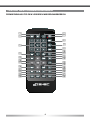
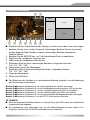
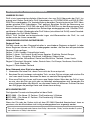
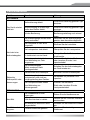
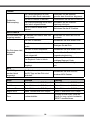
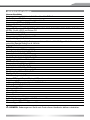
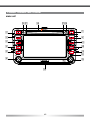
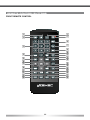
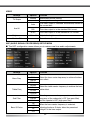
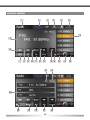
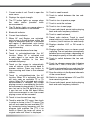
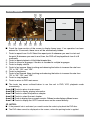
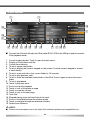
1. POWER/MUTE
■ Press the POWER/MUTE-button to turn
on the unit.
■ Press and hold the POWER/MUTEbutton to turn off the unit.
■ Press the POWER/MUTE-button to mute
the audio output and press the button
again, to go back to the last volume level.
2. FM/AM
■ Press the FM/AM-button to enter the
radio mode.
■ Change in radio mode between the
following radio bands: FM-1, FM-2, FM3, AM-1, AM-2
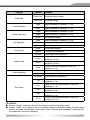
3. DVD
■ Press the DVD-button to enter the DVD/
CD mode.
4. SRC
■ Press and hold the SRC-button to enter
the main menu.
■ Press the SRC-button to change between the following playing modes:
RADIO ➞ Disc ➞ NAVI ➞ AV IN ➞
DVBT ➞ SD CARD ➞ iPod ➞ USB ➞
CAMERA
The selected playing mode will be
displayed on the screen.
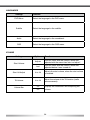
5. NAV
■ Press the NAV-button to enter the
navigation mode. The audio output of the
last playing mode will be played back.
■ Press the NAV-button in navigation mode
to change between the navigation mode
and the last playing mode.
6. PUSH/VOL
■ Turn the PUSH/VOL rotary knob to
change the volume.
■ Press the PUSH/VOL rotary knob to
enter the equalizer menu.
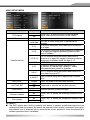
7. EJECT
■ Press the EJECT-button to insert or eject
a disc.
8. PREVIOUS
■ Press the PREVIOUS-button to choose
the previous track/chapter.
■ Press the PREVIOUS-button in radio
mode to auto search down.
9. NEXT
■ Press the NEXT-button to choose the
next track/chapter.
■ Press the NEXT-button in radio mode to
auto search up.
10. WIDE PIC
■ Press the WIDE PIC-button to enter the
video setup.
■ Press and hold the WIDE PIC-button
to change the brightness of the panel
directly.
11. BT
■ Press the BT-button to enter the Bluetooth
mode.
■ Press the BT-button in Bluetooth mode
to change between the Bluetooth mode
and the last playing mode.
12. RESET
■ Press the RESET-button to make a
hardware reset.
13. PUSH/ENT
■ Turn the PUSH/ENT rotary knob to
choose a preset station or a track etc.,
which is stored on a media.
■ Press the PUSH/ENT-button to confirm
your selection.
14. SD-card slot
15.Internal microphone for Bluetooth
mode 16. DVD/CD slot
■ Insert a disc with the label on the top
side into the DVD/CD slot until it will be
inserted automatically.
17. Disc indicator
■ Disc inside: red.
■ No disc inside: white.
18.Receiver for IR-remote control
43