1
KV-M70 (EN)
TQBX0243[E]
21
ENGLISH
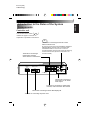
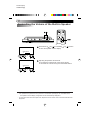
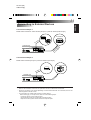
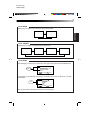
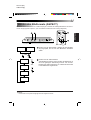
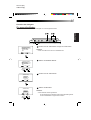
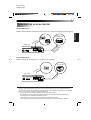
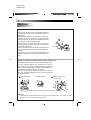
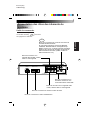
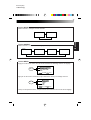
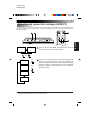
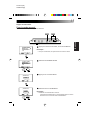
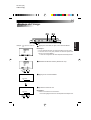
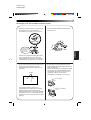
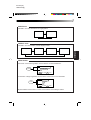
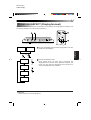
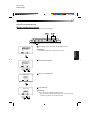
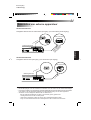
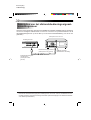
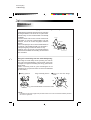
Connecting to External Devices
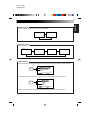
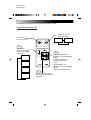
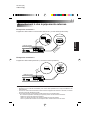
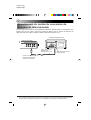
Connection example 1
inp
1
Controller unit
AV INPUT 1
POWER
DISPLAY UNIT
VIDEO
L-AUDIO-R
VIDEO
AV INPUT 2
L-AUDIO-R
VIDEO REMOTE
AV
L-AUDIO-R OUTPUT
ut al
tp min d)
u
o r te
io o te nec
d
e
Au Vid con
( ot
n
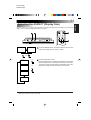
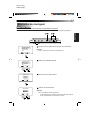
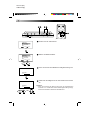
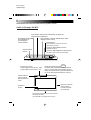
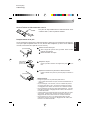
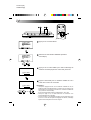
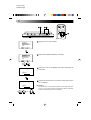
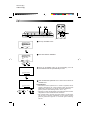
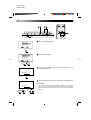
Connection example 2
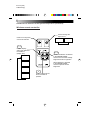
Mobile video machine (AV input 1) and 2nd monitor (AV output)
To 2nd monitor
put
1
in
AV
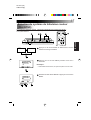
Controller unit
t
pu
AV INPUT 1
POWER
DISPLAY UNIT
VIDEO
L-AUDIO-R
VIDEO
AV INPUT 2
L-AUDIO-R
VIDEO REMOTE
AV
L-AUDIO-R OUTPUT
AV
t
ou
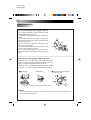
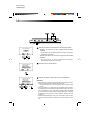
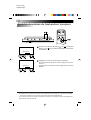
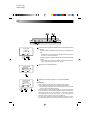
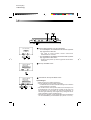
Note:
• Refer to the installation manual for an explanation of how to make these connections.
• Since the connection cord varies depending on what external devices are connected, refer to the
video equipment manual as well.
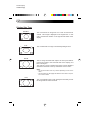
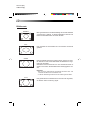
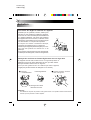
• For connection of a mobile video machine or video camera:
When howling (a “pi” sound) occurs, take one of the following steps.
· Lower the volume on the monitor system
· Use earphones (when the camera has an earphone jack)
· Keep the monitor system and the camera microphone apart.
FRANÇAIS
ut
AV
NEDERLANDS
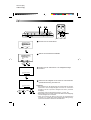
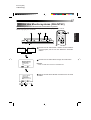
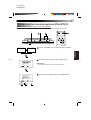
To car stereo
DEUTSCH
Mobile video machine or video camera (AV input 1) and car stereo (Audio output)