1
Handbuch / Manual
Connecting a Microphone
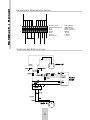
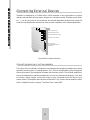
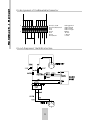
A mono microphone is connected to the input designated „Mic“(See the diagram „Connecting
external devices“). The input sensitivity should be adequate for operating commercially available
electret or dynamic microphones. You can record from this input via the „Mix“ recording channel
together with other soundsources like Audio-CDs or MIDI files (for the pleasure of the Karaoke
fans!).
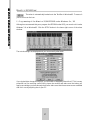
A stereo microphone can be connected to the input „In-2“. You can activate or deactivate an
existing microphone preamplifier in the software mixer. If you want to connect a mono
microphone to this input, please make sure that this microphone is equipped with a stereo
plug, where the left and right channel are connected. So you avoid noise on one channel and
you have the same signal on both of the stereo channels.
If you want to record via microphone under Cubasis Audio you should use the input „In-2“
anyway to avoid the recording of the synthesizer output on the same track.
Connecting an external Audio Device
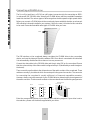
The „In-1“ input is used for connecting external devices such as a mixer, CD player, cassette
recorder etc. (See the diagram „Connecting external devices“). These external sound sources
can be mixed with the internal sound sources or digitally recorded via the software-controlled
mixer. The sensitivity is sufficient for common audio devices.
The „In-2“ input is used for devices with adjustible output like mixers, external preamplifier
etc. The sensitivity is higher than „In-1“. Take care that you switch off the internal microphone
preamplifier if you use other devices than microphones. Both inputs can be used for recording
under Cubasis Audio.
62