1
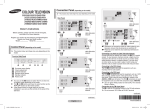
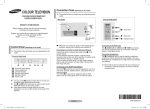
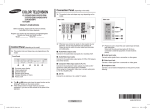
Remote Control (depending on the model)
➢ Operation of remote control may be affected by bright
artificial light near to the TV.
➢ This is a special remote control for the visually impaired,
Front (or Side) Panel
1
and has Braille points on the POWER, Channel and
Volume buttons.
4
5
1
2
2
3
6
7
1
2
3
1 Audio input 2 Video input 3 Headphone jack
1
8
2
3
9
0
1
!
2
@
Connecting to the RCA Input
The 1 (AUDIO-L/R or AUDIO) and 2 (VIDEO) connectors
are used for equipment, such as a camcorder, video disc
player, or video game device.
Connecting Headphones
The 3 (headphone) jack is used for watching a television
programme without disturbing the other people in the room.
Prolonged use of headphones at a high volume may damage
your hearing.
➢ When both the front (or side) AV and rear connectors are
connected to external equipment, the front (or side) AV
receives priority.
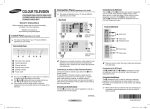
1 POWER
Used to switch the TV
on and off.
2 Numeric buttons
Used to select channels
directly.
3 -/-Used to select a
channel numbered
ten or over. Press this
button, then “--” symbol
is displayed. Enter
the two-digit channel
number.
/
Used to increase or
decrease the volume.
MENU
Used to display the
on-screen menu or
return to the previous
menu.
▲/▼/◄/►
Used to control the
cursor in the menu.
S.MENU (option)
Used to display the
sound menu.
TURBO (option)
Used to select the turbo
sound option.
DUAL I-II (option)
Used to select the
sound mode.
SOURCE
Used to display all of
the available video
sources.
INFO
Used to view the
channel information
and setting status you
selected.
PRE-CH
Used to switch
repeatedly between
the last two channels
displayed.
# P / P
Used to display the
next or previous stored
channel.
$ EXIT
Used to exit from any
display or return to
normal viewing.
% MUTE
Used to switch the
sound off temporarily.
To turn the sound back
on, press the MUTE, , or
button.
^ ENTER
While using the
on-screen menus, press
the ENTER button to
activate (or change) a
particular item.
& S.MODE (option)
Used to select the
sound effect.
* P.MODE
Used to select the
picture effect.
( TV
Used to return to the
TV mode when it is in
external input mode.
) SLEEP
Used to select a
preset time interval for
automatic turn off.
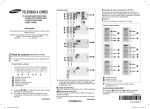
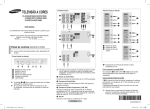
Installing Batteries
Remove the cover. Install two AAA size
batteries, then replace the cover.
When the remote control does not operate
normally, check that the “+” and “–” ends of
the batteries are inserted correctly or the
batteries are drained.
Do not mix battery types, i.e. alkaline and manganese.
➢
English - AA68-3996A_Eng_0411.indd 2
2008-05-27 오후 7:24:02