1
WARNING! (re)Loading a preset causes a couple of seconds of
interruption of the audio stream.
10.11 Copy and paste operations
Any paste operation does not affect the DSP binary and its
corresponding structure; therefore, applying data with the paste
command does not lead to audio interruption.
WARNING! Any data pasted into a device needs to be saved in
a preset slot, otherwise any turn off/on cycle leads to data loss.
10.14 Workspace
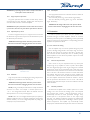
The copy/paste function from an M Series device to another M
Series device is limited to:
The same family device (e.g. source M20D, target M20D).
The same internal processing layout (e.g. source 1IN/2OUT,
target 1IN/2OUT).
WARNING! All changes will be lost if the preset is NOT
stored on board before unplugging the unit from the mains.
10.12 Input/output eq curves
11 Protection
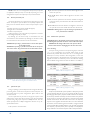
In order to copy/paste an eq curve, copy the source curve with
the dedicated copy function and paste to the destination eq. with
the dedicated paste function.
In order to protect your device and your speakers from
accidental damage, M Series amplifiers include an extensive
automatic protection system. In the following sections, potentially
dangerous scenarios and the amplifiers’ corresponding protective
response are explained in detail.
WARNING! All changes will be lost if the preset is NOT
stored on board before unplugging the unit from the mains.
11.1 Turn on/Turn off muting
Class D amplifiers may cause severe speaker damage at power
up due to the high voltage levels at the output stage. In order to
avoid this, the outputs are muted for less than 2 seconds (less
than 5 seconds for DSP models) after turn on. Similarly, turning
off the amplifier can cause the same problem: outputs are muted
immediately at turn off.
11.2 Short circuit protection
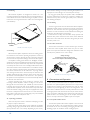
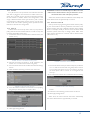
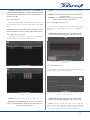
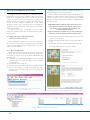
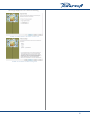
FIGURE 38: The output eq, there are 4 possible alternatives to
handle the curve.
10.13 Channels
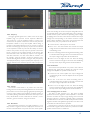
Copy and paste of the current playing processing setup from/to
the clipboard is possible from the device layout.
WARNING! All changes will be lost if the preset is NOT
stored on board before unplugging the unit from the mains.
Short circuits or very low impedance loads may destroy the
output stage of any amplifier. In order to protect the amplifier
from the dangerously high current surges arising from accidental
output short circuits or low impedance loads, all M series amps
block channel activity when the current drawn from the load rises
above a set value. The channel is muted for 2 seconds after which
the amplifier will unmute the channel and check whether the
current draw is still over the safety threshold. Should this be the
case, the amplifier will mute the channels for another 2 seconds
and the procedure will reiterate. The red “CLIP” LED will be
turned off only when the output current draw will have returned
within safe limits.
11.3 Thermal protection
NOTE: pasting a channel preset file doesn’t modify the internal
structure of a device. For example, a channel copied from a
1 in / 2 out configuration doesn’t affect the internal structure
when pasted in a 2 in /2 out processing layout.
NOTE: in the 1 in / 2 out configuration the input eq is copied (or
applied) to both input eq’s. For example, copying the configuration
of both channels (1 in /2 out configuration) leads to pasting the
unique input eq to both channels.
All Powersoft amplifiers have variable speed fans to assist
cooling. If for some reason the cooling system can’t dissipate
the produced heat correctly, a thermal protection system is
automatically activated to avoid permanent damages. Every
channel pair has a temperature sensor on the output stage
heat sink. Two different protection strategies are implemented
depending on the severity of the overheating. In order to protect
internal components, the amplifier may automatically reduce
output power until the internal temperature returns to safe levels.
21