1
Metapace
10. Factory Reset
1) Default setting after factory reset
- Activate DHCP mode
- Local Port: 9100
- Inactivity Time: 0
- Speed (Except Metapace T-1/ T-2/ L-2)
Metapace L-1: 230400 bps
2) How to rest
(1) Turn off the printer
(2) Turn on the printer while pressing Function Key
[Note]
- Press Function key 3 more seconds after turning on the printer.
(3) Wait 10 seconds until new IP address is allocated to the printer.
- The IP address will be allocated automatically under DHCP mode.
[Note]
- DHCP Network environment
Connect to web-server with newly allocated IP address.
Check new IP address by pressing Function key.
- Static IP Network environment
The IP address will not be allocated automatically.
Set up Static IP with Configuration utility.
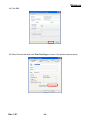
(4) Print Network setting information by pressing Function key.
Connect web-server to change any network setting.
[Note]
- Check if the baud rate of the printer is set same as below.
Metapace L-1: 230400 bps (Except Metapace T-1 / T-2 / L-2)
Rev. 1.01
- 33 -