1
7-7) ADJUSTING HALF-TURN FILM FOR COLOR CHANGE
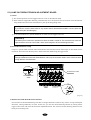
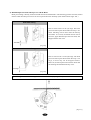
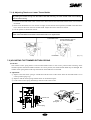
Adjust the half-turn film as below to align the needle to the center of the needle hole on the plate for automatic color
change.
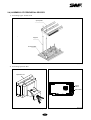
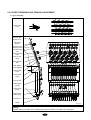
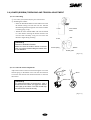
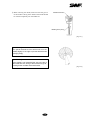
① Turn the hand lever for color change and align the roller at the center of the straight line of the cam (see [Fig.717]). Open the cover of the half-turn sensor and align the center of the half-turn sensor with the center of the film.
Half-turn sensor
Half-turn film
Half-turn sensor
Color change cam
[Fig.7-17]
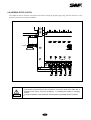
[CAUTION]
Manual color change must be performed at the upper shaft angle of 100 .
Manual color change at the upper shaft angles other than 100 may cause damage on the controller and
the take-up unit.
7-8) ENCODER ADJUSTMENT
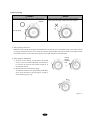
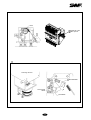
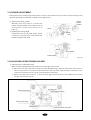
Adjust the encoder as below if the needle bar stops at an incorrect position.
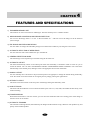
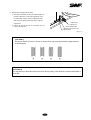
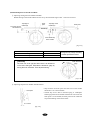
① Unfasten the two encoder coupling screws.
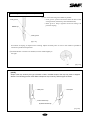
② Turn the hand lever, fix the upper shaft angle at around 98°, and adjust the encoder as in [Fig.7-18]. Tighten the
screws when FIX POS light is turned on.
Encoder Base
Encoder
[Fig.7-18]
7-8