1
secure environment. Selecting this feature will alert the operator to review the
Conference Lock function with you prior to being placed into your conference.
Password: Participants must provide the operator with the pre-determined word
or code you provide in the Password field to join the conference.
Call Transcription: Receive a written record, either electronically or in hard
copy, of what was said during the conference. Transcriptions are helpful for
identifying sound bytes and quotes for post-event press releases. Choose to
transcribe the entire call or just the Q&A session. We provide several different
delivery options to fit your specific needs.
Leader Order/Entry: Create a friendly atmosphere for the conference by joining
the conference before your participants. It gives you the opportunity to greet
participants as they enter the call. Alternatively, Leader Last lets you join the
conference after everyone else has arrived, creating a formal atmosphere.
Leader Last is recommended for large presentations and speaking events.
Promotional Playback: Send InterCall a tape for your participants to hear while
they wait for the conference to begin. A promotional tape sets the tone for your
call and can provide participants with relevant information about the speaker or
conference topic.
Conference Record/Playback: Replay a previously recorded conference or
message at one or more scheduled times. Select from CD, cassette, DAT,
Encore or micro-cassette to indicate in which format the conference playback will
be delivered.
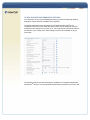
COUNTRY NUMBER DISPLAY
Select the international dial-in numbers that will display on the email
confirmations for your audio calls. By default, no countries are selected for
Operator Assisted and Direct Event calls. For Reservationless-Plus and
Automated services, 23 default countries automatically display. You can add
more countries by selecting a country from the right-hand column and moving it
to the Display these Country Numbers column. When you schedule your
Automated, Operator Assisted or Direct Event call via InterCall Online, click
Enable International dial-in numbers in the Meeting Information section and
the countries you selected will display on your email confirmation.
ENHANCED FEATURES
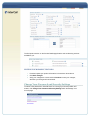
Special Enunciator: Customize the recording that is heard initially when dialing
in for your conference call.
Communication Line: Speak with an operator outside of the main conference to
convey behind-the-scenes information, orchestrate guest speakers or give timing
cues. A communication line makes it easier to manage a large conference.
UK/HK Comm Link: Allows contacts from Europe or Asia Pacific to speak with
an operator outside the main conference to convey behind-the-scenes
information to orchestrate guest speakers or give timing cues.