1
3
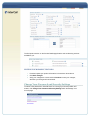
Click Save Changes at the bottom of the form. You will be asked to confirm your
owner profile details. If the information is correct, click Continue to save your
changes, otherwise your updated information will not be saved.
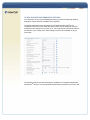
View/Edit Product Details
To view or edit your product options and settings that are enabled on your profile, click
View Product Details at the bottom of the owner profile screen. Your Product Details
page summarizes all the features available to you as an owner and allows you to
customize your preferences for your conferencing services. A description of the options
available with each service is provided at the end of this guide.
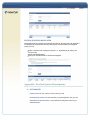
VIEW YOUR DIAL-IN NUMBERS
The first section on the Product Details page shows the conferencing services available
with your account. Click View All [service name] Numbers to see the dial-in numbers
associated with that service. You can select which country numbers (toll-free and local)
appear on the emails (welcome email, email confirmations, etc.) by using the Country
Number Display feature which appears below the feature settings for each of your
assigned audio products.