1
Creating a Link—193
converted into ordinary series at any time. Once a series is created, however, it may not be
converted back into a link.
Match merge options
Whether you elect to create a new series with fixed values or to create a new link series,
you must specify link options.
Match ID information
First, you must specify the information that EViews will use to identify matches between
observations in the two pages.
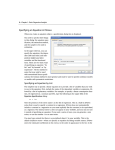
In the Source ID and Destination ID edit fields, you will enter the names of one or more
source ID series and one or more destination ID series. The number and order of the
names in the two fields should match. Thus, if you wish to match both CXID1 and
PERIOD1 in the source page to CXID2 and PERIOD2 in the second page, you should enter
the sets of names in parallel. Here, we choose to match observations using the values of
the STATE1 series in the source page and the values of the STATE2 series in the destination
page.
Next, there is a checkbox labeled Treat NA as ID category for whether to use observations
which have NA values in the source and destination ID values. By default, observations
are ignored if there are NAs in the ID series; by selecting this option, you instruct EViews
to match observations with NA ID values from the source page to observations with NA ID
values in the destination page.
Link calculation settings
The remaining options are used when computing the link values.
First, you should specify a source series contraction method. As described in “Linking by
general match merging” on page 178, the first step in every match merge is to perform a
contraction to ensure uniqueness of the source values. Since contraction is always performed, you should pay attention to your contraction method even when the source IDs
are unique, since some settings will not yield the original source data.
There is an extensive list of contractions from which you may choose.
For links involving numeric series you may choose to employ obvious
methods such as the Mean (default) or the Median of the observations,
or less obvious summary statistics such as the Variance, Kurtosis,
Quantile, Number of obs, or Number of NAs.
For links involving alpha series, you must select from a subset of the
numeric contractions: Unique values (default) , No contractions
allowed, First, Last, Maximum, Minimum, Number of obs, Number
of NAs.