1
Contents
CHAPTER
5
Deleting Messages 5-1
Deleting Messages By Phone 5-2
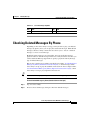
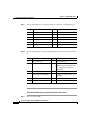
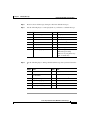
Checking Deleted Messages By Phone 5-3
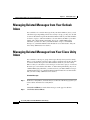
Managing Deleted Messages from Your Outlook Inbox 5-6
Managing Deleted Messages from Your Cisco Unity Inbox 5-6
CHAPTER
6
Sending and Responding to Messages 6-1
Sending a Voice Message By Phone 6-2
Sending a Voice Message from Your Outlook Inbox 6-4
Sending a Voice Message from the Cisco Unity Inbox 6-5
Replying to a Message by Phone 6-7
Replying to a Message from Your Outlook Inbox 6-8
Replying to a Voice Message from Your Cisco Unity Inbox 6-10
Forwarding a Message by Phone 6-11
Forwarding a Voice Message from Your Outlook Inbox 6-13
Forwarding a Voice Message from Your Cisco Unity Inbox 6-14
CHAPTER
7
Changing Personal Settings 7-1
Changing Your Recorded Name 7-1
Changing Your Fax Delivery Phone Number 7-3
Setting Up Alternate Devices 7-4
Changing Your Directory Listing Status 7-5
Changing Your Phone Password 7-7
CHAPTER
8
Changing Phone Menu Preferences 8-1
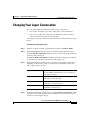
Changing Your Cisco Unity Conversation Language 8-1
Changing Your Cisco Unity Phone Menu Type 8-2
Cisco Unity 4.0(4) User Guide (With Microsoft Exchange)
iv
OL-5853-01