1
Using custom fax Cover Pages
CallPilot users can choose to include a cover page with their faxes. The server
administrator typically designs and manages these cover pages. The user simply
chooses the desired style of cover page (if more than one is available).
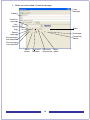
Cover pages created with these tools include the following information:
From Information:
To Information:
Title
Name
Department
Phone number
Fax number
Title
Department
Name
Phone number
Company
Company
Fax number
Number of Pages
Sent Date & Time
A Cover Sheet Memo section
CallPilot Configuration
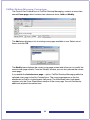
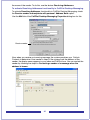
The Configuration page of CallPilot Desktop Messaging includes an option labeled
Include cover page when forwarding fax message. The default value for Include
cover page when forwarding fax message is unchecked, meaning that a cover page is
not added to the message.
If you select this option, you can choose and set a default cover page from a list of
available cover pages. Use the Browse… button to choose the location where the cover
pages are stored. The default location is: \ \Program Files\Nortel\ CallPilot\cvrpages.
27