Download WordQ 3 (PC) User Guide Contents
Transcript
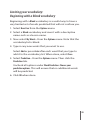
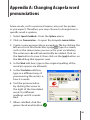
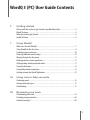
21 Getting the best predictions Expanding your vocabulary: Family, friends and special words.......................... 21 Expanding your vocabulary: Learn from existing documents.............................. 22 Focusing your vocabulary:Topics for specialized writing..................................... 23 Limiting your vocabulary:Beginning with a Blank vocabulary........................... 25 Going over misspelled and unknown words....................................................... 26 27 Customizing the prediction box Number of predicted words................................................................................ 27 Font style and size............................................................................................. 27 Order of predicted words.................................................................................... 27 Layout............................................................................................................... 28 Position of the prediction box............................................................................. 28 Color.................................................................................................................. 29 30 Using with different learners Young learners.................................................................................................. 30 Confident writers/typists................................................................................... 30 In the workplace................................................................................................ 31 More than one user............................................................................................ 31 32 Managing Vocabularies Create a new user vocabulary............................................................................ 32 Promote your personal words............................................................................ 33 Open another user vocabulary........................................................................... 34 Create a new user vocabulary based on the current user vocabulary.................. 34 Copying a WordQ vocabulary to a different computer......................................... 34 Delete a user vocabulary.................................................................................... 35 36 Appendix A: Changing Acapela word pronunciations 38 Service and support 39 Acknowledgements 2