1
Aleis 8030 Series Operational Manual
Regularity Notices and Conformity ................................................................................................................................. 5
Part 1: Important User Instructions................................................................................................................................ 6
1.0
8030 Reader Instructions ...................................................................................................................................... 6
2.0
The 8030 Keypad ................................................................................................................................................. 7
3.0
8030 Series Reader Method of Use ....................................................................................................................... 7
3.1 How to: Read & Store RFIDs ............................................................................................................................. 7
3.2 How to: Create Sessions using menu. ................................................................................................................. 7
3.3 How to: Create Sessions using F1 and F2 Keys. ................................................................................................ 8
3.4 How to: Upload RFIDs into the Reader.............................................................................................................. 8
3.5 How to: Compare RFIDs in the Reader .............................................................................................................. 9
3.6 Formatting the File System ............................................................................................................................... 10
3.7 How to Format your reader............................................................................................................................... 10
4.0
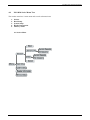
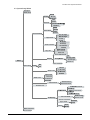
ISO 8030 Series Menu Tree ................................................................................................................................ 11
4.1 Session Menu .................................................................................................................................................... 11
4.2 Read Setup Menu.............................................................................................................................................. 12
4.3 System Setup Menu .......................................................................................................................................... 13
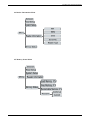
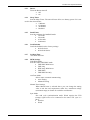
4.4 Reader Information Menu................................................................................................................................. 14
4.5 Memory Status Menu ....................................................................................................................................... 14
5.0
Audio and Visual Alerts ...................................................................................................................................... 15
6.0
Menu ..................................................................................................................................................................... 16
6.1 Sesssion ............................................................................................................................................................ 16
6.11
6.12
6.13
6.14
New ................................................................................................................................................................ 16
Send to PC ....................................................................................................................................................... 16
Clear ................................................................................................................................................................ 16
Select ............................................................................................................................................................... 16
6.2 Read Setup ........................................................................................................................................................ 16
6.21
6.22
6.23
6.24
6.25
Load/Save Profile ............................................................................................................................................ 16
Comparison ..................................................................................................................................................... 16
Alert ................................................................................................................................................................. 16
Storage ............................................................................................................................................................. 16
Send ................................................................................................................................................................. 17
6.3 System Setup .................................................................................................................................................... 17
6.31
6.32
6.33
6.34
6.35
6.36
6.37
6.38
Communications .............................................................................................................................................. 17
Display............................................................................................................................................................. 17
Buzzer.............................................................................................................................................................. 18
Sleep Timer ..................................................................................................................................................... 18
Read Timer ...................................................................................................................................................... 18
Load Defaults .................................................................................................................................................. 18
Set Date/Time .................................................................................................................................................. 18
RFM Settings ................................................................................................................................................... 18
6.4 Reader Information ........................................................................................................................................... 19
6.5 Memory Status .................................................................................................................................................. 19
7.0
Battery Charging ................................................................................................................................................. 20
7.1 Battery Messages............................................................................................................................................... 20
7.2 Battery Charging Requirements ........................................................................................................................ 20
7.3 Battery Charging Tips ....................................................................................................................................... 20
7.4 Battery Charging Options .................................................................................................................................. 20
7.5 Alternative Recharging Methods ....................................................................................................................... 21
8.0
Tuning the Reader ............................................................................................................................................... 21
9.0
The Clock on the 8030 Reader ............................................................................................................................ 21
10.0
Using BlueTooth (On 8030BT models only) ...................................................................................................... 22
10.1 BlueTooth PIN code ....................................................................................................................................... 22
11.0
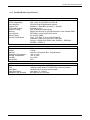
IS0-8030 Reader Specifications........................................................................................................................... 23
12.0
Aleis DataLink Software ..................................................................................................................................... 24
3 of 29