1
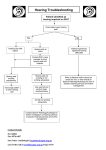
Ensure that the RED power indicator light is lit. If yes, continue to step 6. If not, make
sure the power supply is plugged into an active power outlet and that the power supply is
plugged into the amplifier. If the RED power indicator light is still not lit, Contact
Advanced Listening Systems at 1-250-580-2180.
6) Ensure that the GREEN input indicator light flickers when you tap on the
microphone attached to the computer monitor. If yes, continue to step 7. If not,
ensure that the microphone cable is plugged into ‘Mic 1’ input on the amplifier
(see picture above). If no, plug it in. Repeat step 6
7) Ensure that both the RED and BLUE ‘Antenna’ Wires are plugged into the
amplifier. If no, contact Advanced Listening Systems at 1-250-580-2180 for
directions on reattaching the Antenna wires. If yes, contact Advanced Listening
Systems at 1-250-580-2180.