Citrix Information Library
Show the Contact List as an Email Address Book
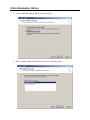
1. Right click on the Contacts Folder and select Properties
2. Click on the Outlook Address Book Tab and check the “Show this folder as an email
Address Book” box. Click on OK.