1
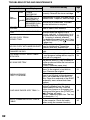
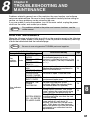
TROUBLESHOOTING AND MAINTENANCE
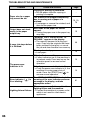
Indication
Lamp indicator
Display
INSTALL A NEW
Blinks TONER
CARTRIDGE
TONER
Error
CARTRIDGE IS
indicator
Steadily NEAR EMPTY.
lit
MAINTENANCE
REQUIRED CALL
FOR SERVICE
MEMORY FULL, PRESS START TO
RESUME.
NO 2-SIDED COPY FROM BYPASS
TRAY.
Cause and remedy
Page
The toner cartridge is not installed
correctly. Reinstall the toner cartridge.
74
Replacement of toner cartridge will be
needed soon. Prepare a new cartridge.
74
Service by an authorized TOSHIBA
service technician is required.
Data is being held in memory. Print the
data or clear it from memory.
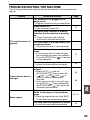
Two sided printing or 2 IN 1 copying is
selected when the bypass tray is
already selected ,or the bypass tray is
selected when two-sided printing or 2
IN 1 copying is already selected.
NO 2IN1 COPY FROM
The bypass tray cannot be used. Press
BYPASS TRAY.
the [TRAY SELECT] key ( ) to select
a paper tray.
2 IN 1 copy and margin shift cannot be
NO 2IN1 COPY WITH MARGIN SHIFT. used in combination. Cancel the
function what was selected last.
COPY RATIO CAN NOT BE
Copy ratio can not be changed in 2 IN 1
CHANGED IN 2IN1.
copy.
This appears if you attempt to change
THIS MENU IS NOT SELECTABLE
a user program setting while a copy or
WITH DATA.
print job is in progress.
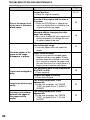
There is no paper for printing. Press
the [MODE SELECT] key to switch to
printer mode and follow the instructions
NO XXXX SIZE TRAY
in the display.
("XXXX" indicates paper size)
An original remains on the document
glass, or the original is too thick to
scan. Remove the original.
If the message is no cleared when
CHECK ADF/RADF.
there is not original on the document
START TO RESUME.
glass, the underside of the RADF is
dirty. Clean the underside of the RADF.
(especially areas where black lines
appear.)
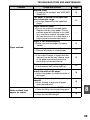
Printing is not possible if the paper size
setting is different from the size of
paper loaded in the tray. Load the
LOAD XXXX PAPER INTO TRAY<*>. same size of paper as the paper size
setting and then press the [START] key
( ). Printing will begin.
("XXXX" indicates paper size. The tray
is indicated in <*>.)
The machine is not correctly connected
NO PC COMMUNICATION; CHECK
to the computer. Check the cable
CABLE.
(when using the scanner function).
62
30
26
31
31
34
25
31
54
-
21
78
15
42