1
8.
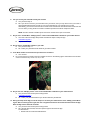
Can you access your home Wi-Fi from your hot tub?
a. Yes: proceed to step 9.
b. No: If you cannot connect to your home Wi-Fi from your hot tub, then you may need to move your router or
add a repeater/signal booster so that you can receive signals from your home Wi-Fi at your tub.
Alternatively, you can also mount the Wi-Fi module on the outside of the tub instead of the inside of the tub.
You can also try moving the Wi-Fi module to a different spot where the Wi-Fi reception is better.
NOTE: The Wi-Fi module is weather proof and can be mounted in the open environment.
9.
Do you see a Jacuzzi Wi-Fi ‘JHTSpa_xxxxxx’ in the list of available Wi-Fi networks on your mobile device?
a. Yes: refer to the Jacuzzi App Setup Guide and follow the steps to setup the App.
J-500 Start Up guide |
b. No: proceed to step 10.
10. Do you have a Jacuzzi Wi-Fi module in your tub?
a. Yes: proceed to step 11.
b. No: contact your preferred Jacuzzi dealer to get a Wi-Fi module.
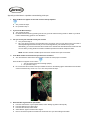
11. Is the Wi-Fi module connected to the spa electronics controller?
a. Yes: continue
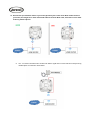
a. No: connect the Wi-Fi module to the spa controller as shown in the following figure. Note that the Wi-Fi module
can be connected to any one of J13, J14, or J15.
12. Do you now see ‘JHTSpa_xxxxxx’ in the list of available Wi-Fi networks on your mobile device?
a. Yes: proceed to the next step in the setup process
J-500 Start Up guide |
b. No: contact your preferred dealer as your Wi-Fi module may be defective.
13. During the setup of the App, one of the steps is to connect your mobile device to the JHTSpa_xxxxxx Wi-Fi
signal. After connecting to the signal, the user is supposed to wait for 30 seconds and then launch the App.
Does the App launch within 90 seconds?
a. Yes: proceed to the next step in the setup process.
b. No: If the App does not load, then force-quit the App and re-launch the App.
For iOS Devices:
i. Double click the center iPhone/iPad button.