1
TECHNISONIC INDUSTRIES LIMITED
www.til.ca
SECTION 2 – OPERATING INSTRUCTIONS
2.1
GENERAL
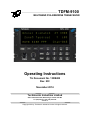
An LED display, a keypad and a rotary knob provide the operator control of the 1 or 2 RF
modules installed in the unit. The display shows the activity of both modules as well as the soft
key menu of the active band. The active module is selected by pressing the BAND key. The knob
has multiple functions including volume, channel and zone. The microphone, key line and
headphone audio can be wired separately for each module therefore switching from band to band
is performed at an audio panel such as the Technisonic A71X series. This allows for separate
and simultaneous operation on each of the bands just like having 2 separate radios. The
transceiver can also be connected so that both bands are available on one combined output. It is
possible to connect the transceiver such that both methods are used simultaneously.
2.2
FRONT PANEL
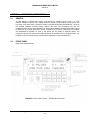
Refer to the diagram below:
FIGURE 2-1 Front Panel Controls – TDFM-9100 Transceiver
TDFM-9100 Operating Instructions
TiL 13RE482 rev N/C
2-1