1
TECHNISONIC INDUSTRIES LIMITED
www.til.ca
2.18
MAINTENANCE MENU
Some technical specifications of the TDFM-9100 transceiver can be configured to suit the
installation. The settings in this menu should only be adjusted by maintenance or technical
personnel as incorrect settings can result in undesired operation. The following menu items
can be changed or modified. Rotate the knob to select the desired condition and press the knob
to continue to the next configuration item:
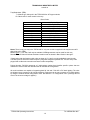
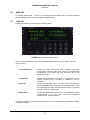
Mic 1 Level
Turning the knob will adjust the microphone input level for band 1
transmit. The level is displayed as a hexadecimal number and is
adjustable between 00 and FF.
Mic 2 Level
Turning the knob will adjust the microphone input level for band 2
transmit. The level is displayed as a hexadecimal number and is
adjustable between 00 and FF.
Mic C Level
Turning the knob will adjust the combined microphone input level for
band 1 and 2. The level is displayed as a hexadecimal number and is
adjustable between 00 and FF.
Band 1 RX Audio
Adjusts the audio output of the band 1 RF module to the audio
amplifiers in the TDFM-9100. This level is set at the factory for
maximum undistorted audio at full volume.
Band 2 RX Audio
Adjusts the audio output of the band 2 RF module to the audio
amplifiers in the TDFM-9100. This level is set at the factory for
maximum undistorted audio at full volume.
Press the knob to accept the setting. The radio will then return to normal operating mode. The
radio will keep these settings until they are changed again.
2.19
FRONT PANEL PROGRAMMING (FPP) MODE
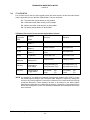
All modules have the capability to program channel information such as frequencies, PL tones,
modulation types, etc from the front panel provided the modules were ordered with the FPP
option. FPP also must be activated in the APX CPS software for ‘FPP’ to appear in the soft menu.
Note:
Individual zones must be activated for FPP in order to allow editing of channel
information. For zones that have FPP disabled, the FPP menu will still function but no
changes can be made to the channels in that zone. FPP can only be used on zones
containing conventional analog or P25 channels. Zones with P25 Trunking or Motorola
Trunking channels can only be programmed via APX CPS software.
TDFM-9100 Operating Instructions
TiL 13RE482 rev N/C
2-9