1
Electronic Disposition System
Area Operating Agreement
Maintenance User Manual
Version 1.01
July 2007
EDS AOA Maintenance User Manual
Revision History
Version
Date
Author/Organization
Description
V0.01
2007-04-12
Krystian Staniszewski
●
Document draft.
V1.00
2007-04-24
Krystian Staniszewski
●
Document final.
V1.01
2007-07-19
Krystian Staniszewski
●
Updated screenshots.
July 19, 2007
© 2007 Government of Alberta
Page 2 of 17
EDS AOA Maintenance User Manual
DISCLAIMER
In this disclaimer provision:
“Crown” means Her Majesty the Queen in right of the Province of Alberta;
“Minister” means the Minister responsible of the Alberta Sustainable Resource Development;
“Their employees” means and includes each, any and every officer, employee, servant and agent of
either or both of the Crown and the Minister and without limiting the generality of the foregoing, and
includes employees of the Crown and the Minister employed in Alberta Sustainable Resource
Development.
“EDS” means the Electronic Disposition System and all programs, hardware, documentation,
functions and services forming a part thereof or associate therewith.
The Crown, the Minister and their employees and the contractors and technical advisors of the aforesaid:
(a) Make no warranty or representation, whether expressed or implied, to any person with respect to
this material or documentation of EDS or as to the service, performance, quality, merchantability or
fitness of any part of the aforesaid for any purpose; and
(b) Shall not be liable for any action, damages or claims, whether occasioned by negligence or
otherwise, that any person, user, Subscriber or any employees of the aforesaid may hereafter have,
allege or become entitled to (including but not limited to any claim of third-party contribution of
indemnity, any economic or moral loss, or direct, immediate, special, indirect or consequential
damages which do, may, or are alleged to arise as a result of:
(i) The use of this material or documentation or EDS or any service connection therewith; or
(ii) Any error or omissions in data or any loss or partial loss of data or incomplete retrieval of
information, even if any or all of the Crown, the Minister or their employees were advised of the
possibility of such risk, action, claims or damages, including damages sustained or actions brought by
third parties and claims made against the Subscriber by third parties.
The entire risk of loss relating to or associated with the quality and performance of EDS and any product
and results thereof shall be assumed by the Subscriber and by any other user of EDS.
July 19, 2007
© 2007 Government of Alberta
Page 3 of 17
EDS AOA Maintenance User Manual
Table of Contents
1.
EDS Overview ..................................................................................................5
1.1
Hours of Operations .......................................................................................................... 5
1.2
EDS Use Restrictions: ....................................................................................................... 5
1.2.1 Dispositions .................................................................................................................... 5
1.2.2 AOA Maintenance......................................................................................................... 5
1.3
Attachment Requirements ................................................................................................ 5
1.3.1 Documents...................................................................................................................... 5
1.3.2 Plan Package .................................................................................................................. 6
1.4
EDS URL ............................................................................................................................ 6
1.5
Navigation .......................................................................................................................... 6
2.
2.1
3.
EDS Front Page................................................................................................7
Help ..................................................................................................................................... 8
AOA Monthly Status Report Screens ............................................................9
3.1
AOA Number Entry .......................................................................................................... 9
3.2
AOA Upload..................................................................................................................... 10
3.3
Submission Acceptance ................................................................................................... 11
3.4
Confirmation.................................................................................................................... 11
4.
AOA Monthly Status Report Submission Process .....................................12
4.1 Populating the spreadsheet...............................................................................................12
4.2
Using EDS to submit the spreadsheet ............................................................................ 13
4.3 Receiving e-mail confirmation ........................................................................................ 13
5.
Getting Support .............................................................................................14
6.
AOA Monthly Status Report Business Rules ..............................................14
7.
Appendix A –AOA Monthly Status Report Spreadsheet Codes ...............15
8. Appendix B –AOA Monthly Status Report Spreadsheet Screenshot.......17
July 19, 2007
© 2007 Government of Alberta
Page 4 of 17
EDS AOA Maintenance User Manual
1.
EDS Overview
EDS is an online service that allows clients to submit specified applications/amendments and documents
for surface dispositions to SRD electronically. Presently EDS has 3 subsystems:
Surface Dispositions allows for submission of specified purpose codes for License of
Occupation (LOC), Mineral Surface Lease (MSL), Pipeline Agreement (PLA), Pipeline
Installation Lease (PIL), Easement (EZE), Vegetation Control (VCE) and Rural
Electrification Association (REA) disposition types.
Surface Material Lease allows for submission of Surface Material Lease (SML) and
associated License of Occupation (LOC) dispositions.
AOA Maintenance allows for submission of Area Operating Agreement (AOA) Monthly
Status Reports.
For details about each of the subsystems please review their individual User Manuals.
EDS will allow clients to submit applications and amendments during extended hours. It will also provide
validation of selected data fields at the client workstation thereby assisting the client to minimize the
opportunity for errors on the submission.
Applications that are accepted by EDS for uploading to Land Standing Automated System (LSAS) will be
assigned an activity number by EDS and emailed back to the client along with a copy of the application.
The opportunity that will be provided by this automated system will ensure that clients are provided with
efficient and consistent service.
1.1
Hours of Operations
EDS Support help desk is available Monday to Friday 8:15 am to 4:30 pm except statutory
holidays. The system is available from 6:30 am to 10:00 pm everyday.
1.2
EDS Use Restrictions:
1.2.1
Dispositions
EDS is limited to disposition types MSL, LOC, PLA, PIL, EZE, VCE, SML and REA for
processing applications and amendments.
Applications or amendments processed using EDS at this time must have only one applicant.
The maximum number of different dispositions types on a plan is two.
Confirmation Number can only be used once.
One selected purpose for each disposition type only.
Multiple plans for an activity will not be accepted.
1.2.2
AOA Maintenance
AOA Maintenance is limited to the submission of the Monthly Status Report
1.3
Attachment Requirements
1.3.1
Documents
All documents submitted to the department other than the plan submission package and the
AOA Monthly Status Report must be in a Microsoft Word (.doc) or PDF format. Documents
that require imaging must be scanned to the following standard and converted into a PDF
format for submission.
Black & White 300 dpi
Colour 150 dpi
July 19, 2007
© 2007 Government of Alberta
Page 5 of 17
EDS AOA Maintenance User Manual
The file naming must not contain spaces or more than one dot (period). Use of characters such
as *, -, (, ), @, %, $, or % are not allowed in the file name.
1.3.2
Plan Package
Other than filing administrative amendments, a plan package is required for all
applications and amendments. The plan package is an encrypted file that is produced
and downloaded from the Plan Confirmation Service. Within this encrypted file is
the plan in a PDF format, CAD drawing and an attribution file, XML.
1.4
EDS URL
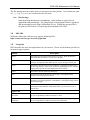
Within the address bar of the browser, type the following URL:
https://securexnet.env.gov.ab.ca/eds_login.html
1.5
Navigation
EDS functions like most web applications on your browser. Please use the buttons provided to
navigate to pages required.
Buttons
Description
Submit
This button is located on the bottom of the review page. When the button is
selected the data provided is to commit to the database.
Correct
This button is available when the system detects that there is an error in the data
provided. Selecting the button allows the user to go to the page with the error.
Browse
This button is used to browse for the attachments. Selecting this button opens a
file-browsing window. Select the file required by highlighting the file, or double
clicking on the file and select the OPEN button on the window.
Cancel
This button is used to return to the main page.
Next
This button is located at the bottom of most pages. Selecting this button
forwards to the next page in the process.
Finish
This Finish button is located on the successful submission page (the last button in
submitting a successful application or amendment). Selecting this button returns
you to the main page.
Display & Print Form
This button enables you to print or save the application or amendment form.
Selecting this button launches Adobe Reader where you can select to save or
print the files.
Hyper Link
Click here to correct the
above form
This Link is located under each form in the Submission Review page. This gives
the user an opportunity to make corrections to a form.
Click here to correct
attachments
This Link is located under each form in the Submission Review page. This gives
the user an opportunity to make corrections to the attachments.
July 19, 2007
© 2007 Government of Alberta
Page 6 of 17
EDS AOA Maintenance User Manual
2.
EDS Front Page
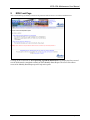
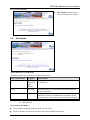
After a successful log in, Industry Clients will be presented with two choices as in the screenshot below.
Clicking on the second link of Area Operating Agreement Maintenance will display the first screen of
several which must be completed to submit an AOA Monthly Status Report. The user will be able to
access AOA Monthly Status Report-specific help at this point.
July 19, 2007
© 2007 Government of Alberta
Page 7 of 17
EDS AOA Maintenance User Manual
2.1
Help
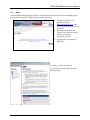
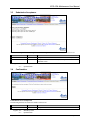
AOA Monthly Status Report-specific help is available from the first screen of the AOA Monthly Status
Report submission process. Help links are circled in red below.
●
Selecting Contact Us will
generate an email to
[email protected] where
you can indicate any questions or
comments.
●
Selecting EDS Website will
forward you to the EDS website
where you can browse
information available.
●
Selecting Help will launch the
EDS Help.
A number of topics are displayed.
To print any topic right click your mouse
and select print.
July 19, 2007
© 2007 Government of Alberta
Page 8 of 17
EDS AOA Maintenance User Manual
3.
AOA Monthly Status Report Screens
3.1
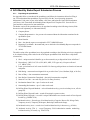
AOA Number Entry
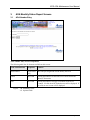
AOA Number Entry Screen Components
The following table lists all elements available on this screen:
Field or button name
Properties
Remarks
AOA Number
TEXT BOX This is the pre-assigned Id used to identify the AOA
[M]
Cancel
BUTTON
Clicking this button will cancel the service and return to the
Industry Client menu
Next
BUTTON
Clicking this button will trigger a validation of the AOA
NUMBER. If valid, the AOA Upload screen will be displayed. If
not valid, an error screen will be displayed.
Legend: <M: Mandatory field>
<O: Optional field>
July 19, 2007
© 2007 Government of Alberta
Page 9 of 17
EDS AOA Maintenance User Manual
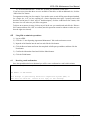
Error message will display
AOA Number entered must be a
valid and existing AOA Number
3.2
AOA Upload
AOA Upload Screen Components
The following table lists all elements available on this screen:
Field or button name
Properties
Name/Remarks
Browse
BUTTON
[MANDAT
ORY
FIELD]
Clicking this button will invoke a dialogue to locate and select
the required file.
Cancel
BUTTON
Clicking this button will cancel the service and return to the
Industry Client menu
Next
BUTTON
Clicking this button will trigger a validation of the file being
submitted. If valid, the AOA Submission Acceptance screen
will be displayed. If not valid, an error screen will be displayed.
Legend: <M: Mandatory field>
<O: Optional field>
Error message will display
The spreadsheet being uploaded must be the current version.
The AOA Number entered in the web form and in the spreadsheet must match.
July 19, 2007
© 2007 Government of Alberta
Page 10 of 17
EDS AOA Maintenance User Manual
3.3
Submission Acceptance
Submission Acceptance Screen Components The following table lists all elements available on this screen:
Field or button name
Properties
Name/Remarks
Cancel
BUTTON
Clicking this button will cancel the service and return to the Industry Client menu
Submit
BUTTON
Clicking this button will submit the AOA report, taking the user to a final
confirmation screen.
Legend: <M :
<O :
3.4
Mandatory field>
Optional field>
Confirmation
Confirmation Screen Components
The following table lists all elements available on this screen:
Field or button name
Properties
Name/Remarks
Finish
BUTTON
Clicking this button will return the user to the main menu.
Legend: <M :
<O :
July 19, 2007
Mandatory field>
Optional field>
© 2007 Government of Alberta
Page 11 of 17
EDS AOA Maintenance User Manual
4. AOA Monthly Status Report Submission Process
4.1.1
Populating the spreadsheet
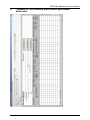
See Appendix B for a screenshot of the spreadsheet, and follow the instructions below for filling it
out. To first download the spreadsheet, log in to EDS, click the "Area Operating Agreement
Maintenance" link, enter in your AOA number, click Next, and below the Cancel and Next buttons
you'll have a link "Download AOA Monthly Status Report Excel Template File". Save the file on
your hard drive and proceed as instructed below.
The header section of the spreadsheet has to be populated according to the following criteria (fields
that are not self explanatory are elaborated below):
1) Company Name.
2) Company Representative – the person to be contacted about the information contained in the
spreadsheet report.
3) Phone Number.
4) Date – the date the report was completed in YYYY-MM-DD format.
5) Reporting Year-Month – the month and year to which the AOA Monthly Report corresponds in
YYYY-MM format.
6) AOA #.
The table section of the spreadsheet has to be populated according to the following criteria (see Appendix
A for a detailed listing of the codes for the AOA Report spreadsheet fields which have a drop-down
selection list):
1) Site # - unique numerical identifier (up to four numerals) as per disposition list in AOA Part C.
2) Disposition # - MSL, LOC, PLA, PIL, MLL, MLP, VCE types only. No spaces allowed
(i.e. MSL071234).
3) Land – point location of well center for MSL. For linear type dispositions use location of start and
end points.
4) Risk Rating – must match to mitigated risk as per AOA Part C (Low, Medium, High, or No Go).
5) Date of Entry – date construction commenced.
6) Date Surface Construction Completed – date initial construction completed.
7) Status of Use Code – one code only (In Use, No Entry, Inactive).
8) Reclamation Status Code – up to 2 codes can be used.
9) Outstanding Reclamation – up to 3 codes can be used.
10) Drilling Waste Disposal Methods – select all methods used (e.g. on-site mix/bury/cover, off-site
pump-off).
11) Drilling Waste Disposal Lands – record all locations by quarter section.
12) Drilling Waste Disposal # - record if a unique DWD number was issued to track off-site disposal
location (e.g. DWD071234).
13) Incidental Activity – Record type of incidental activity (Campsite, Borrow Pit, Salvage Deck,
Temporary Access, Temporary Workspace, Backslope, and Remote Sump).
14) Incidental Activity Area – record size of each incidental activity in hectares (e.g. 0.50 ha).
15) Incidental Activity TFA # - record Temporary Field Authorization number authorizing
incidental activity (if issued) (e.g. TFA071234).
July 19, 2007
© 2007 Government of Alberta
Page 12 of 17
EDS AOA Maintenance User Manual
16) As Built Submitted Date – record date As Built plan submitted to field office.
If you have more sites than there are rows available in the table, to add an additional site, click the
“Add a New Site” button.
To augment an existing site (for example, if you need to enter several drilling waste disposal methods
for a single site, or if you are reporting on a linear disposition that spans 2 quarters and would
therefore need to enter in “from” and “to” land descriptors), click the “Add Data to Site” button, with
the cursor in a cell in the row you’d like to augment.
To delete an erroneous site entry click on any cell in the row you want deleted and click the “Delete a
Site” button and then click “OK” to confirm (note this operation can not be undone so make sure you
have the right row selected).
4.2
Using EDS to submit the spreadsheet
1) Log in to EDS.
2) Click the “2. Area Operating Agreement Maintenance” link on the main menu screen.
3) Input the AOA Number into the text box and click the Next button.
4) Click the Browse button and locate the completed AOA Report spreadsheet, and then click the
Next button.
5) Confirm the information listed and click the Submit button.
6) Click the Finish button.
4.3
Receiving e-mail confirmation
Once the spreadsheet has been submitted you will be sent a confirmation e-mail within minutes.
The AOA Monthly Status Report has been successfully received in EDS.
AOA Number is AOA 060001
This message is generated by Electronic Disposition System (EDS) on
2007.04.23 at 09:01:08. Please do not reply to this message.
July 19, 2007
© 2007 Government of Alberta
Page 13 of 17
EDS AOA Maintenance User Manual
5.
Getting Support
If there are any problems with the SecureXNET login contact the GoA help at 780-427-4357 and select option 1.
EDS Support Team
Phone enquiries regarding login accounts/passwords or system problems should be directed to:
Alex Crosland – (780) 415-4609
Sharon Yap – (780) 422-2518
Krystian Staniszewski – (780) 644-1862
Pauline Peterson, Team Lead – (780) 415-4612
Land Dispositions Reception – (780) 427-3570
System and Documentation Feedback
Please send any feedback or suggestions to [email protected]
6.
AOA Monthly Status Report Business Rules
The commitment to submit Monthly Status reports to SRD by the company is outlined in Part C
of the Area Operating Agreement.
A monthly status report including all approved dispositions must be submitted monthly.
Approved dispositions are considered to be any disposition issued with a Letter of Authority.
Companies are encouraged to include all dispositions within the operating area, whether they
were approved under this AOA, an EFR, or previous AOA. Companies are also strongly
encouraged to develop a strategy to include all dispositions within a time frame of 5 years.
July 19, 2007
© 2007 Government of Alberta
Page 14 of 17
EDS AOA Maintenance User Manual
Appendix A –AOA Monthly Status Report Spreadsheet Codes
7.
A.1 Risk Rating codes:
High
Medium
Low
No Go
A.2 Status of Use Code codes:
1a In Use - Under Construction
1b In Use - Drilling
1c In Use - Production/Operational
1d In Use - Interim Reclamation Completed
2
No Entry
3a Inactive - D&A
3b Inactive – Suspended
A.3 Reclamation Status Code codes:
1
Satisfactory
2
Not Satisfactory
3
Reclamation Certificate Issued - Field Inspected
4
Reclamation Certificate Requested
5
Clearance
6
Reclamation certificate request cancelled
7
Reclamation certificate/letter of clearance on request
8
Reclamation certificate issued - no inspection
9
Reclamation certificate rescinded
10 Reclamation certificate audit - pass
11 Construction and Reclamation Notice Issued
12 Environmental protection order/Emergency Environmental Protection Order Issued
A.4 Outstanding Reclamation codes:
1
Vegetation Establishment
2
Leveling/Backsloping
3
Sumps
4
Erosion Control
5
Brush Disposal
6
Waste Removal
7
Weed Control
8
Fencing
9
Timber Salvage
July 19, 2007
© 2007 Government of Alberta
Page 15 of 17
EDS AOA Maintenance User Manual
10
Berming
11
Culverts
12
Creek Crossings
13
Penalty Assessments
14
Pollution
15
Reforestation
17
Reclamation (general)
18
Flare Pit
19
See Remarks/Additional Codes
20
Flowing or Cratered Shot Holes
21
Plugged or Tagged Shot Holes
22
Sod Salvage
23
Topsoil/Surface Soil Replacement
24
Soil Reconstruction
25
Flushing
26
Company Inspection
27
Bio Piles
A.5 Drilling Waste Disposal Method codes:
1a
On Site - Mix Bury Cover
1b
On Site - Landspread
2a
Off Site - Landspraying
2b
Off Site - Pump-off
2c
Off Site - Landspraying While Drilling
2d
Off Site - Doloc (DFPL)
2e
Off Site - Move to other site
3
Land Treatment
4
Alternative
5
None
A.6 Incidental Activity codes:
Campsite
Borrow Pit
Salvage deck
Temporary access
Temporary workspace
Backslope
Remote Sump
July 19, 2007
© 2007 Government of Alberta
Page 16 of 17
EDS AOA Maintenance User Manual
8.
Appendix B –AOA Monthly Status Report Spreadsheet
Screenshot
July 19, 2007
© 2007 Government of Alberta
Page 17 of 17