1
Game Time Operation
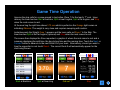
If you do not wish to change any of the Game
Settings simply touch Start Game. The ROG will
remember your settings from the last time you
entered them and they will remain in effect until
you decide to make a change.
The Shot Selection Mode screen below will
appear and the Default split time for Zone 7 will
be 3.70 seconds if you have not made any prior
changes.
Zone 7 – Tee-Line
In Shot Selection Mode the default is Zone 7 and
Rock 1 of the end. Scroll to the Zone required to
make the called shot.
At any time you may advance to whatever rock you
choose. For example, should you miss timing one of
your rocks simply advance to the rock currently
being thrown. The Rock # is immaterial if all of your
members have the same deliveries and releases
(more on that later). You will be given the option of
timing the opposition’s rock as well without affecting
the Rock Counter.
6