1
You can generate another type of list, called a change list, after an initial cut list has been
created or when you want to compare two XML versions of a Final Cut Pro sequence. In
a film workflow, the change list assumes a workprint has been cut to the specifications
of a cut list (or prior change list) and specifies further changes to make to the workprint,
based on edits you have made to the sequence in Final Cut Pro. See Creating Change
Lists for more information.
Choosing the List Format
Cinema Tools provides three format options for exporting your lists:
• PDF file: A format for easy viewing that contains only the information that you specify
• XML file: A format for use with other software that contains all of the film information
from the sequence
• Style sheet–based file: A format controlled by a style sheet that you choose. You can
use the style sheets provided by Cinema Tools, including a plain text style sheet.
See Exporting Film Lists Using Final Cut Pro for information about creating film lists using
Final Cut Pro and Creating EDL-Based and XML-Based Film Lists for information about
creating film lists using Cinema Tools.
About PDF-Format Film Lists
Exporting a PDF-format film list creates a file that can be opened in Preview or any other
PDF viewer. You can choose which items to include in the list and even set their order.
Tip: Although you cannot directly edit the text in a PDF file when viewing it with Preview,
you can use the Preview annotation tool to add comments. See Preview Help for more
information.
About XML-Format Film Lists
Exporting an XML-format film list creates a file that contains all film-related information
from the Final Cut Pro sequence.
Important: XML-format film lists are not related to the other XML files you can export
from Final Cut Pro.
Unlike PDF-format film list files, which are intended to be printed and read, XML-format
film list files are formatted so that other applications can reliably extract specific data
from the film list. The XML format is intended to be used to exchange information between
software applications. The purpose of XML-format film lists is to provide all of the film
information about a Final Cut Pro sequence in a format that the user can incorporate into
other custom software being used in the film workflow.
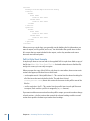
Note: You can open an XML-format film list in a text editor, such as TextEdit, to see the
structure and information it contains.
160
Chapter 10 Generating Film Lists and Change Lists