1
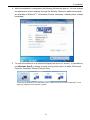
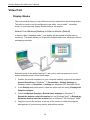
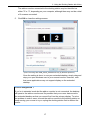
Docking Station with Video User’s Manual Video and DVD Playback in Extened Mode On Windows Vista with extended mode, it’s suggested that you run video or DVD playback programs on your primary monitor instead of the add-on monitor to ensure the playback performance. Mirror Your Windows Desktop This mode is referred to as “mirror” or “clone” mode. In this mode, your original screen (the primary display) will be mirrored to the add-on monitor. In mirror mode, the video component will automatically select the settings (screen resolution, color quality and refresh rate) for the add-on monitor. But you can manually adjust the settings as required. However, the settings of the add-on monitor are limited by that of the primary monitor. For example, even though your add-on monitor supports a resolution of up to 1680x1050, you can only configure it to use 1280x1024 due to the primary monitor only supports a resolution of up to 1280x1024. If you change the video output to extended mode and then want to switch back to mirror mode, follow these steps: 1. Position the mouse anywhere on your computer desktop, right-click and select Screen Resolution on Windows 7, Personalize > Display Settings on Windows Vista or Properties > Settings on Windows XP/ Windows 2000. 2. In the Display drop-down menu, select the option with the string “DisplayLink Graphics Adapter”. 3. Check the Multiple Displays> Duplicate these displays on Windows 7, uncheck the Extend the desktop onto this monitor on Windows Vista or Extend my Windows desktop onto this monitor on Windows XP/ Windows 2000. 18