1
CONNECTING TO USB
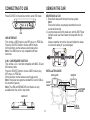
USING IN THE CAR
Press SOURCE on the remote control to enter USB mode.
Mounting in a Car
1. Thread both strap ends through the strap eyelets.
Note:
Ensure the buckles are properly assembled to avoid
accidental loosening.
2. Loop the straps around the head-rest, with the DVD Player
facing the rear seat, then fasten the straps with the clip.
Note:
Always remember to lock the clips and tighten the straps
to ensure the safety of your passengers.
usb
USB INTERFACE
This unit has a USB IN jack to play MP3 music or JPEG files.
Press the SOURCE button to choose USB IN mode.
All the functions are the same as used to play a disc.
Note: The USB IN port is only compatible with flash
memories.
3-IN-1 CARD READER FUNCTION
This unit has a 3-in-1 card slot compatible with MMC, SD and
MS memory cards.
Press the SOURCE button to choose CARD mode to play
MP3 music or JPEG files.
All the functions are the same as used to play a disc.
Note: This player can support a standard SD card of 4GB as
the maximum capacity.
Note: The USB and SD/MMC/MS card modes are only
available when the unit is in stop mode
installation guide
dvd player
monitor
LINK UP
cable
car power
adapter
CARD SLOT
5
remote
control