1
Overview
Thank you for purchasing an Oceanscience Group product. It is our intention to provide our
customers with the latest technologies, the highest quality manufacturing and the most efficient
customer service and support. This manual outlines the use of HydroLink SL series Wireless Data
Transceivers with specific references to their use with The Oceanscience Riverboat for ADCP
deployment.
Simply put, the HydroLink transceivers eliminate the need for data transmission cables.
Please note: The transceivers have a fixed data transmission rate (baud rate). In order to send
data through them, your instruments and laptop or other receiving device must be set to the
same baud rates as those installed in the transceivers. The default baud rate for your SL series
transceivers is 115,200. This rate is optimized and cannot be altered unless you have purchased
an SL programming cable and guide, or you return the transceivers to The Oceanscience Group.
The HydroLink SL Wireless Data Transceivers are pre-configured for high-speed data
communication and each pair is programmed to communicate only with one another.
Configuring the ADCP: Baud Rate of 115,200 bps
The following procedure explains how to set the baud rate and save it in the ADCP. This procedure
assumes that you will be using the program BBTalk supplied by RD Instruments.
With ADCP connected directly to your PC, begin by configuring the baud rate of the ADCP to
match the baud rate of the radio. If these do not match, the ADCP cannot communicate through
the transceiver.
1. Connect the ADCP to the computer and apply power (see the appropriate
ADCP User's Guide).
2. Start the BBTalk program and establish communications with the ADCP by choosing
Workhorse, the appropriate Com, and Next. If this is the first time using the Workhorse choose
Next at the “Port Settings” window. When the “Options” window appears place a check in
the boxes labeled Send CK on baud rate change, and Use Software Break.
3. Wake up the Workhorse by sending a break signal with the blue (===) button.
4. Send the command CR1 to enter setup.
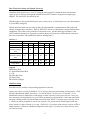
5. Find the baud rate on the table below that matches the baud rate of your Oceanscience
HydroLink transceivers (115,200 bps). Send the corresponding
CB command.
Table 1: Baud Rate
Baud Rate
4800
9600 (default)
19200
38400
57600
115200
CB Command
CB311
CB411
CB511
CB611
CB711
CB811
6. In BBTalk, press F5 and change the settings to match your CB command settings. Press OK to
exit the communication setup screen.
4