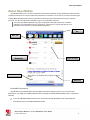
1
Getting Started Supported Hardware Mobile Broadband Devices To use Mobile Broadband connectivity, you need an iPass-supported Mobile Broadband device and a subscription with the iPass Mobile Broadband service or another Mobile Broadband network carrier. Open Mobile supports a wide variety of Mobile Broadband devices, and iPass regularly adds support for more. Contact your iPass account representative if you have questions about support for a specific device. If your Mobile Broadband device is not provided by iPass, you should install it and test it for connectivity with your carrier’s network, using your carrier’s client, before attempting to use it with Open Mobile. Wi-Fi Devices An 802.11b/g wireless device is needed for Wi-Fi connections. Open Mobile supports all standard Wi-Fi devices with an NDIS 5.1 or later interface. Installing Open Mobile Your system must meet the Open Mobile requirements or the Open Mobile installer will block the installation. In addition, you must have local administrator rights in order to perform the installation. (Local administrator rights are not required to run Open Mobile.) To install Open Mobile, 1. Double-click the Open Mobile installer file. The installation wizard is launched. 2. Follow the prompts for installation. iPass recommends that you install the application in the default location. You should always use the Open Mobile installer as it was supplied to you by your IT department. Do not rename or otherwise alter an installer file. Uninstalling Open Mobile You must have local administrator rights in order to uninstall Open Mobile. If you are currently running Open Mobile, right-click the Open Mobile system tray icon and choose Exit before uninstalling. To uninstall Open Mobile, 1. Launch your Windows Control Panel. 2. Select Open Mobile from the list and follow the prompts to complete the uninstallation. Migrating to Open Mobile from iPassConnect™ If you are an iPassConnect user, you can carry your iPassConnect settings to Open Mobile. Install Open Mobile as described above. Upon first launching Open Mobile, the application will prompt you to migrate your settings from iPassConnect. iPass Open Mobile 1.4.1 for Windows User Guide 2011 iPass Inc. 2