1
Power sources
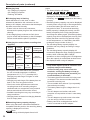
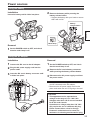
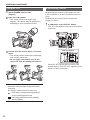
Using the battery
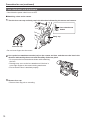
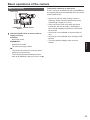
Installation
Insert the battery until it clicks into place.
2 Remove the battery while pressing the
battery release button.
• Support the battery with your hand to ensure
that it will not fall.
. . ON
POWER
OFF
CAM MODE
PB
AUDIO LEVEL
Preparation
Battery
release button
CH2
Mode lamp
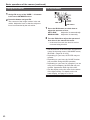
Removal
1 Set the POWER switch to OFF, and check
that the mode lamp is off.
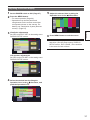
Using the AC adaptor
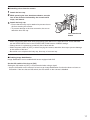
Installation
Removal
1 Connect the DC cord to the AC adaptor.
2Plug the AC power supply cord into the
1Set the POWER switch to OFF, and check
power outlet.
3Insert the DC cord’s battery connector until
it clicks into place.
that the mode lamp is off.
2Remove the DC cord’s battery connector
while pressing the battery release button.
3 Disconnect the AC power supply cord from
the power outlet.
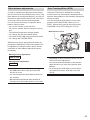
• Battery cannot be recharged when the DC
cord is connected to the AC adaptor.
• Disconnect the AC power supply cord from the
power outlet when the unit is not going to be used.
DC cord’s battery
connector
CAUTION:
• This apparatus can be operated at a
voltage in the range of 110 – 240 V AC.
Voltages other than 120 V are not intended
for U.S.A. and Canada.
Operation at a voltage other than 120 V AC
may require the use of a different AC plug.
Please contact either a local or foreign
Panasonic authorized service center for
assistance in selecting an alternate AC plug.
25