1
7. Other Functions
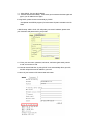
1. IP Kamera 9000 can view 9 different IP at the same time.
8. Authorization
In IP Kamera 9000 factory set up : factory setting
Username: administrator
Password: 1234
*Is recommended to change its factory setting password and user name
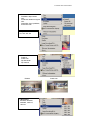
1. Administrator:
Change Password:
Camera Control:
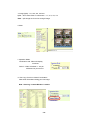
(Quality) - Low, High, Medium, Clarity, Motion
(Resolution) - 640*480, 352*288, 320*240, 176*144, 160*120
(Frequency) Outdoor, Indoor &50, Indoor&60
(Split) - 1x1, 2x2, 3x3 and 4x4.
(Operation Mode):
Continues
Period: 1-60 sec.
View Log: view visitor IP
Configuration: System, User, Motion detection, Network & DDNS
- 24 -