1
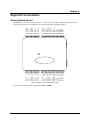
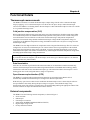
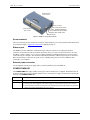
Chapter 4 Functional Details Thermocouple measurements The WEB-TC hardware level-shifts the thermocouple’s output voltage into the A/D’s common mode input range by applying +2.5 V to the thermocouple’s low side at the C#L input. Always connect thermocouple sensors to the WEB-TC in a floating fashion. Do not attempt to connect the thermocouple low side C#L to GND or to a ground referencing resistor. Cold junction compensation (CJC) When connecting the thermocouple sensor leads to the sensor input channel, the dissimilar metals at the WEBTC terminal blocks produce two additional thermocouple junctions. This junction creates a small voltage error term which must be removed from the overall sensor measurement using a cold junction compensation technique. The measured voltage includes both the thermocouple voltage and the cold junction voltage. To compensate for the additional cold junction voltage, the WEB-TC subtracts the cold junction voltage from the thermocouple voltage. The WEB-TC has four high-resolution CJC temperature sensors integrated into the design. The CJC sensors are configured as one sensor for each channel pair. CJC sensors measure the average temperature at the terminal block so that the cold junction voltage can be calculated. A software algorithm automatically corrects for the additional thermocouples created at the terminal blocks by subtracting the calculated cold junction voltage from the analog input's thermocouple voltage measurement. Increasing the thermocouple length If you need to increase the length of your thermocouple, use the same type of thermocouple wires to minimize the error introduced by thermal EMFs. Data linearization After the CJC correction is performed on the measurement data, an on-board microcontroller automatically linearizes the thermocouple measurement data using National Institute of Standards and Technology (NIST) linearization coefficients for the selected thermocouple type. The measurement data is then output as a 32-bit floating point value in the configured format (voltage or temperature). Open-thermocouple detection (OTD) The WEB-TC is equipped with open-thermocouple detection for each analog input channel. OTD is automatically enabled when the channel pair is configured for thermocouple sensors. With OTD, any open-circuit or short-circuit condition at the thermocouple sensor is detected by the software. An open channel is detected by driving the input voltage to a negative value outside the range of any thermocouple output. The software recognizes this as an invalid reading and flags the appropriate channel. The firmware continues to sample all channels when OTD is detected. External components The WEB-TC has the following external components, as shown in Figure 5. Screw terminals Ethernet port External power connector Status LEDs (POWER/COMM and LINK/ACTIVITY) Digital output voltage switch Factory default reset button 21