1
Quick Start & Troubleshooting
Guide
TABLE OF CONTENTS
Important Information
3
Computer Basics
4
Safety and Comfort .................................... 4
Safety Precautions ................................ 4
Health Precautions ............................... 4
Getting to Know your Computer ................ 5
The Keyboard and Mouse ................... 5
Remote Control (optional) .................... 7
Your Computer’s Drives ....................... 8
Ports and Connectors ......................... 10
Turning your Computer ON or OFF ... 11
Upgrading your Computer.................. 13
First steps on the Net ............................... 15
Get Connected! ................................. 15
Network connections ......................... 16
Surf the Net! ...................................... 17
Using Windows and your Software........... 20
Windows Welcome Center................. 20
Setup my PC...................................... 20
Packard Bell Recovery Backup Creator 20
Packard Bell Updator.......................... 23
Your Computer's Documentation ....... 23
Your Software .................................... 24
Playing Multimedia Files .................... 25
Volume Controls................................ 27
Helpdesk
28
Safe Computing.......................................
Maintenance .....................................
Updates .............................................
Security .............................................
Windows Remote Assistance..............
Diagnose & Repair ...................................
Top Troubleshooting Cases ................
Miscellaneous Troubleshooting ..........
Restoration and Recovery.........................
Packard Bell Smart Restore.................
Packard Bell Recovery Program ..........
28
28
32
32
37
38
38
44
52
52
52
Packard Bell Limited Warranty
56
Regulatory Information
61
Environment
63
Software License
64
Index
65
Table of Contents - 1
Copyright Notice
Packard Bell Quick Start & Troubleshooting Guide (DT). Copyright © 2008 Packard Bell B.V. All Rights Reserved. No part
of this manual may be reproduced or transmitted, in any form or by any means, whether electronic, chemical, manual or
otherwise, including but not limited to photocopying, recording, or information storage and retrieval systems, for any purpose
without prior written permission of Packard Bell B.V.
Disclaimer
Packard Bell B.V. specifically disclaims all warranties, either express or implied, including, but not limited to, implied warranties of merchantability and fitness for a particular purpose with respect to this product and documentation. Updates to software and hardware components are made regularly. Therefore some of the instructions, specifications and pictures in this
documentation may differ slightly from your particular situation. All items described in this guide are for illustration purposes
only and may not apply to your particular situation. No legal rights or entitlements may be obtained from descriptions made
in this manual. Packard Bell B.V. reserves the right to revise or make changes or improvements to this product or documentation at any time without obligation to notify any person of such revisions or improvements. In no event shall Packard Bell
B.V. be liable for any consequential or incidental damages, including but not limited to loss of business profits or any other
commercial damages, arising out of the use of this product.
Trademark
Microsoft and Windows Vista are registered trademarks of Microsoft Corporation. FireWire is a trademark of Apple
Computer, Inc. PS/2 is a trademark of International Business Machines Corporation. Google is a registered trademark of
Google Inc. Packard Bell is a registered trademark of Packard Bell B.V. All other company or product names are trademarks,
registered trademarks or service marks of their respective owners.
2 - Quick Start & Troubleshooting Guide
IMPORTANT INFORMATION
Thank you for purchasing a Packard Bell computer!
This guide has been designed to introduce you to the features of your computer and assist in your computing
experience. It will also help you maintain your computer and troubleshoot in case you encounter a problem.
To make the most of your computer, Packard Bell recommends you perform the actions described below
before you start working with your computer.
Setup my PC
To make it easy, Packard Bell has gathered all important setup steps in one application! Setup my PC will
start automatically when you first turn on your computer, this is an easy step by step process to configure
your Internet access, antivirus program, Identity card, etc. (see page 20 for details).
Packard Bell Recovery Backup Creator
Use Recovery Backup Creator (or Recovery DVD Creator) to copy your computer's recovery data to DVDs.
No separate copies of the Windows discs and Microsoft utilities are provided. All the programs are included
in your recovery data in a specific partition of your hard drive. Packard Bell recommends you create the
recovery DVDs before you start to work with your new computer (see page 20 for details).
Packard Bell Updator
To ensure that your computer has the latest updates for drivers and software, please use the Packard Bell
Updator program as soon as you have configured an Internet connection (see page 23 for details).
Packard Bell InfoCentre
To discover more about your computer, please make sure you check Packard Bell InfoCentre, the electronic
user‘s guide installed on your computer. You need to update the guide at least once online (see page 23 for
details).
Packard Bell Website
Remember to visit www.packardbell.com often! Check out the Support section: it contains our online Troubleshooter, up-to-date information, help, drivers and downloads.
Packard Bell Support
Make sure you write down your computer serial number, date and place of purchase
and model name on the cover of this guide. Also, save your proof of purchase. If you call
us, please write down any error message causing the problem, and have the computer in
front of you and switched on if possible. Having these items to hand when contacting us
will ensure better and quicker service.
Important Information - 3
COMPUTER BASICS
SAFETY AND COMFORT
Safety Precautions
Please follow the guidelines below to use your computer comfortably and to avoid health problems.
Computer Environment
Make sure that the computer:
✓
✓
✓
✓
✓
is away from direct sunlight and sources of heat;
is away from magnetic fields or any device generating static electricity;
is kept at least 30 centimetres away from a mobile phone;
is not in a dusty or damp environment;
is not placed on a carpet or any other surface that may have an electrical charge.
Cables
Make sure that:
✓
✓
✓
✓
cables are not strained and that there is no risk of people walking or tripping over them;
other devices do not crush the cables;
power cords are connected to a grounded electrical outlet;
the power outlet is easily accessible and as close to the computer as possible (do not overload it with too
many adapters).
Cleaning your Computer
✓
✓
✓
✓
✓
Always unplug your computer from the power outlet before cleaning it;
do not use liquid or aerosol cleaners, use a damp cloth instead;
never spray cleaning product directly on the screen;
if dust has accumulated inside your computer, do not use a vacuum cleaner to remove it;
if you spill liquid on your computer or any device attached to it, switch it off immediately, unplug the
power cord and make sure it is completely dry before switching it on again. Wait overnight if necessary.
Health Precautions
✓ If you work or play for hours at a time, then make sure you take regular breaks. Look away from the computer's screen once in a while. Do not use your computer if you are tired.
To use your computer comfortably, remember the following:
Sit up straight with your back relaxed
Adjustable chair
Feet flat on floor or on footrest
Desk height 60-70 cm from the floor
Free space around the computer and devices to allow proper ventilation
Top of monitor at eye level
Eye distance 45-70 cm from screen
Easy access to drives and controls
✓
✓
✓
✓
✓
✓
✓
✓
✓ Ensure that the computer’s ventilation slots and openings are never obstructed or covered. Do not place
the computer on a soft surface (such as a carpet, chair or bed) that may block ventilation slots.
4 - Quick Start & Troubleshooting Guide
✓ Some disorders of the hands, wrists, arms, neck, shoulders, legs and back may be associated with, or
aggravated by certain repetitive actions. To reduce your risk of developing these disorders, type with your
wrists straight and your hands and wrists floating above the keyboard. If you experience periods of pain,
tingling, numbness or other discomfort, please contact your doctor.
✓ We advise that parents monitor the use of games by their children. If you or your child experience any of
the following symptoms: dizziness, blurred vision, eye or muscle twitches, loss of consciousness, disorientation, any involuntary movement or convulsion, IMMEDIATELY discontinue use and consult your doctor. This may happen even if the person has no medical history of epilepsy.
GETTING TO KNOW YOUR COMPUTER
The Keyboard and Mouse
Cordless Devices
The cordless mouse and keyboard normally connect automatically as soon as you turn your computer on.
However, if the cordless mouse and keyboard do not work after installation, you should try to manually
establish communication with the receiver.
Note: The Keyboard/Mouse and Receiver shown below may not be the same as the Keyboard/Mouse
supplied with your computer. Check your InfoCentre documentation to see your Keyboard/Mouse
specifications if they are different from those shown below.
1. First check that the batteries for the keyboard and mouse are inserted correctly.
2. Then identify the mouse:
• Press the connect button on the receiver (A).
• Turn the mouse over.
• Use a thin object (such as a pen tip) to press the connect button on the mouse (B).
C
A
B
3. Wait 20 seconds.
4. Identify the keyboard:
• Press the connect button on the receiver (A).
• Turn the keyboard over.
• Use a thin object (such as a pen tip) to press the connect button on the keyboard (C).
Computer Basics - 5
Keyboard
The keyboard is used to enter text or commands. The functions of the keys depend on the program you are
using. The keyboard displayed in this guide is just an example. The layout of your keyboard may vary
slightly. For a full description of your keyboard, please refer to InfoCentre.
➊
➋ ➌
➒
➍
➑
➏
➐
➏
➎
1. Numbers: Used to enter numbers and special characters. Press [Shift] simultaneously for characters on the
top and press [Ctrl] + [Alt] for characters on the right.
2. Backspace: Used to go back one space and delete the last key pressed.
3. Del: Deletes characters to the right of the cursor or any highlighted item.
4. Numeric keypad: Functions as a second set of cursor keys. Press the [Numlock] key to enter numbers.
5. Arrow keys: Move the cursor up, down, left and right.
6. Enter: Press to enter a command, insert a paragraph break in a text or accept a chosen option.
7. Space: used to enter an empty space in your text.
8. Shift: Use simultaneously with a letter key to enter capital letters.
9. Esc: Cancels most current tasks.
Multimedia Keys (on selected keyboards)
➊
1.
2.
3.
4.
5.
6.
➋
➌ ➍
Activate Standby (sleep) mode.
Go to Packard Bell online services: Shopping, Support, Homepage.
Display your Favorites.
Launch Internet
Multimedia controls: play/pause, stop
Volume controls: Volume-/+, mute
6 - Quick Start & Troubleshooting Guide
➎
➏
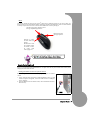
Mouse
The mouse controls the arrow on the screen . This arrow is called the pointer or the cursor. When you
move the mouse over a hard and flat surface, the pointer will follow this movement. Click one of the buttons
on the top of your mouse to select or activate the command the cursor is pointing at.
Use the scroll wheel or button to move
through compatible applications
Right-click to bring
up a pop-up menu
Left-click to select
the item under the
pointer.
Double-click to start
the program under
the cursor, or select
an entire word
when typing text.
Improve the motion and visibility of the pointer! Click on
‘Start’
> Control Panel > Mouse > Pointer Options.
Remote Control (optional)
Enjoy all your favourite digital entertainment in one place with the easy-to-use media center menu system
(see page 25) and remote control!
Installing the Remote Control and optional receiver
Before starting Windows Media Center (see page 25), prepare the remote
control.
1. If your computer does not feature an internal infrared receiver, a USB
receiver is required. If supplied, connect the USB receiver to a USB port
on the computer.
2. Insert the batteries into the remote control; check the batteries are orientated correctly.
Computer Basics - 7
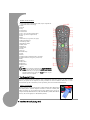
Remote Control Functions
1. Power ON/OFF or Quick Resume mode (if your computer features Intel® Viiv™ technology)
2. Pause
3. Record
4. Stop
5. Fast rewind
6. Fast forward
7. Skip - (go to previous chapter/track)
8. Skip + (go to next chapter/track)
9. Back
10.Info
11.Direction keys (up, down, left, right)
12.Start (Windows key)
13.Volume up/down
14.Program up/down
15.Mute sound
16.Record TV
17.DVD menu
18.Guide
19.Live TV
20.Number keys
21.Clear
22.Enter
23.Teletext (launch Teletext while in TV mode)
24.Teletext selection (red, green, yellow, blue)
25.Play
26.My TV*
27.My Videos*
28.My Music*
29.My Pictures*
* optional
Note: If your computer is equipped with Intel® Viiv™ technology, you will be able to use the Intel® Quick Resume
mode. This means you can quickly turn your system on and
off (after initial boot-up) using the Power button on your
remote control or computer.
Your Computer’s Drives
The drives described below are commonly used on Packard Bell computers. However, this does not mean
that they are present on the computer you have purchased, nor that it is limited to these drives. To view
documentation specific to the model you have purchased, please check Packard Bell InfoCentre.
Memory Card Reader
Memory cards are used in a wide selection of digital cameras, PDAs, MP3 players
and mobile phones. Selected computers include an “all-in-one” memory card
reader that allows you to read and write the most common types, such as CF
(Compact Flash®), IBM Microdrive™, SM (Smart Media™), MMC (Multi Media
Card™), SD (Secure Digital)™ or MS (Memory Stick®).
8 - Quick Start & Troubleshooting Guide
Formatting a Memory Card
Before using a card for the first time, it should be formatted.
1. Insert your card in the corresponding slot and click on ‘Start’
2. Right-click on the card icon and select Format.
3. Click on Start in the format window and then click on OK.
> Computer.
Removing a card from an External Card Reader
1. Click on the Safely Remove Hardware icon in the Notification
Area (next to the clock).
2. Click on Safely remove USB Mass Storage Device.
3. Wait until a Safe to Remove Hardware message is displayed.
4. Remove the card.
Optical Drives
An optical drive is able to read from (or write to) a variety of CD or DVD discs (e.g. Audio CD, CD-ROM,
DVD).
Read-only (ROM) drives
Some optical drives are only able to read information from a disc, they cannot be used to store new information. These drives can be used to watch films, install programs and read data such as photos or music.
Recordable (R) or Re-Writable (RW) Drives
In addition to reading data from compatible discs, the optical drive(s) provided with your computer may be
able to write (or 'burn') information to appropriate discs. You can use these drives to duplicate your CDs,
create your own music compilations, digital photo albums or keep a safe copy of your valuable data. Disc
recording software must be used to write information to recordable discs.
Note: Before copying a CD, make sure that its content is not protected by Trademarks and Copyrights,
and that you are authorised to replicate it. In most countries you are allowed to make an archival backup
of software or copy music for your own personal use.
Disc Compatibility for Recordable Drives
• DVD±RW Writer: DVD±RW drives (or DVD Dual drives) can write to recordable CDs, recordable DVDs
('-' or '+').
• Double-Layer DVD-RW Writer: Double-Layer DVD-RW drives (or DVD+R9 DL drives) can write to
recordable CDs and single- or double-layer recordable DVDs.
• Blu-ray Combo Drive: Blu-ray Combo drives can write to recordable CDs, all 'standard' recordable DVDs
(but not 'HD' DVDs) and may read from (but not write to) Blu-ray discs.
• Blu-ray Writer: Blu-ray drives can write to recordable CDs, all 'standard' recordable DVDs and recordable
Blu-ray discs.
Note: Discs and devices that use the HD DVD standard may not be used with Blu-ray devices.
Precautions
✓ If a program needs a disc, insert the disc into the drive before you start the program.
✓ Do not force a disc into the drive; make sure the disc is correctly inserted, then close the disc tray.
✓ Do not eject the disc without first closing the program that is using the disc. This could potentially cause
your computer to stop responding. Should this happen, restart your computer by using the Windows Task
Manager.
✓ If the tray does not eject, you may try to open it manually:
Computer Basics - 9
1. Switch your computer off.
2. Carefully insert a straightened paper clip into the emergency
eject port (if available). Do not use a pencil as the lead may break
inside the eject port and damage the drive.
✓ Keep the disc tray closed whenever you are not using the drive. Do not touch the optical lens in the drive,
if the lens is dirty, the optical drive may not function correctly.
✓ Do not wipe the lens with a normal cloth. Use a cotton swab to gently clean the lens.
✓ The optical drive is classified as a Class 1 laser product.
Note: This product incorporates copyright protection technology that is protected by U.S. patents and
other intellectual property rights. Use of this copyright protection technology must be authorized by
Macrovision, and is intended for home and other limited viewing uses only unless otherwise authorized
by Macrovision. Reverse engineering or disassembly is prohibited.
Ports and Connectors
The ports and connector types described below are commonly used on Packard Bell computers. However,
this does not mean that they are present on the computer you have purchased, nor that it is limited to these
ports. To view documentation specific to the model you have purchased, please check InfoCentre.
Precautions
✓ Before you attach any device, check the installation instructions that were supplied with it.
✓ Do not remove a device if the computer is using it.
✓ Most devices may be added or removed while the computer is on. They will be detected and installed
automatically. However, they must be deactivated before they can be removed from the computer (for
example, see Removing a card from an External Card Reader on page 9).
Legacy Ports
PS/2 - Connect a mouse and keyboard to these connectors.
Caution: Unlike most connectors, you must turn off your computer before adding or removing a legacydevice.
Communication Ports
Network - Connect your computer to a network (‘LAN’) or certain high-speed Internet
connections.
Modem - An internal fax/data modem connects you to the Internet over a dial-up connection.
A network port looks very similar to a modem port; they are often situated near each other. The
network port is slightly larger than the modem port.
Warning: In thunderstorm conditions, make sure that you disconnect all your connection cables;
unplug the modem from the telephone line, the TV port from the aerial socket and any network cable.
A lightning strike to nearby telephone lines or an aerial could damage your modem, network or TV card
or even your whole computer. Please note that the product warranty does not apply if damage to your
computer is the result of a lightning strike.
Expansion Ports
USB (Universal Serial Bus) - USB ports allow you to connect many peripheral devices to your
computer (for example: keyboard, printer, scanner).
10 - Quick Start & Troubleshooting Guide
IEEE 1394 (FireWire) - An IEEE 1394 port (aka FireWire™ or i.LINK) allows you to connect highspeed digital devices to your computer, such as digital video cameras, external hard disk drives, or
scanners.
eSATA - An eSATA port allows you to connect a compatible external storage device (usually a hard
disk drive) with a high-speed SATA connection.
Display and Audio Ports
VGA Port - Connect to a monitor with a VGA port. The appropriate cable is usually included with
the monitor.
DVI Port - Connect to a monitor with a DVI (Digital Video Interface) port. The appropriate cable is
usually included with the monitor.
Note: Many monitors use a 15-pin analogue connection, so you may need to purchase an adapter or a
DVI-to-Analogue cable.
S-Video (TV-Out) Connection - An S-Video TV-Out port allows you to connect a compatible television.
HDMI (TV-Out) Connection - An HDMI TV-Out port allows you to connect a compatible display
device (such as a high-definition television) with a single, easy-to-use connector.
Caution: If you want to use your television's speakers, you must change the audio output or connect
the Line-Out port of your computer to your television (or a speaker system).
Line-Out - Lets you plug in stereo headphones or powered speakers. Plugging in an audio device
disables any built-in speakers.
Microphone - Allows you to connect an external microphone for mono recording or amplification
through the unit. Plugging in an external microphone disables the built-in microphone.
Other Connectors
Memory Card Reader - Memory cards are used to store and transfer data by a wide selection of
digital cameras, PDAs, MP3 players and mobile phones (see page 8).
TV Tuner - Allows you to connect an aerial and watch analogue or digital television on your computer (see page 25). An adapter may be required to
connect to an aerial - if your computer features two TV tuner ports, use a
splitter cable to connect both ports to an aerial.
Note: The TV tuner must be compatible with signals in your area.
Other Features
Remote Control Receiver - The remote control receiver (Commercial IR) allows you to control the
media functions of your computer from a distance when used with a compatible remote control
(optional).
Caution: The sensor is not an 'full' IR port and can only receive signals from a remote control. It cannot
be used to communicate with a mobile telephone.
Turning your Computer ON or OFF
Turning your Computer ON
1. First, switch ON any devices connected to your computer (including a monitor) by pressing the main
power button on these devices.
2. Then switch ON your computer by pressing the main power button.
Computer Basics - 11
To share the family computer and have your own system settings every time you turn on the
computer, you can set up accounts for each user. You can access and modify your accounts at
any time by clicking on ‘Start’
> Control Panel > User Accounts. To learn more about user
account management, please see the section User Account Control on page 37.
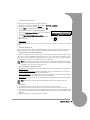
Sleep mode
Click on the Sleep button to save your session and put the computer in a low-power state so that you may
quickly resume working (see the Power Options section on page 13 for details).
➊
➋
Note: You may also put your computer into sleep mode without going to the Windows Start menu.
Simply close all your applications and press the power button.
Turning your Computer OFF
Make sure all applications are closed before you turn off your computer. Turning off your computer will
ensure that a data is saved and it will use as little power as possible (there may be a small power drain to
charge batteries), however your computer will take longer to start.
➊
➋
➌
Once the computer has shut down, switch OFF all external devices (such as a monitor) if they have a power
button.
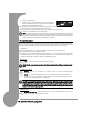
Forced Shutdown
If your computer doesn’t respond, then try using the Task Manager.
This utility provides information about your system’s performance
and displays details about programs and processes running on your
computer.
To do so, press the [Ctrl]+[Alt]+[Del] keys simultaneously and select
Start Task Manager in the pop up menu.
Click on the Applications tab, select the task that you want to end
and click on End Task.
Warning: If your computer still does not respond, press the
computer power button to turn your computer off. Keep this
button pressed until all of the LEDs turn off and wait for roughly
30 seconds before turning the computer on again.
12 - Quick Start & Troubleshooting Guide
Power Options
The power options of Windows can control your computer’s power state and allow you to
save energy. Depending on your needs, you can define the power scheme that suits you
best. Four power saving modes are provided: Turn off device, Standby, Hibernate and Sleep.
The Sleep state combines the speed of Standby with the data protection features and low
power consumption of Hibernate. Resuming use when your computer is in the Sleep state
takes just a few seconds. You can shut down and restart your computer less often. The Sleep
state not only reduces power consumption, but also helps protect your data.
To learn more about personalising your computer,
click on Start
> Help and Support.
Upgrading your Computer
Packard Bell strives to make your computing experience as easy and pleasant as possible. Because your
computing needs may evolve, Packard Bell is here to help you choose the right accessories and make the
most of your computer.
Memory
Memory (RAM) is a key component of your computer. If you run memory-intensive applications such as
image or digital-video editing or 3D games, adding some memory will increase the computer performance
and help your computer run faster.
To help you find out the memory module that is best suited to your Packard Bell computer, you can use our
online configurator on www.packardbell.com! The step-by-step configurator is your best pick to find the right
module quickly and easily with no risk of error, at a competitive price.
Storage (e.g. External Hard Disk Drive)
Whether you need additional storage space, need to create backups or need removable storage to carry your
data, an external hard disk drive will be a convenient solution to expand your computer. Simply plug it into a
USB port and "drag and drop" to transfer your valuable data in a few seconds. To make temporary backups,
this is a lot quicker than burning a CD or DVD! High capacity drives are also ideal for storing your favourite
music, photos and videos and take them with you everywhere you go!
Visit www.packardbell.com to discover our accessories and buy online or locate a store near you!
Convergence
Packard Bell aims at making the most of today's increasingly digital world with products that are ideally
suited to popular and emerging digital activities. Our products integrate the best technologies and allow you
to benefit from the latest advances, such as broadband Internet, WiFi networking and digital media. Our
home entertainment range includes a collection of MP3 players to bring technology and entertainment with
you wherever you go!
Visit www.packardbell.com today and enter the
Lounge, where technology is always stress-free
and personally enriching!
Computer Basics - 13
Warranty
Packard Bell computers come with a limited warranty. For further peace of mind, optional PB Care packs let
you extend the standard warranty up to three years (one year + two additional years) and upgrade to on-site
service for your computer. For information, please visit www.packardbell.com.
If your warranty has expired, or if PB Care packs are not available in your area, don't worry, Packard Bell has
the answer. Packard Bell has appointed Authorised Service Centers to provide you with high quality service!
You will benefit from the service of experienced technicians, trained on your Packard Bell product.
Recycling
You just bought a new computer or a new monitor and wonder what you can do with your old equipment?
Don't just throw it out! Packard Bell encourages you to recycle!
Most computer equipment contains hazardous materials, which are best kept out of landfills. Through
recycling, many materials used in computers can be recovered and used again. Many charitable organizations
collect computer equipment, other companies can repair and sell used computers.
Please refer to Regulatory Information on page 61 to learn more about product disposal.
14 - Quick Start & Troubleshooting Guide
COMPUT
FIRST STEPS ON THE NET
Get Connected!
Using the Internet has become natural part of daily computing. To make it easier, Packard Bell has included
tools to help you get started!
Internet Service Provider
To get connected, you need to register with an Internet Service Provider (ISP), which supplies the physical
connection between your computer and the Internet. Certain computers come with a selection of ISPs
already preinstalled.
If you wish to use an ISP that is not proposed, please refer to the instructions supplied with the installation
pack from the ISP.
Connection Types
Depending on your computer model, your location and your communication needs, you have several ways
to connect to the Internet.
Dial-Up
Most computers include a standard dial-up (‘modem’) connector. This allows you to connect to the Internet
using the telephone line. With a dial-up connection, you cannot use the modem and the telephone simultaneously on a single phone line. This type of connection is recommended only if you have limited use of the
Internet as the connection speed is low and connection time is typically charged per hour.
DSL (e.g. ADSL)
DSL (Digital Subscriber Line) is an ‘always-on’ connection that runs over the phone line. As DSL and phone
do not use the same frequencies, you can use your telephone at the same time you are connected to the
Internet (this requires a ‘micro-filter’ on each telephone socket to avoid interference). To be eligible for DSL,
you must be located near an DSL-equipped phone exchange (service is sometimes unavailable in rural areas).
Connection speeds vary depending on your location, but DSL generally provides very fast and reliable
Internet connection. As the connection is always-on, it is generally charged at fixed monthly rates.
Note: A DSL connection requires an appropriate modem. A modem is usually provided by the ISP when
you register. Many of these modems include an ‘router’ that provides network and Wi-fi access.
Cable
A cable connection provides fast and ‘always-on’ Internet service via a cable television line. This service is
generally available in large cities. You can use your telephone and watch cable TV at the same time you are
connected to the Internet.
Computer Basics - 15
Network connections
A LAN (Local Area Network) is a group of computers (for example, within an office building or home) that
share a common communications line and resources. When you set up a network, you can share files,
peripheral devices (such as a printer) and an Internet connection. You can set up a LAN using wired technologies (such as Ethernet) or wireless technologies (such as WiFi or Bluetooth).
Wireless networks
A wireless LAN or WLAN is a wireless local area network, which may link two or more computers without
using wires. Setting up a wireless network is easy and allows you to share files, peripheral devices and an
Internet connection.
Note: More detailed information is available in the InfoCentre wireless networks tutorial.
What are Benefits of a Wireless Network?
Mobility
Wireless LAN systems allow allows you and other user’s of your home network to share access to files and
devices connected to the network, for example a printer or scanner.
Also you can share an internet connection with other computers in your home.
Installation Speed and Simplicity
Installing a wireless LAN system can be fast and easy and eliminates the need to pull cables through walls
and ceilings.
Components of a Wireless LAN
To set up your Wireless network at home you need to have the following:
Access point (router)
Access points (routers) are two-way transceivers that broadcast data into the surrounding environment.
Access points act as a mediator between wired and wireless network. Most routers have a built-in DSL
modem that will allow you access to a high speed DSL internet connection. The ISP (Internet Service
Provider) you have chosen normally supplies a modem/router with the subscription to their services. Read
carefully the documentation supplied with your Access point/router for detailed setup instructions.
Network Cable (RJ45)
A network cable (also called RJ45 cable) is used to connect the host computer to the access point (see illustration below); this type of cable may also be used to connect peripheral devices to the access point.
Wireless Adapter
This is connected to the computer that you wish to
connect to your network, there are different types of
wireless adapter available, the most common are:
USB WiFi adapter: Connects to a free USB port on your
computer.
Wireless Expansion Card: This card is installed inside your
computer in an available expansion slot.
16 - Quick Start & Troubleshooting Guide
Diagram of a working network
1.
2.
3.
4.
5.
6.
7.
Access point/router
Desktop computer
Modem
Printer
Portable computer
PDA/Smartphone
Network cables (RJ45)
➍
➎
➐
➊
➌
➐
➐
➋
➏
Ad-Hoc internet sharing
The Internet Connection Sharing (ICS) feature of Microsoft Windows Vista allows
you to share a single Internet connection with multiple computers. Built-in support
for IEEE 802.11 wireless LANs (WLANs) allows you to create an ad-hoc wireless
network. These two features can be used together to share a wired Internet
connection with the members of an ad-hoc wireless network. This is the method of
connection if you do not possess an Access Point (router).
Turning On/Off a WiFi Network Connection
If your computer does not feature a ‘WiFi’ button, you may turn your wireless
network on or off, or control what is shared over the network with the network
management options. Click on ‘Start’
> Network > Network and Sharing
Center.
Surf the Net!
To surf the Internet, you need a program called an Internet browser. Internet Explorer provides an easy and
secure web browsing experience. As soon as you have your Internet access installed and you are connected,
click on the Internet Explorer shortcut located on the Windows desktop and take your Internet experience to
a new level!
Computer Basics - 17
Internet Explorer features
The image below shows the Internet Explorer browser’s start page. A brief description of some key aspects of
the browser are listed below.
➎
➌
➑
➐
➏ ➒
➋
➍
➊
1. Link to the Help menu: click to access the Internet Explorer Help section. There you can find information
about Internet Explorer and take the Internet Explorer Tour. You may also press [F1] on your keyboard.
2. Reduce, maximize or close the window.
3. Address bar: Type in an Internet address (ex: www.packardbell.com) and press the Enter key on your keyboard, this will take you directly to the address you typed.
4. Instant Search Box: Search the web without having to open a search provider page. You can customize
your search by setting your favorite search provider as the default. Use the dropdown list to choose a provider.
5. Back and Forward buttons: go back one page or forward one page while you are browsing.
6. Tabs: View multiple sites in a single browser window by switching from one site to another through tabs
at the top of the browser frame.
7. Quick tabs: Select and navigate through open tabs by displaying thumbnails of them all in a single window.
8. Favourites Center: Manage your favourite websites, your browsing history and your RSS Feed subscriptions in just a few clicks.
9. RSS feeds: allow you to keep up with your favourite websites in an automated manner. An illuminated
icon on the toolbar indicates that the site offers a feed to which you can subscribe, in order to be notified
when content is updated. Your browser delivers the information to your Favourites Center. Now you can
read news headlines, sports scores, etc. as soon as they arrive.
Caution: Internet Explorer includes a Phishing Filter that warns you about and helps to protect you
from potential or known fraudulent websites (sites that look legitimate but actually are designed to capture your personal information). The address bar will turn yellow and a warning message will be displayed if you visit a suspected phishing site.
Google Desktop (optional)
Google Desktop™ is a free pre-installed application that allows you to easily
search and personalise your Packard Bell computer. Google Desktop
provides full-text search over your email, files, music, photos, chats, Web
pages you've viewed, and more. By making your computer searchable,
Google Desktop puts your information easily within your reach and frees
you from having to manually organise your files. Google Desktop also helps you gather new information from
the Internet with Sidebar and Google Gadgets, visually appealing mini-applications that can display anything
such as your new email, the local weather forecast to personalised news. With Google Desktop, you get
18 - Quick Start & Troubleshooting Guide
personalised information when you want it, right on your computer’s desktop. Simply click on the Google
Desktop search icon to start the program.
Picasa (optional)
Google's photo organiser, Picasa™, is also installed on your new Packard
Bell computer, which means you can easily find, edit and share all your
digital photos.
This is the software that should have come with your digital camera. Each
time you open Picasa, it automatically locates all your pictures (even the
ones you forgot you had) and sorts them into visual albums organised by date with folder names you know.
You can drag and drop to arrange your albums and make labels to create new groups. Picasa also makes
advanced editing simple by putting one-click fixes and powerful effects at your fingertips. You can find Picasa
in the list of installed programs: click on ‘Start’
> All Programs > Packard Bell - Photo/Video > Picasa.
Note: To learn more about Google™ products and features, visit www.google.com.
Packard Bell Website
To get you started why not visit our website, www.packardbell.com.
(Click on Select your country on the top of the page)
Packard Bell is dedicated to provide you with on-going personalised support. Check out our Support section
to get help tailored to your needs:
✓ The Identification section can recognize your computer serial number and instantly give you all information specific to your computer!
✓ The Troubleshooter can help you find solutions in case you have a problem with your computer (may not
be available in all countries).
✓ Enter keywords in the Search box and find all the support articles related to your search!
✓ Enter the Downloads area to search for and download driver updates for your computer, as well as
patches and upgrades for programs and firmware.
✓ Share your experiences with other Packard Bell users and find help in the User Forum.
✓ You can also search for product information by range or category, read about your warranty and find con-
tact information.
To learn more about the latest technologies offered by Packard Bell, check out our Product Showroom. With
the Shopping section, you can also locate a store near you, or get the latest Packard Bell products delivered
straight to your home in a few clicks!
www.packardbell.com is your gateway to a world of online activities and services: visit us regularly for the
latest information and downloads!
Computer Basics - 19
USING WINDOWS AND YOUR SOFTWARE
Windows Welcome Center
The first time you turn on your computer, the Welcome Center window opens. The Welcome Center
introduces you to the new features and tools of Windows Vista. You can access the Welcome Center at any
time by clicking on ‘Start’
> Control Panel.
Setup my PC
To make it easy, Packard Bell has gathered all
important setup steps into one application called
Setup my PC. The Setup my PC application will automatically start when you first turn on your computer.
A wizard will guide you through the steps to install
your Internet access, antivirus software, telephone
and gaming programs, Recovery Backup Creator, and
print your PC Identity Card. Simply select the items
you wish to install and follow the prompts!
Note: The number of options may differ according to your computer model and region.
Caution: Even if you do not use Setup my PC,
you should use the Recovery Backup Creator as
early as possible.
Packard Bell Recovery Backup Creator
The recovery backup creator (Recovery DVD Creator or Recovery Disk Creator) allows you to make a safe
copy of the recovery data stored on your hard disk drive.
20 - Quick Start & Troubleshooting Guide
Note: Certain computers are provided with Recovery DVDs instead of the recovery data on the computer's hard disk drive. In this case, the Recovery DVD Creator program is not required. See page 52 for
information on using the Recovery DVDs.
If your computer was not originally equipped with a DVD writer, and Smart Restore proposes the Create
my Recovery disk option (instead of the Recovery DVD Creator) then you may copy the recovery data
to an external USB hard disk drive.
Please read carefully before using the recovery backup creator:
✓ The recovery data contains all the programs that were originally supplied with your computer, including
your operating system.
No separate copies of the Windows discs and Microsoft utilities are provided.
✓ The Recovery DVDs that you create will only contain the software that was originally on the hard disk of
your computer when it left the factory. Your personal files and other software that you have installed will
not be copied.
✓ This operation takes time. During the whole process, do not shut down the computer or run any other
programs.
✓ Should a power failure occur while you are creating your recovery disk, please restart the recovery
backup creator at the earliest opportunity.
If you are creating Recovery DVDs, you will need:
✓ At least one blank recordable DVD; do not use rewritable DVDs.
✓ A CD marker pen to label your discs. Do not use stickers on the disc faces.
If you are creating a Recovery Disk, you will need:
✓ An external USB hard disk drive capable of holding at least 8GB (exact size needed depends on your computer’s configuration).
✓ Certain external disks are not compatible with the recovery process. Once created, always test the disk to
check compatibility with the recovery process (see page 22).
Creating your Recovery Disk
To create a recovery disk, open Smart Restore, select ‘Start’
> All Programs > Packard Bell - Security &
Support > Smart Restore. Select Create my Recovery DVD (or in some cases Create my recovery disk) then
click on the Create my Recovery DVD button to start the process. Throughout the process, you will be
guided by on-screen instructions. Please read them carefully!
➊
➋
Computer Basics - 21
Creating Recovery DVDs
1. The program will create one disc at a time. A counter in the lower left part of the windows indicates the
number of discs to create as well as the number of discs created so far. When it is finished, the program
will check each disc for errors.
2. Label your Recovery DVD (Recovery DVD 1, 2, etc.). Use a CD marker pen to write on the disc's label
side. Do not use stickers on the disc faces.
3. Store your Recovery DVDs in a safe place. They contain the recovery data of your computer.
Please refer to the Packard Bell Recovery Program section (page 52) if you need to use your recovery data.
Creating a Recovery Disk
1. Select Copy backup data to USB disk.
2. Click on a disk or partition that will be used to store the recovery data and click on Ok (a disk may be
divided into one or more partitions).
3. The program will check that there is enough space available on the selected disk. If there is not enough
space, either remove some files from the disk or use a disk with a higher capacity.
4. Remove the disk from your computer (using the remove hardware icon in the notification area) and label
it Recovery Backup.
5. Store the disk in a safe place. It contains the recovery data of your computer.
Please refer to the Packard Bell Recovery Program section (page 52) if you need to use your recovery data.
Test the Recovery Disk
As there are a wide variety of external disks, you should always test the Recovery Disk to ensure it is
compatible with the recovery process. Start the Recovery Program, as described on page 53.
• If the Packard Bell Recovery Menu is displayed then the disk is compatible and you may store it for future
use. Select Exit, disconnect the disk and restart your computer.
• If you do not see the Packard Bell Recovery Menu, ensure the disk uses a primary partition (not
extended), or use a different disk and start the recovery backup creator again.
22 - Quick Start & Troubleshooting Guide
Packard Bell Updator
To ensure that your computer has the latest available updates for drivers and software, please use the
Packard Bell Updator program as soon as you have configured an Internet connection.
1. Click on Start
> All Programs > Packard Bell - Security & Support > PBUpdator or double-click the
PBUpdator icon on the desktop and follow the instructions that are displayed.
2. Packard Bell Updator will search the Packard Bell support website for updates based on your system's
serial number and display a list of available updates.
3. Select the updates you wish to download and then install them.
Note: We recommend that you use this tool on a regular basis.
Your Computer's Documentation
User’s Guide (Packard Bell InfoCentre)
This guide is not the only reference for information about your computer! InfoCentre, your electronic user’s
guide contains information for your computer, giving you the help you need directly on your screen. You
need to update this electronic user’s guide in order to have specific information for the computer you have
purchased.
To open InfoCentre, double-click on the User’s Guide (Packard Bell InfoCentre) icon on the desktop or click
on ‘Start’
> All Programs > Packard Bell - Security & Support > Packard Bell InfoCentre.
Computer Basics - 23
Select a category
To update the contents of the User’s Guide (you will need an internet connection) simply click on the Check
for updates button on the InfoCentre welcome page (see image above).
The updates will be downloaded from Packard Bell and automatically installed on your computer. Your
updated version of InfoCentre will contain detailed specific information on your computer’s configuration.
The My Computer button contains all the technical information about your computer's components and
useful tips on how to upgrade your computer.
Other buttons give you access to additional information, such as tutorials on performing day-to-day tasks and
tips and information on using the Internet.
Note: The number of categories and titles available may differ according to the computer you purchased.
Remember to update your InfoCentre to have the latest
information available! You should also make regular visits
to www.packardbell.com and check out the Support
section: it contains up-to-date information, help, drivers
and downloads.
Software Documentation
Most of the applications preinstalled on your computer by Packard Bell feature a documentation file.
Note: If you need help while using a program, press [F1] on your keyboard, or click on Help or the Help
icon (typically a ? sign).
Your Software
Where is my Software?
Packard Bell computers include a range of software applications. The types of programs and categories
available on your computer depend on the model you purchased.
24 - Quick Start & Troubleshooting Guide
Your software can be found:
✓ Preinstalled: your software is ready to use or to set up. However, some titles require a CD or DVD to run
(typically, games or encyclopædia). You will find these discs in your computer's packaging.
✓ On a CD or DVD: the software first needs to be installed. To do so, insert the installation CD or DVD. An
installation wizard will start automatically and all you have to do is follow the instructions on the screen.
Playing Multimedia Files
You may use the media software on your computer
to play music, films or photo slide-shows and watch
television (if your computer has a TV tuner). Other
options allow you to create CDs or DVDs.
One or more media programs are installed on your
computer, Windows Media Player and optionally
Windows Media Center are provided by Microsoft.
Other media programs may have been installed by
Packard Bell to provide an improved media experience.
Windows Media Player
Windows Media Player may be used to play MP3 or WMA audio files, CDs or most video files.
Note: It is not recommended that you use Windows Media Player to play DVD movies. Other media
players (such as PowerCinema) provide additional playback options.
Windows Media Center or PowerCinema
Certain computers also include all-in-one media
‘centers’ such as Windows Media Center or
PowerCinema. These programs can handle a variety
of multimedia content, presented with simple menus
that may be easily controlled with a remote control.
You may watch live or recorded TV (if your
computer has a TV tuner), listen to digital music,
view pictures and personal videos, create CDs and
DVDs, or access content from online services.
To start the media program installed on your
computer, either click on ‘Start’
> Windows
Media Center or ‘Start’
> All Programs > Photo/
Video > PowerCinema.
Setup
Caution: If your computer includes a remote control (page 7) or TV tuner (page 11) they must be connected and active before starting the media program for the first time.
The first time you start the media program, it will start a setup wizard, which will configure some basic
settings. If available, select the Express setup option, you may then configure additional options as needed.
Note: If you have an Internet connection, the Guide (Electronic Program Guide) allows you to view a
list of current TV shows. This shows channel and network information, as well as the title, description
and scheduled broadcast time of shows.
Computer Basics - 25
Check out the Help and Support section.
Click on ‘Start’
> Help and Support >
What's new? > Windows Media Center.
TotalMedia Theatre (for Blu-ray)
If your computer is equipped with a Blu-ray drive, you may watch Blu-ray movies with TotalMedia Theatre.
You may start TotalMedia Theatre by inserting a Blu-ray disc and waiting for the program to start automatically, with TotalMedia Extreme (select the Play option) or with Windows Media Centre (select the Play BD
or Blu-ray option).
AutoPlay
The Windows AutoPlay function allows you to choose the way
Windows handles media files on devices with removable storage
(digital camera, CD, DVD, etc).
If you have inserted a disk that contains files (such as a DVD, USB
key or memory card), Windows will display a dialogue box and ask
you to choose how you want to open the files.
For example, if you have inserted an audio CD or a DVD movie,
Windows will automatically display a dialogue box and ask you to
choose how you want to play it. If Windows asks you to select a DVD
player, we recommend that you always choose the DVD player
included with your software collection (e.g. PowerCinema or
Windows Media Center).
Playing downloaded files
Downloaded files may work with the media programs installed on your computer, or may require specific
programs. Files that include DRM functions may only play in specific programs (e.g. iTunes, Windows Media
Player) or only on devices certified for use with the each type of file. Other formats may require a specific
audio or video codec that may not have been installed on your computer.
Codecs
A codec is software that is used to compress or decompress a digital media file, such as a song or video.
Windows Media Player and other programs use codecs to play and create digital media files.
For example, when you rip a song from an audio CD to your computer, the player uses the Windows Media
Audio codec to compress the song into a compact WMA file. When you play that WMA file (or any WMA
file that might be streamed from a Web site), the media player uses the Windows Media Audio codec to
decompress the file so the music can be played through your speakers.
Why do I get a message that says my computer is missing a codec?
If you get a message that says that your computer is missing a codec, it may be because you are using a file
that was compressed using a codec that Windows or the media player does not include by default. In many
cases, you can download and install the missing codec by clicking on the Web Help button in the error
message.
Please also see Windows Help and Support for more information.
26 - Quick Start & Troubleshooting Guide
Volume Controls
Apart from the volume controls on your computer, keyboard, monitor or speakers (depending on your
equipment), you can also adjust the volume and balance of your speakers from Windows.
Adjusting the Volume
To adjust the volume, simply click on the Speaker icon located in the Notification Area,
next to the clock.
Drag the slider up or down to adjust the volume. Click on the Speaker icon to mute the
volume. Click again to resume playback.
Click on Mixer to access advanced volume control settings.
Note: If you cannot see the speaker icon:
• Click on ‘Start’
> Control Panel >
Taskbar and Start Menu.
• Select the Notification Area tab.
• Place a tick in the Volume box and click
OK.
Computer Basics - 27
HELPDESK
SAFE COMPUTING
To make the most of your new computer and ensure it runs smoothly for a long time, you should use the
programs below and regularly perform the actions described in this guide.
Maintenance
Packard Bell Recovery Backup Creator
The recovery backup creator (Recovery DVD Creator or Recovery Disk Creator, see page 20) allows you to
make a safe copy of the recovery data stored on your hard disk drive. Please see the Restoration and
Recovery section on page 52 for information on using the recovery backup.
Caution: You should use the recovery backup creator as early as possible. The recovery backup is a your
computer’s most important maintenance tool.
Recommended maintenance tasks
There are several tasks you should perform periodically (about once per month) to ensure your computer
stays in good health:
Error Checking
Using the Check Disk tool regularly prevents your system from getting unreliable and information getting
lost. It checks and repairs two types of errors:
✓ file system errors, such as fragmented files that were not deleted and files with invalid sizes or dates;
✓ physical errors, which occur in your hard disks so-called cluster and/or sector areas that may wear out
over time.
1. Click on ‘Start’
> Computer. Right-click on the HDD icon and select Properties.
2. Click on Tools and Check Now in the Error-checking field.
3. Tick Automatically fix file system errors in the options area. If you tick Scan for and attempt recovery of
bad sectors, your computer will carry out the physical error checking for a few minutes and will need to
restart. Click on Start to proceed.
Disk Cleanup
The Disk Cleanup Wizard helps free up space on your hard drive. It
searches your drive and displays unused files, such as temporary
Internet files, files in the Recycle Bin and other temporary files that
you can safely delete.
1. Click on ‘Start’
> Computer. Right-click on the HDD icon
and select Properties.
2. Select the General tab and click on Disk Cleanup.
3. Tick each category in the Files to delete area you wish to delete
and click on OK.
28 - Quick Start & Troubleshooting Guide
Disk Defragmenter
With the creation and deletion of files over time, scattering occurs all over the hard disk area and affect
performance. The Disk Defragmenter helps you rearrange the items stored on your hard drive to make your
computer run faster and more efficiently.
Running the Disk Defragmenter once a month (depending on computer usage) will decrease wear and tear
on your hard drive and thus decrease the chance of a fault developing at a later date.
1.
2.
3.
4.
Perform a Disk Cleanup and close all open programs.
Click on ‘Start’
> Computer. Right-click on the HDD icon and select Properties.
Click on Tools and Defragment Now.
Click on the volume you want to defragment and click on Defragment to start. The whole process may
take several hours to complete. It is best not to use your computer while running the Disk Defragmenter
as any changes on your system may cause the process to restart. If you divided your hard disk in several
partitions you should perform the same action for each partition.
Manage your Hard Disk Drive (HDD)
Check the remaining free space on your hard disk drive
1. Click on ‘Start’
> Computer.
2. Right-click on the HDD icon and select Properties.
3. The Hard Disk Properties window displays the amount of used space
and free space on your hard disk. If your hard disk is almost full (less
than 100 MB remaining), you should consider freeing some space.
To see easily how much space is used and how much is left, simply place
your pointer over the hard disk drive icon. The information will automatically appear.
Helpdesk - 29
Free some Space on your Hard Disk Drive
1. Empty the Recycle Bin: When you delete a file from your computer, Windows
places it in the Recycle Bin. All the deleted files remain there until you decide
to permanently delete them from your computer or to restore them to their
original location. Double-click on the Recycle Bin on the Windows desktop and
click on Empty Recycle Bin or select only the items you want to delete. Items
deleted from external devices, such as memory cards, do not go to the Recycle
Bin, they are permanently deleted.
2. Uninstall the programs you no longer use:
• To remove software titles that were originally provided with your computer,
click on ‘Start’
> All Programs > Packard Bell - Security & Support > Smart Restore.
• To remove additional software titles, click on ‘Start’
> Control Panel > Programs and Features.
3. Archive files on an external hard disk drive, recordable CDs or DVDs (if your computer is equipped with a
CD or DVD writer) and delete them from the hard disk.
Run Windows Vista System Tools
Windows Vista includes some convenient tools to keep your computer in good shape. Use these tools on a
regular basis to maintain a reliable and speedy system! To make it easier, System Tools includes a Scheduled
Tasks utility, which you can customise to run specific tasks regularly.
The image below illustrates one way of accessing the System Tools:
‘Start’
> All Programs > Accessories > System Tools.
Windows System Restore.
System Restore monitors the changes to your computer and automatically creates restore points to revert to a
previous time if necessary. It can undo harmful changes to your computer and restore its settings and
performance, while saving your personal data files (such as documents, browsing history, drawings,
favourites, or e-mails).
Note: When you restore your computer you will need to reinstall any programs you installed after the
restore point was created. These programs will not work until you do this. Windows System Restore
does not uninstall programs. To do this, you should use Programs and Features in the Control Panel.
Starting Windows System Restore from the Windows desktop
Click on ‘Start’
> All Programs > Accessories > System Tools > System Restore.
30 - Quick Start & Troubleshooting Guide
If you cannot access the Windows desktop:
1. Press the F11 key upon start-up when the Packard Bell logo appears. This will open the Recovery Program.
2. Select Windows Vista System Restore and click on Next. Your computer will automatically restart and
open System Restore.
System Restore options
Restore your computer to an earlier time
This option will return to your computer to how it was on an earlier date, without affecting your personal
documents or e-mails (it will not restore lost documents either). By default Windows Vista saves snapshots of
itself when major changes are made to the Operating System (e.g. driver installations or specific software).
This is useful when a driver installation failed, or when you changed a system setting, and it did not work.
1. Click on Restore my computer to an earlier time, and then click on Next.
2. Select from the calendar the date when the restore point was created and click on Next. All the restore
points that were created on the selected date are listed by name in the list box to the right of the calendar.
3. In the confirmation screen, click on Next to restore the computer to the selected date and time.
Create a Restore Point
Windows creates restore points automatically at regularly scheduled times or before certain programs or
drivers are installed. This option allows you to create your own restore points when you need to.
1. Click on Create a restore point, and then click on Next.
2. Enter a description to identify this restore point. System Restore automatically adds the date and time to
this name.
3. To finish, click on Create.
Undo the last restoration
If the system fails after restoring the computer to a certain date, you can use this option to undo the restoration.
Alternately, you can use Last Known Good Configuration to restore the system to your most recent settings
that worked.
1. Restart the computer, press [F5] on your keyboard for a few seconds. If necessary, press [F8] to access the
advanced startup options.
2. Use the arrow keys to highlight Last Known Good Configuration and press [Enter].
Helpdesk - 31
Updates
As new viruses, worms, and other threats are discovered everyday, keeping your security applications and
operating system up-to-date is crucial. Norton Internet Security, combined with other security applications
can protect your computer from Internet attacks and ensure that the latest security updates have been downloaded and installed on your system. To keep your computer safe with all the latest programs, please perform
the following actions:
✓ Update your antivirus
✓ Update your anti-spyware and anti-malware tools.
✓ Perform updates when prompted by Windows Security Center
✓ Use Microsoft Windows Automatic Updates
✓ Run Windows Defender
✓ Run Windows Update
Windows Update can help you keep your computer up-todate via Internet downloads. It allows you to choose updates
for your computer's operating system, software programs,
and hardware. New content is added to the Windows
Update Website regularly, so you can always get the most
recent updates and solutions to protect your computer and
keep it running smoothly.
• ‘Start’
> Control Panel > Windows Updates >
Change Settings.
Security
You are probably eager to explore everything the Internet has to offer. In order for you to be safe online,
Packard Bell has pre-installed Symantec’s award-winning Norton Internet Security on your computer.
The new Norton Internet Security™ runs quietly in the background to block today’s complex threats and
protect your identity when you shop, bank, or browse online.
Norton Internet Security blocks online identity theft, detects and eliminates spyware, removes viruses and
Internet worms, protects against hackers.
Definitions
What is a Virus?
Malicious software, typically called ‘viruses’, are programs designed to infect and damage computers. Most
viruses are transmitted over the Internet, e-mails or malicious Web sites. A typical virus will replicate and
pass itself undetected to multiple computers. Other forms of nuisance, such as Trojan horses, worms or spam
can infect your computer in various ways, using up resources or clogging up a network.
Note: Packard Bell guarantees that your computer was 100% virus free at the time of purchase and does
not cover damages due to viruses.
What is Spyware?
Spyware refers to generally unwanted programs that are downloaded onto your computer while connected
to the Internet, often without you knowing it. Once it has infected your computer, it can snoop on your
browsing activity, collect personal information, cause pop-up ads to appear, or even change the configuration
of your computer. Spyware consumes resources on your computer; it can slow down your Internet
connection or entire computer system, and even cause crashes.
32 - Quick Start & Troubleshooting Guide
Spyware is sometimes used by unscrupulous companies to monitor and track the sites you visit on the
Internet so as to determine your web-surfing habits and display targeted pop-up ads on your screen.
However, some kinds of spyware go beyond simple tracking and actually monitor keystrokes and capture
passwords and other functions which pose a definite security risk.
What is Malware?
Malicious software, also known as malware, is software designed to deliberately harm your computer. For
example, viruses, worms, and Trojan horses are malicious software. To help protect your computer against
malware, make sure it is using up-to-date antivirus and anti-malware software.
What is a personal Firewall?
A personal firewall is a software program designed to prevent unauthorized access to or from a private
network. It acts as a shield to protect your Internet connection from unwanted connections, some of which
may attempt to take control of your computer to install or re-distribute viruses or malicious programs. Each
connection to your computer is monitored - programs that attempt to receive information without your
permission are detected and the firewall will display an alert. You can then decide if you will allow the
connection, if the connection is to a program you are currently using then normally you would allow it (i.e. a
game connecting to a multi-player server or an encyclopaedia making a content update).
How to protect your computer
Cybercrime prevention can be straight-forward - when armed with a little technical advice and common
sense, many attacks can be avoided. In general, online criminals are trying to make their money as quickly
and easily as possible. The more difficult you make their job, the more likely they are to leave you alone and
move on to an easier target. The tips below provide basic information on how you can prevent online fraud.
1. Keep your computer current with the latest patches and updates.
One of the best ways to keep attackers away from your computer is to apply patches and other software fixes
when they become available. By regularly updating your computer, you block attackers from being able to
take advantage of software flaws (vulnerabilities) that they could otherwise use to break into your system.
While keeping your computer up-to-date will not protect you from all attacks, it makes it much more difficult
for hackers to gain access to your system, blocks many basic and automated attacks completely, and might be
enough to discourage a less-determined attacker to look for a more vulnerable computer elsewhere.
More recent versions of Microsoft Windows and other popular software can be configured to download and
apply updates automatically so that you do not have to remember to check for the latest software. Taking
advantage of "auto-update" features in your software is a great start toward keeping yourself safe online.
2. Protect your computer with security software.
Several types of security software are necessary for basic online security. Security software essentials include
firewall and antivirus programs. A firewall is usually your computer's first line of defense-it controls who and
what can communicate with your computer online. You could think of a firewall as a sort of "policeman" that
watches all the data attempting to flow in and out of your computer on the Internet, allowing communications that it knows are safe and blocking "bad" traffic such as attacks from ever reaching your computer.
The next line of defense many times is your antivirus software, which monitors all online activities such as
email messages and Web browsing and protects an individual from viruses, worms, Trojan horse and other
types of malicious programs. Your antivirus and antispyware software should be configured to update itself,
and it should do so every time you connect to the Internet.
Integrated security suites such as Norton Internet Security combine firewall, antivirus, antispyware with
other features such as antispam and parental controls have become popular as they offer all the security
software needed for online protection in a single package. Many people find using a security suite an
attractive alternative to installing and configuring several different types of security software as well as
keeping them all up-to-date.
A complete version of Norton Internet Security™ is pre-installed on your Packard Bell system. It includes a
90-day free subscription to protection updates. Make sure you Turn it On!
Helpdesk - 33
Note: You may activate your antivirus program through the Setup my PC application.
3. Choose strong passwords and keep them safe.
Passwords are a fact of life on the Internet today; we use them for everything from ordering flowers and
online banking to logging into our favorite airline Web site to see how many miles we have accumulated.
The following tips can help make your online experiences secure:
✓ Selecting a password that cannot be easily guessed is the first step toward keeping passwords secure and
away from the wrong hands. Strong passwords have eight characters or more and use a combination of
letters, numbers and symbols (e.g., # $ % ! ?). Avoid using any of the following as your password: your
login name, anything based on your personal information such as your last name, and words that can be
found in the dictionary. Try to select especially strong, unique passwords for protecting activities like
online banking.
✓ Keep your passwords in a safe place and try not to use the same password for every service you use
online.
✓ Change passwords on a regular basis, at least every 90 days. This can limit the damage caused by someone who has already gained access to your account. If you notice something suspicious with one of your
online accounts, one of the first steps you can take is to change your password.
4. Protect your personal information.
Exercise caution when sharing personal information such as your name, home address, phone number, and
email address online. To take advantage of many online services, you will inevitably have to provide personal
information in order to handle billing and shipping of purchased goods. Since not divulging any personal
information is rarely possible, the following list contains some advice for how to share personal information
safely online:
✓ Keep an eye out for phony email messages. Things that indicate a message may be fraudulent are misspell-
✓
✓
✓
✓
ings, poor grammar, odd phrasings, Web site addresses with strange extensions, Web site addresses that
are entirely numbers where there are normally words, and anything else out of the ordinary. Additionally, phishing messages will often tell you that you have to act quickly to keep your account open, update
your security, or urge you to provide information immediately or else something bad will happen. Don't
take the bait.
Don't respond to email messages that ask for personal information. Legitimate companies will not use
email messages to ask for your personal information. When in doubt, contact the company by phone or by
typing in the company Web address into your Web browser. Don't click on the links in these messages as
they make take you to fraudulent, malicious Web sites.
Steer clear of fraudulent Web sites used to steal personal information. When visiting a Web site, type the
address (URL) directly into the Web browser rather than following a link within an email or instant message. Fraudsters often forge these links to make them look convincing. A shopping, banking or any other
Web site where sensitive information should have an "S" after the letters "http" (i.e. https://www.yourbank.com not http://www.yourbank.com). The "s" stands for secure and should appear when you are in
an area requesting you to login or provide other sensitive data. Another sign that you have a secure connection is the small lock icon in the bottom of your web browser (usually the right-hand corner).
Pay attention to privacy policies on Web sites and in software. It is important to understand how an
organization might collect and use your personal information before you share it with them.
Guard your email address. Spammers and phishers sometimes send millions of messages to email
addresses that may or may not exist in hopes of finding a potential victim. Responding to these messages
or even downloading images ensures you will be added to their lists for more of the same messages in the
future. Also be careful when posting your email address online in newsgroups, blogs or online communities.
5. Online offers that look too good to be true usually are.
The old saying "there's no such thing as a free lunch" still rings true today. Supposedly "free" software such as
screen savers or smileys, secret investment tricks sure to make you untold fortunes, and contests that you've
surprisingly won without entering are the enticing hooks used by companies to grab your attention.
34 - Quick Start & Troubleshooting Guide
While you may not directly pay for the software or service with money, the free software or service you
asked for may have been bundled with advertising software ("adware") that tracks your behavior and displays
unwanted advertisements. You may have to divulge personal information or purchase something else in
order to claim your supposed content winnings. If an offer looks so good it's hard to believe, ask for someone
else's opinion, read the fine print, or even better, simply ignore it.
6. Review bank and credit card statements regularly.
The impact of identity theft and online crimes can be greatly reduced if you can catch it shortly after your
data is stolen or when the first use of your information is attempted. One of the easiest ways to get the tip-off
that something has gone wrong is by reviewing the monthly statements provided by your bank and credit
card companies for anything out of the ordinary.
Additionally, many banks and services use fraud prevention systems that call out unusual purchasing
behavior (i.e. if you live in Texas and all of the sudden start buying refrigerators in Budapest). In order to
confirm these out of the ordinary purchases, they might call you and ask you to confirm them. Don't take
these calls lightly; this is your hint that something bad may have happened and you should take necessary
action.
Protect your computer with Windows security tools.
Windows Vista provides a variety of protection applications.
Windows Firewall
Windows Vista has a built-in firewall that you can use straight away:
1. Click on ‘Start’
> Control Panel > Security > Windows Firewall.
2. In the Change Settings window, you may allow or block certain programs from accessing the internet. To do so open the “Exceptions”
tab.
3. You may also turn off Windows Firewall here if necessary, for example while installing some programs you may be required to turn off all
firewalls and antivirus protection.
Caution: Always remember to turn the firewall/antivirus programs
back on after you finish installing the new software!
Note: When you first start to use a Firewall it is in a ‘Learning mode’, you may see pop-up windows
alerting you that certain programs you know and trust wish to access the internet. After a period of time
the Firewall will know your list of trusted programs and wont ask your permission the next time the
program tries to connect to the internet. The Firewall also protects your computer from programs from
the internet trying to access your computer, this sometimes is necessary to allow access for program
updates, downloads, etc.
Windows Security Center
Windows provides a central area from where you can control the security settings of your computer, helping
you to protect it from Internet attacks and ensuring that the latest security updates have been downloaded
and installed on your computer.
> Control Panel > Security Center.
To open the Security Center, click on ‘Start’
Alternatively, if a security alert has been reported (in the Notification Area, next to the clock) then you can
click on the notification balloon or double-click on the small Security Alert icon. If the icon is hidden, click
on the arrow to show all the Notification Area icons.
Helpdesk - 35
The Security Center indicates the status and settings used for three of the most important applications that
protect your computer: Windows Firewall, Windows Defender, Windows Automatic Updates and the virus
protection applications. Windows Firewall, Windows Defender and Windows Automatic Updates are
provided by Microsoft as part of Windows. The antivirus application varies according to the program installed
on your computer.
Windows Updates
If you have an active Internet connection, Windows can check for important updates for your computer and
install them automatically. These updates include security patches and program updates that can improve
your computing experience and help protect your computer against new viruses and attacks.
Windows Defender
Windows
Defender helps protect your
computer against malicious and unwanted
software, such as spyware and adware.
Windows Defender is installed and turned on
by default.
1. Open Windows Defender from the Control
Panel. Click on Tools, and then click on
Options.
2. Under Automatic scanning, select the Automatically scan my computer box.
3. Under Real-time protection options, select
the Use real-time protection box. To help
protect your privacy and your computer,
we recommend that you select all real-time
protection options.
Real-time protection alerts you when spyware
and other potentially unwanted software
attempts to install itself or run on your
computer. You are also alerted if programs attempt to change important Windows settings.
36 - Quick Start & Troubleshooting Guide
Note: Windows Defender works with your Windows Update settings to automatically install the latest
definitions.
User Account Control
User Account Control is a feature in
Windows that can help prevent unauthorized changes to your computer. User
Account Control will ask you for permission
or an administrator password before
performing actions that could potentially
affect your computer's operation or that
change settings that affect other users. When
you see a User Account Control message,
read it carefully, and then make sure the
name of the action or program that's about to
start is one that you intended to start.
By verifying these actions before they start,
User Account Control can help prevent
malicious software (malware) and spyware from installing or making changes to your computer without
permission.
To access User Account Control settings, click on ‘Start’
> Control Panel > User Accounts.
Note: You may turn off the User Account Control Messages (not recommended) in the User Account
settings window (see image above).
Internet Explorer Security Settings
Internet sites use small files called cookies to keep track of user preferences and information. You can adjust
your Internet browser's security settings to determine how much -or how little- information you are willing
to accept from a Web site.
To access Internet Explorer security settings:
1. In Internet Explorer, click on Tools > Internet Options.
2. In the Privacy tab, move the slider up or down to select a setting.
How do i know when my computer is at risk?
If the Security Center reports an alert, or if your computer behaves erratically, crashes unexpectedly or if
some of your programs do not work correctly, your computer may be infected by malicious software.
However, do not blame any computer problem on a virus! If you suspect your computer is infected, the first
thing to do is update -if you have not already done so, and run your antivirus and anti-spyware software.
Windows Remote Assistance
Remote Assistance allows a Windows Vista user to temporarily take over a remote Windows Vista computer over a
network or the internet to resolve issues. Remote Assistance
makes it possible to diagnose and repair problems with a
computer without personally visiting it.
You can access Remote Assistance by clicking on Start
>
All Programs > Maintenance > Windows Remote
Assistance. Upon launching Remote Assistance, you will see
a screen giving you the choice of either inviting someone to
help you or offering to help someone.
Helpdesk - 37
HELPDESK
DIAGNOSE & REPAIR
We all experience problems with our computer from time to time... Before calling us, please read the
following. This troubleshooting guide will help you diagnose and solve some common problems. Please note
that the solutions proposed in either one of the cases below may not be limited to that specific case and may
be used to solve other computer issues.
Check the latest fixes on www.packardbell.com. Our online
Troubleshooter can help you find solutions in a few clicks!
Top Troubleshooting Cases
Have a look at the ‘symptoms’ described below, see if they match the problem you encounter with your
computer and follow the steps to fix the issue. Also remember to read our recommendations in the Safe
Computing section (page 28) to get the most of your computer and prevent problems in the future.
Nothing Displays on the Screen (page 39)
The Screen Freezes when the Packard Bell Logo Displays (page 40)
The Screen Freezes when the Windows Logo Displays (page 41)
The Windows Desktop Displays, but the Operating System is not stable (page 42)
The Screen Displays Applications, but They Crash or Run Erratically (page 43)
38 - Quick Start & Troubleshooting Guide
1. NOTHING DISPLAYS ON THE SCREEN
✓ Make sure that you have switched on both your computer and your monitor.
✓ Your computer is in suspend or power saving mode.
1. If the computer is in power saving mode, move the mouse or press a key on the keyboard to "wake up"
the computer.
2. If the computer is in Sleep mode, press the power button. After a short pause the light should light up
and you will be able to use your computer.
✓ A screen saver may be active.
1. Strike any key to reactivate the display.
2. If you wish to change the screen saver properties:
a. Close all open programs, with the exception of Windows.
b. Right-click on an empty spot on the Windows desktop.
c. Select Properties from the menu.
d. Adjust the screen saver properties and the energy saving features to your needs.
✓ Check your Installation poster.
1. Check the power cord connections between your computer and the power outlets.
2. Certain computers are equipped with two video ports, one on the motherboard (“integrated video”)
and another on a high-performance graphics card using an expansion slot.
Note: Please refer to your Installation poster and check if all your cables are connected correctly.
Always connect your monitor to the graphics card, if present. If one video port does not work, then try
the other. The number of items available will depend on your computer’s configuration.
✓ Test the power cords:
1. Unplug the power cord from your monitor.
2. Unplug the power cord of the computer and plug it into the monitor (and the other end to a working
wall socket).
3. Power on only the monitor and watch if the power LED of the monitor is lit.
✓ Test the power socket:
1. Plug any other electrical device on the wall socket and check if it works.
2. If it does not, your wall socket is probably faulty.
✓ Try to reset your computer:
1. Unplug the power cable from the wall socket and keep the power button pressed for at least ten seconds.
2. Then release it, connect the power cable again and press the power button to turn on your computer.
Helpdesk - 39
Caution: Before you connect or disconnect the power cord to the back of the computer, please ensure
that the power plug is disconnected from the wall outlet.
✓ Disconnect or remove additional devices:
A faulty device can prevent the system from booting in some situations.
Removing additional external devices
...such as a printer, a scanner, a modem, etc.
1. Disconnect all external devices from your computer, except the monitor cable and the keyboard.
2. Try to restart your computer and check if it works correctly.
3. If it does not, restart your computer without the keyboard and mouse. If it solves your problem, please
contact the Customer Contact Center.
Check InfoCentre to learn more about your
computer. Don’t forget to download your
InfoCentre updates!
Removing additional internal hardware
...such as additional memory, a network card, etc.
1. Remove any additional internal device you have installed. Note that if a third party installed a device, we
advise you to refer to them to remove the device.
2. Try to restart your computer and check if it works fine.
Depending on your warranty conditions, you might not be allowed to open the chassis by yourself. Please
refer to your Warranty & Service Sheet (if supplied) before proceeding.
If you are sure you want to proceed, please first touch the ground to prevent electrostatic damages and
unplug the power cord before opening the chassis.
✓ Check USB ports.
When the USB connector on the front of the chassis is damaged (for instance when inserting a USB plug
upside-down), it can short circuit the system, thus preventing the computer from booting.
1. To determine whether the USB connector is the root cause of the problem, disconnect the USB cable
from the motherboard. Only do so if your warranty entitles you to and if you are an advanced user.
2. Try to restart your computer and check if it works fine.
3. If it does, replacing the USB assembly of that particular motherboard will solve the problem entirely.
2. THE SCREEN FREEZES WHEN THE PACKARD BELL LOGO DISPLAYS
When the computer starts, it first performs a test of all system requirements. When the computer is functioning correctly, it emits a short beep and starts up. However, if the test fails, the computer may freeze
when the Packard Bell logo displays.
40 - Quick Start & Troubleshooting Guide
✓ Try to boot but press the [TAB] or [ESC] key to display some details.
✓ Set the BIOS to default settings.
Press [F1] or [F2] when starting your computer to enter the BIOS. This controls the hardware of your
computer. You should only enter the BIOS if you are an advanced user, or when asked to do so by a
qualified technician.
1. Select Exit in the top menu using the arrow keys or mouse (if available).
2. Select the Default Values in the menu and press [Enter]. Press [OK] to confirm.
3. Select Save Changes and Exit and press [Enter]. Press [OK] to confirm.
4. The computer will automatically reboot.
✓ Try to boot with a different boot device.
Press [F8] when starting your computer to enter the boot menu (this feature may not be available on all
computers). If your first boot device is HDD, change it into CD or DVD using the arrow keys and press
[Enter] to exit.
✓ Disconnect or remove additional devices.
Please read Removing additional external devices and Removing additional internal hardware on page 40.
✓ Use the Packard Bell Troubleshooter on the Packard Bell Support Website.
Our online Troubleshooter (troubleshooter.packardbell.com) is an easy-to-use tool that provides quick
access to troubleshooting solutions. Answer a few questions and our smart engine will help you with the
right solution.
3. THE SCREEN FREEZES WHEN THE WINDOWS LOGO DISPLAYS
During the boot process, Windows runs a number of checks. If it detects incorrect settings, damaged or
missing software or hardware components, the system will likely hang. To fix this, try to restart your
computer using one of the options below.
✓ Boot in Safe Mode to use basic files and drivers.
1. Switch your computer and monitor on.
Helpdesk - 41
2. When the Packard Bell logo appears, press [F5] on your keyboard for a few seconds. If necessary, press
[F8] to access the advanced startup options.
3. Use the arrow keys to highlight Safe Mode and press [Enter].
✓ Start with the Last Known Good Configuration.
This option will restore the system settings that were in effect the last time the computer started
successfully. This may cause to lose data that you have entered after the last successful boot.
1. Switch your computer and monitor on.
2. When the Packard Bell logo appears, press [F5] on your keyboard for a few seconds. If necessary, press
[F8] to access the advanced startup options.
3. Use the arrow keys to highlight Last Known Good Configuration and press [Enter].
✓ Uninstall software.
If your computer does not function correctly after you have installed new programs, try uninstalling them.
1. For software that was originally provided with your computer, click on ‘Start’
Packard Bell - Security & Support > Smart Restore.
2. For any additional software, click on ‘Start’
> All Programs >
> Control Panel > Programs and Features.
✓ Go back to previous restore point with Windows System Restore (see page 30).
✓ Disconnect or remove additional devices.
Please read Removing additional external devices and Removing additional internal hardware on page 40.
✓ Use the Packard Bell Troubleshooter on the Packard Bell Support Website.
Our online Troubleshooter (http://troubleshooter.packardbell.com) is an easy-to-use tool that provides
quick access to troubleshooting solutions. Answer a few questions and our smart engine will help you with
the right solution.
4. THE WINDOWS DESKTOP DISPLAYS, BUT THE OPERATING SYSTEM IS NOT STABLE
Even when your computer starts successfully, you cannot go further and use your programs correctly. Ask
yourself the following questions and try to find the solution to your problem with the answers proposed.
✓ Did you install new programs?
Installing new software may cause conflict with your existing software. If your computer does not function
correctly after you have installed new programs, try to uninstall them.
1. For software that was originally provided with your Packard Bell computer, click on ‘Start’
> All
Programs > Packard Bell - Security & Support > Smart Restore.
2. For any additional software, click on ‘Start’
> Control Panel > Programs and Features.
✓ Did you notice strange behaviour in Internet browser or E-mail program?
Most problems affecting Internet applications, and potentially your whole operating system are caused by
malicious software propagated when you are connected. To check if your computer has been infected, run
a check with your antivirus and anti-spyware programs. To be fully efficient, these protection programs
42 - Quick Start & Troubleshooting Guide
must be up-to-date. Please refer to the Security chapter (page 32) to learn more about keeping your
computer safe.
✓ Update your system files using Windows Update
Windows Update is a catalogue of items such as drivers, security fixes, critical updates, the latest Help files,
and Internet products that you can download to keep your computer running smoothly and up-to-date.
1. Click on ‘Start’
> All Programs > Windows Update.
2. Select Check for updates and Yes when prompted to install any required software or device drivers.
✓ Did you install new hardware?
When you install a new hardware device, Windows usually detects it automatically and copies the appropriate files (drivers) to your computer to make it work. This process modifies the system files and can
sometimes generate conflicts within Windows.
Device Manager
1. Open the Device Manager (‘Start’
> Control Panel > Device Manager). This allows you to view the status of your hardware devices.
2. If you see any “!” or “?” signs in front of a device name, going back to a
previous version of that driver may help. Right-click on your device and
select Properties.
3. Click on the Driver tab and select Roll Back Driver.
✓ Go back to previous restore point with System Restore.
System Restore monitors the changes to your computer and automatically creates restore points to revert
to a previous time if necessary. It can undo harmful changes to your computer and restore its settings and
performance, while saving your personal data files (such as documents, browsing history, drawings,
favourites, or e-mails). Please see page 42 for more details.
✓ Perform a non-destructive recovery.
> All Programs > Packard
Launch the Packard Bell Recovery Program in Smart Restore. Click on ‘Start’
Bell - Security & Support > Smart Restore.
If your computer cannot display the Windows desktop, restart your computer, press the [F11] key upon
start-up when the Packard Bell logo appears to start the Recovery Program.
5. THE SCREEN DISPLAYS APPLICATIONS, BUT THEY CRASH OR RUN ERRATICALLY
When your programs run erratically, there are good chances that your operating system may not be functioning correctly. Please also check the recommendations on the previous case (page 42) if the steps below
do not help solve your problem.
Helpdesk - 43
✓ Close programs using Windows Task Manager
If you cannot close your programs by clicking on the cross in the top right corner of the screen, try using
the Task Manager.
1. Press the [Ctrl]+[Alt]+[Del] keys simultaneously or right-click on an empty space on the taskbar and
select Task Manager in the pop up menu.
2. Select the failing program in the list and click on End Task.
✓ Does this happen with only one application?
If you notice that a specific program does not work correctly, try uninstalling and reinstalling it.
1. For software that was originally provided with your computer, click on ‘Start’
Packard Bell - Security & Support > Smart Restore.
2. For any additional software, click on ‘Start’
> All Programs >
> Control Panel > Programs and Features.
✓ Are there updates available for the erratic application(s)?
If you do not notice improvement after reinstalling your program, please check the software editor's
Website for updates. If the program was originally supplied with your computer, you may check the
Packard Bell Support Website on www.packardbell.com for downloads as well.
✓ Is your computer up-to-date?
Malicious programs such as virus and spyware can infect your computer and cause some of your programs
to malfunction. To fix this problem and avoid it in the future, make sure you run antivirus and anti-spyware
regularly and get the latest updates. For more on keeping your computer up-to-date, please refer to the
Updates chapter on page 32.
✓ Perform a non-destructive recovery
> All Programs > Packard
Launch the Packard Bell Recovery Program in Smart Restore. Click on ‘Start’
Bell - Security & Support > Smart Restore.
If your computer cannot display the Windows desktop, restart your computer, press the [F11] key upon
start-up when the Packard Bell logo appears to start the Recovery Program.
Miscellaneous Troubleshooting
Keyboard & Mouse
My Keyboard Does Not Work
1. The numeric keypad is disabled
When the [Num Lock] key is active, the numeric keypad can be used to enter numbers, like the keyboard
of a calculator. When the [Num Lock] key is not activated, the keypad either functions as a second set of
cursor keys (on "full-sized" keyboards), or they revert to normal letter keys (on certain compact keyboards).
On some computers, the Num lock icon is shown in the Notification Area or a LED on the keyboard indicates that it is enabled.
2. Your keyboard is not properly connected (see your Installation Guide).
a. Switch your computer OFF.
b. Disconnect then reconnect the keyboard properly.
c. Switch your computer ON.
3. Your cordless keyboard is not properly connected.
a. Check that the receiver is connected properly (see page 5).
b. If your receiver uses a USB connector, try to connect it to another port.
c. Also check your batteries.
44 - Quick Start & Troubleshooting Guide
USB keyboard or mouse
PS/2 keyboard or mouse
My Mouse Does Not Work
1. Your mouse is not properly connected.
Follow the same procedure as for checking keyboard connection.
2. The mouse needs to be cleaned.
a. Switch your computer OFF.
b. Turn the mouse upside down.
c. Open the underside of the mouse.
d. Extract the track ball from the mouse belly and clean it.
e. Gently clean the bearings in the track ball housing with a moist soft cloth. If
it needs further cleaning, carefully remove any dirt that has accumulated on
the bearings with a solid, blunt object.
Note: Optical mice do not have a track ball and do not get as dirty as regular mice since they do not
pick up as much dust.
3. The controller properties may not be properly set up.
If the pointer moves with difficulty, too quickly or too slowly, or if
double clicking does not work all the time, try adjusting the properties of your controller.
a. Click on ‘Start’
> Control Panel > Mouse.
b. Click on the different tabs to access the properties and modify how the mouse acts.
c. Click on Apply to confirm your settings then on OK to close
the window.
Display
The Display Is Not Centred or Gets Wavy
1. I see thin lines scrolling down the screen, flickering images or wavy displays.
a. Interference from other appliances or magnetic sources may cause irregular images on your screen.
b. Switch your computer off and restart it. This should automatically adjust your display.
2. The image is smaller or larger than the screen surface.
a. Adjust the monitor display, image size and/or position with the screen controls.
b. If you have an LCD screen, use its optimal resolution. LCD screens are designed to use a specific
resolution. Changing this resolution may cause the display to grow beyond or shrink away from the
edges of the screen. (See your monitor documentation and/or InfoCentre).
Note: The magnitude of interference, noise or distortion depends on your screen's proximity to sources
such as TV sets, mobile phones, other monitors, refrigerators, large stereo speakers, power adapters, halogen lighting with built-in power supply or motor driven appliances. Faulty fluorescent light assemblies
or the proximity to high voltage lines can also cause distorted images. Place your computer as far as
possible from these sources.
Helpdesk - 45
If there is no source interference, or removing the source of interference does not alleviate the symptoms, please refer to your monitor documentation to perform a series of screen adjustments (image size
and position, refresh rate, degauss, etc.). Certain adjustments may not be available, depending on the
display technology used.
Sound
Upon Startup, My Computer Emits a Continuous Beeping Sound
1. There is a keyboard or mouse detection failure: Check your keyboard and mouse connections (page 5).
2. There may be a stuck key on the keyboard or a stuck button on the mouse:
a. Switch your computer OFF.
b. Press all the keys of your keyboard to ensure that no key is stuck.
c. Tap the mousebuttons to ensure that none of them are stuck.
d. Switch your computer ON again.
My Computer Has no Sound
1. The speaker volume may be set too low.
Adjust the volume controls (either on your speakers, keyboard or on the computer).
2. Your speakers may not be connected properly (only applies to external speakers).
a. Check all the speaker cables to ensure that they are connected properly.
b. If your speakers are equipped with a power adapter, make sure that it is plugged into a power
source (wall outlet or back of your monitor) and that the speaker power is on.
3. The Windows main volume control needs adjusting.
a. Click on the speaker icon on the right side of the Notification Area to make the volume control bar appear.
b. If you cannot see this icon, go to the Control Panel to display it.
c. If this icon has "disappeared", click on the arrow in the Notification Area and then on the icon to
display it (to reduce clutter in the Notification Area, icons that have not been used in a while are
hidden).
4. Your computer's volume control settings need adjusting.
a. Double-click on the speaker icon in the Notification Area.
b. Adjust the Balance to make sure that sound comes from both
speakers.
c. Click and hold the slider to adjust the volume level.
d. Make sure the Mute option is NOT checked.
e. To display more volume controls, click on Options > Properties.
5. Your sound hardware does not work properly.
a. Check that your sound card is correctly configured. Click on ‘Start’
> Control Panel > Sound.
In the Playback tab, select an audio device and click on Properties to modify its settings.
b. Run Smart Restore to easily uninstall and reinstall the faulty components drivers (see page 52).
6. Your computer will not play audio CDs.
a. Make sure that your computer sound is set up properly (see previous steps).
b. Make sure that the disc's printed side is facing upward in the drive and that the disc is lying flat in
the drive tray.
c. Wait for the disc drive's indicator light (busy signal) to stop flashing before you try to start the CD
player program.
d. Make sure that the disc's surface is clean and scratch free.
e. Make sure the CD is not copy-protected. Some audio CDs include a copy protection mechanism to
avoid illegal copying. This mechanism prevents the CDs from being played or copied on a computer. In this case, playback is only possible on conventional CD or DVD players.
46 - Quick Start & Troubleshooting Guide
Internet
In order to get the best possible Internet connection, ensure that you:
✓
✓
✓
✓
Always connect to a grounded power socket (a standard “earthed” 3 pin socket).
Connect your modem directly to the phone socket.
Avoid using telephone extension cables (this degrades the signal quality).
In thunderstorm conditions, make sure that you disconnect your modem from the telephone line and pull
out the power cord from the power outlet.
You Cannot Connect to the Internet
1. Your account details have not been released yet.
a. After you have just performed your online subscription with an Internet Service Provider (ISP), it is
recommended that you restart your computer to complete the Internet setup process.
b. The first time you use your Internet connection, your account may not be accepted immediately.
Certain ISPs require a short setup period to process your account details. Please wait 30 minutes
before you try to connect to their services again.
2. You entered an incorrect user name and/or password.
a. Check your user ID and password. Re-type them if necessary.
b. Check exact spelling (upper and lower case, or any punctuation).
c. Check the login and setup information given to you by your ISP
3. The server you are trying to connect to is out of order.
Check with your ISP whether the service is available.
4. Your Internet settings (browser, e-mail, or connection) may have been changed.
When you subscribe, your ISP usually provides connection details (user name, password, server phone
number, e-mail address, etc.). Check these details and restore your Internet settings, following the
procedure given by your ISP.
5. Your account with your Internet Service Provider has been terminated or your ISP server is unavailable.
Contact your ISP and check the access conditions to their Internet server.
6. You have moved and your dialling location has changed.
a. Change your settings by clicking on ‘Start’
> Control Panel > Phone and Modem Options.
b. Select the Dialing Rules tab and click on the Edit button.
c. Specify your new location and click on OK.
7. You have used the Recovery Program.
a. If you subscribed to one of the ISPs offered by Packard
Bell, try reinstalling the Internet service.
b. Click on ‘Start’
> All Programs > Online Services
and select your provider's name.
You are using a dial-up modem
1. The modem may not be connected properly.
Check the modem cable connections between the computer
and the telephone socket (see the Installation Guide).
If your computer has a network port, make sure your modem
cable is connected to your modem port and not to your network port.
Helpdesk - 47
1. Telephone cable
2. Telephone socket
3. Modem plug and cable
4. PC Modem port
➋
➌
➍
➊
2. The telephone line may already be in use.
Free the telephone line before you dial a modem connection. You cannot phone and connect to the Internet
at the same time if both your telephone and your modem use the same line.
3. There is no dial tone
a. Disconnect your modem and plug in a telephone to check the integrity of your telephone line. If
you can hear a normal dialling tone on the phone, then your modem or cable may be defective.
b. Check that the dial type is correctly set-up for your country. Click on ‘Start’
> Control Panel >
Phone and Modem Options. Select the Dialing Rules tab and click on the Edit button.
4. The modem is used by another program ("COM port in use" error message).
You may have a telephone or fax program running; These use the modem and make it unavailable for other
applications:
a. Close all programs that might use the modem (e.g. your telephone or fax software).
b. Restart the computer. This will reset all connections.
5. The modem does not work at all.
Run Smart Restore to easily reset and reinstall the faulty drivers (see page 52).
You are using DSL or cable connection
1. Your DSL connection has not been activated.
Your ISP must contact your local telephone operator to activate DSL access on your line. This may take
several weeks. To enquire about your connection, please contact your ISP.
2. Your DSL modem is not picking up the line.
a. Check all cable connections (e.g., plugs, sockets, filters).
b. Disconnect your modem and plug in a telephone to check the integrity of your telephone line. If
you can hear a normal dialling tone on the phone, then your modem or cable may be defective.
3. Your modem is defective.
Check the status lights on your modem and refer to manufacturer's documentation. If the problem persists
and the connection has been previously working, then contact your ISP.
When Surfing the Internet, You Get an Error Message
1. You are not connected.
a. Look at the lower right part of the Notification Area.
b. If you cannot see the two small computers
, right click on the Task Bar at the bottom of your screen and choose Properties, click on
the Notification Area tab, place a tick in the box in
front of Network.
2. A connection to the remote site cannot be established.
Try again later or check with your ISP whether the service
is available.
3. A pop up message warns you that the page contains errors (e.g. ‘the page contains javascript errors’).
Simply click on OK to close the message window.
48 - Quick Start & Troubleshooting Guide
You Cannot Send or Receive E-mails
1. You are not connected.
To send and receive e-mails, you need to be connected to the Internet. Look for the computer icons at the
lower right part of the Notification Area. Please see "When surfing the Internet, you get an error message"
page 48.
2. Your ISP or that of your recipient is having technical difficulties.
Try again later or check with your ISP whether the service is available.
3. Using several ISPs or e-mail accounts can cause problems.
Check that you have selected the correct ISP for the account you are attempting to use.
4. Your Internet account settings may have been changed.
a. Disconnect from the Internet: Close Windows Mail and any other applications.
b. Check your connection details (username, password, server phone number, e-mail address, etc.)
and restore your Internet settings, following the procedure given by your ISP.
5. You have sent a message but and get an error message in reply.
a. Check the spelling of your recipient's e-mail address.
b. Check with your recipient that the e-mail address is still valid.
Printer
The guidelines below cover the most common types of problems encountered with printers. Please read your
printer's manual for specific instructions. Should you need further assistance, please contact the manufacturer of your printer.
My printer does not work
Problem/Error
Solution
The printer is OFF
Switch the printer ON
The printer is OFF Line
Press the printer's on line button
The printer is out of paper Add paper
The paper is jammed
See your printer's user's guide for information about clearing paper jams.
The printer has generated
See your printer's manual for information about resolving error messages.
an error message
The printer is not
connected properly
No power is supplied to
the printer
Check that the cables are securely connected to the printer and computer.
Use a grounded AC power outlet (or power strip). Remember to shut down your
computer and printer before disconnecting or reconnecting any cables.
Plug the printer into a different wall socket.
Restart the computer and printer again and try printing to determine if the
previous socket was faulty.
The printer cable is
damaged
If you have another printer cable, try using it to determine if your printer cable
is faulty.
Your printer is not
installed correctly in
Windows
Try reinstalling your printer. See your printer's manual for information about
installing the printer in Windows.
Helpdesk - 49
Adding Software and Hardware
In the event you encounter a problem with a new program or hardware, please check the supplied documentation as well as the manufacturer's Website. For support, please contact the manufacturer's hotline. Packard
Bell cannot be held responsible for any damage caused by adding hardware or software.
Software
Packard Bell Software
To install, remove or reinstall a program originally included with your Packard Bell computer, you can use
Smart Restore (see page 52).
Additional Software
Before purchasing new programs, check that they can run on your computer. Each software program has
system requirements, such as the amount of memory or hard drive space needed to run. These requirements
can usually be found printed on the software box or on the website for the software.
1. Check your computer's specifications
• System Information
Click on ‘Start’
> All Programs > Accessories > System Tools > System
Information. Select an item and click on + to display more options.
For a quick overview of your computer's
specifications, please read the dedicated
sticker on your computer's packaging.
2. Installing a program
When you install a new program, first read the instructions included with it as installation instructions can
vary from product to product.
a. Before installing any new program, be sure all other applications are closed.
b. Insert the CD or DVD. Most CDs or DVDs start automatically and display an installation screen. If the
disc does not start automatically:
c. Right-click on the disc's icon and select Explore. Double-click on the Setup (or Install) icon and follow
the on-screen instructions.
3. Uninstalling a program
a. Click on ‘Start’
> Control Panel > Programs and Features.
b. Click on a program from the list.
50 - Quick Start & Troubleshooting Guide
Hardware
Before purchasing a new hardware device, check that it can be used on your computer.
1. Check your computer's specifications (see page 50).
2. Internal hardware component
If you wish to install an internal hardware component, it will be necessary to open your computer. For best
results, an authorised service provider should perform such installation. For further information on
upgrading your system's Random Access Memory (RAM) or Processor (CPU), please refer to InfoCentre.
Note: If installing an adapter card (PCI or AGP), please refer to the documentation provided with the
card.
3. External hardware device
Installing a new hardware device such as a printer, scanner, joystick, etc. is not a complicated task.
Each type of device has its own installation specifications, so please check the documentation provided with
each device to know how to install it properly. Remember to shut down your computer and device before
disconnecting or reconnecting any cables.
Note: If you have problems installing your new hardware, you should check the supplied manual first.
If you are still having difficulties, please contact the manufacturer or retailer, or check their Website for
more help and advice.
Resetting your Hardware Configuration
If you encounter some problems with your original computer hardware drivers, you may want to restore the
hardware configuration so that it is exactly as it was when your Packard Bell computer left the factory. Please
refer to the Restoration and Recovery section on page 52 for details.
Helpdesk - 51
HELPDESK
RESTORATION AND RECOVERY
Packard Bell Smart Restore
Smart Restore allows you access restoration and recovery tools. You may use it to
safely remove or reinstall the software or drivers originally included with your
Packard Bell computer, to start the Packard Bell Recovery Backup Creator (see page
20) or the Recovery Program (see page 52). To install or reinstall software, Smart
Restore will access your backup data, either from the hard disk drive, or a DVD.
Caution: Before starting, save your current work and close all active applications.
To open Smart Restore, click on ‘Start’
> All Programs > Packard Bell - Security
& Support > Smart Restore. You may then choose the task you wish to perform.
Uninstalling and reinstalling software or drivers
If you don’t use some of the programs or drivers provided by Packard Bell, you may
remove them. Alternately, you may want to reinstall a program or driver that has
been corrupted and does not work, or if it keeps generating errors on the computer.
Note: Some programs (such as Internet Explorer) may not be uninstalled.
1. Select Add or Remove a Packard Bell application or Add or Remove a Packard Bell driver from the list of
tasks.
➊
➍
➋
➌
2. To select an item to reinstall (or uninstall), click on the item name in the list.
3. Either click on the Install or Uninstall button, depending on the action.
Once your have made your selection you will be prompted for confirmation. Click on YES to allow Smart
Restore to start reinstalling/uninstalling the software, or on NO if you wish to abort the procedure.
4. The status of each item is shown in the last column.
Packard Bell Recovery Program
If the troubleshooting steps (page 38) did not help fix your problem, you can run the Packard Bell Recovery
Program. This will restore your computer to the same state as when you purchased it, while giving you an
option to retain all settings and personal data for later retrieval.
✓ Before using the Recovery Program, please start Windows System Restore and select a restore point from
a date when the computer was working correctly. See page 30 for more information.
✓ DO NOT SAVE data in HDD (C:) > Windows. During the recovery process, all data contained in this
folder will be deleted, even if Keep files from user accounts is selected.
52 - Quick Start & Troubleshooting Guide
✓ After recovery, all software titles that you have installed on your computer must be reinstalled before you
can use them again. Only pre-installed titles (e.g. DVD Player, CD writer) will function without additional installation.
✓ If you were given a choice of languages when you first setup your computer, this choice is definitive. You
may only recover the language chosen the first time you started the computer.
✓ Due to the wide range of reasons for which the Recovery Program may be used, no guarantee can be
given that data will be retained. Please backup your personal files!
Please read this section carefully before using the
Recovery Program!
Starting the Recovery Program
Prepare your Computer
1. If possible, backup your personal files
Save a copy of your personal documents onto CDs, DVDs, memory cards or external disks. Please refer to
InfoCentre to learn how to create backups.
2. Return your computer to its original configuration
a. Remove any additional hardware components (e.g. sound card, video card, network card) that you
may have added to your computer.
b. Re-install the original Packard Bell hardware components if you have removed them.
c. Make sure that your keyboard, mouse, monitor and speakers are connected properly (if appropriate for
your computer).
d. Disconnect any additional devices that you have connected to your computer (e.g. scanner, printer,
etc.)
Start the Recovery Program
You may use Smart Restore or, if Windows does not start correctly, the F11 key to start the recovery process.
If these neither of these options allow you to start the recovery process, you may use Recovery (or Master)
DVDs or an external drive (that contains recovery data, see page 20).
• Use the Packard Bell Recovery option in Smart Restore:
a. Click on ‘Start’
> All Programs > Packard Bell - Security & Support.
b. Select Packard Bell Recovery, then click on the Packard Bell Recovery button.
➊
➋
c. Your computer will restart and enter the Recovery Program.
Helpdesk - 53
• Use the F11 key when your computer starts:
a. Start (or restart) your computer.
b. Press the F11 key when the Packard Bell logo appears.
• Start your computer using Recovery or Master DVDs:
a. Turn ON your computer.
b. Insert Recovery DVD 1 (or Master DVD1) into the drive and close the tray.
c. Restart your computer.
d. Press any key on the keyboard when asked to boot from the DVD.
e. The drive's busy light should blink to show that your computer is booting from the disc.
Note: If your computer does not boot from the disc, restart your computer, press the F8 key when the
Packard Bell logo appears and select the optical drive from the list. Alternatively see page 41 to learn
how to set the BIOS to default settings.
• Start your computer using an external drive:
a. Connect the external drive that contains the recovery data to your computer.
b. Start or restart your computer and press the F8 key when the Packard Bell logo appears.
c. Use the arrow keys to select the external device from the list and press the Enter key.
d. The drive's busy light should blink to show that your computer is booting from the drive.
If none of these options start the recovery process, or are not available (for example, you have not created
Recovery DVDs and the recovery data is no longer on the hard disk drive), you may request Recovery DVDs
from the Packard Bell Call Centre (a fee may be charged).
Select recovery options
When the Recovery Program starts, read the information provided and click on Next.
Follow the instructions in each window and select
options that are appropriate to your situation. The
Packard Bell Recovery Program offers a choice of
recovery methods:
• If you have not already used Windows System
Restore, you should use it before continuing with
the Recovery Program.
• If you want to keep files from user accounts (files
stored in Documents, Music, etc.), they will be
moved to a backup folder during the recovery. Updates and software installed since the computer was first
used will either be deleted or will not function until reinstalled. After recovery, you may create new user
accounts and transfer retained files from the old user accounts. This option will not remove persistent
viruses or malware.
Note: It is recommended that you use the Keep files from user accounts option first, backup all your
personal files and settings and then perform a recovery without this option.
• If you deselect Keep files from user accounts,
your computer will be returned to factory settings! All files and settings, and all updates or
software installed since the computer was first
used will be deleted! We recommend this option
if your computer is infected by a persistent virus
or malware, or if other recovery options fail.
Caution: If you do not keep files from user
accounts, the recovery will remove all personal data on the ‘system’ hard disk drive and
restore your computer to its original factory
state (including all partitions).
54 - Quick Start & Troubleshooting Guide
If a second physical hard disk drive is installed in your computer, files on this hard disk drive will not
be removed. However, it is recommended that you backup personal data from all drives.
Start the recovery process
After you have selected the appropriate options, you
may start the recovery process, read the Start
Recovery window and click on Start.
The recovery process will take some time, allow the
process to coninue - do not power off or restart your
computer. When the process has finished, select
Restart or Shutdown. If no selection is made, your
computer will restart automatically.
Note: If the recovery process fails and you are
unable to use your computer, please go to support.packardbell.com or check your computer’s Warranty and Service information for contact details.
Starting your restored computer for the ‘first’ time
After a successful recovery you will see the Setup Windows screen, as if you had started your computer for
the first time. You must re-install or re-configure any programs you wish to use and, if you selected the Keep
files from user accounts option, you may transfer personal files from the contents of c:\backup. Please start
Microsoft Update and PB Updator as soon as possible to update and protect your computer.
Note: If your computer includes a second hard disk drive, or you chose to keep files, and you suspect a
virus infection, you must immediately install an anti-virus program and scan your personal files located
on the hard disk drive. The recovery does not remove viruses in retained files - the computer may still
be infected.
Recovering or deleting files from user accounts
If you chose to keep files from user accounts you may find them in HDD (C:) > backup (if a backup folder
was already present, then a new backup folder will include a number, e.g backup-000). Click on ‘Start’
> Computer and double-click on the HDD (C:) drive icon.
If you need to find files from installed programs, they may be found in the application folder in
HDD (C:) > Program Files. If you cannot find a file, click on ‘Start’
> Search and enter some information
about the file.
Once you have checked your files, you may reinstall software titles you wish to use and remove folders for
applications you no longer wish to use.
Note: Do not delete folders for software that you did not originally install yourself - they may contain
important Windows files.
If you are able to identify un-needed files, we recommend you move them to a backup disk before deleting them permanently.
Recovering files from a second hard disk drive
Files on a second hard disk drive are not removed. Click on ‘Start’
Explorer and access the second hard disk drive, normally DATA (D:).
> Computer to open Windows
Helpdesk - 55
PACKARD BELL LIMITED WARRANTY
1. DEFINITIONS
− “Packard Bell” shall mean the Packard Bell sales office of the country in which the Packard Bell Product has
been purchased or if there is no Packard Bell sales office in this country: Packard Bell B.V., Jonkerbosplein 52,
6534 AB Nijmegen, The Netherlands.
− “Customer” or “You” shall mean the end-user or the purchaser of the Packard Bell product.
− “Product” shall mean Packard Bell branded hardware - computer and/or monitor, including peripherals or consumable items – or software, which are delivered with the Product in the factory packaging.
− "Peripheral" shall mean any hardware device other than processor or memory, connected to the computer (optical drive, hard disk, keyboard, monitor, mouse, speakers, printer, scanner, etc.) and included with the Product
in the factory packaging.
− "Consumable" shall mean any supplementary item delivered with the product, to be used with the Product (earphones, cables, remote control, etc.).
− “Software” shall mean a Software program that is pre-installed on the Product or delivered with the Product in
the factory packaging.
− “Warranty” shall mean the warranty applicable by law in the country of purchase of the Product or the contractual warranty You are entitled to as a result of the purchase of the Product.
− “Warranty Period” shall mean the period during which you are entitled to the application of the Warranty on
the Product. The Warranty Period starts from the date of purchase or delivery of the Product.
− “Service & Support” or "Customer Contact Center" or "CCC" shall mean the Packard Bell technical assistance
and service provided by its technician or technical representative and the Packard Bell call centre that is accessible to You.
− “Country” shall mean the country of purchase of the Product by You.
− “Warranty & Service Sheet” shall mean the document that may be supplied in the factory packaging on which
You may find additional information on the Warranty that you may be entitled to.
2. HOW TO ACTIVATE THE PACKARD BELL WARRANTY
Packard Bell understands your needs for product excellence as well as Service & Support.
In order to supply the best Service & Support when necessary, Packard Bell recommends You to activate the applicable
Warranty as soon as Your Product is installed.
This Warranty is subject to the registration of the Product via the on-line registration software (wherever available).
The Customer will provide Packard Bell with the correct date of purchase in order to obtain the Warranty Period. In
case of doubt, the Customer will provide Packard Bell with a copy of the proof of purchase (invoice or delivery note).
Packard Bell will keep a record of all registrations of personal data in order to provide appropriate Service & Support
and adequate assistance to You during the Warranty Period. Packard Bell will protect this personal data to its best
effort and may transfer this personal data to third party in order to ensure Service & Support is carried out. Packard
Bell will handle all personal data according to the applicable data protection laws.
3. WARRANTY COVERAGE
Packard Bell warrants that the Product and the Software are free from defect in material and workmanship for the
Warranty Period set out below, or in the Warranty & Service Sheet (if supplied). Packard Bell guarantees that the
Product is free of viruses (or other pre-programmed devices with similar effect) at the moment of first use only.
Please note that peripherals/accessories and consumable items may have a different Warranty Period as set out in
these Warranty conditions or Your Warranty & Service Sheet (if supplied).
This warranty is limited to the replacement of the Product or part recognised as defective with an identical or comparable Product or part, new or equivalent to new. This warranty covers the repair, parts and labour included or
exchange, as set out below, during the Warranty Period.
Any items missing from the original packaging of the Product must be reported to Service & Support within 90 days
from the date of purchase. No missing items can be provided free of charge after this period as the Customer is considered to have accepted the Product as delivered. To report any missing items please contact the relevant support
number that you can find in section 9, or on the Warranty & Service Sheet (if supplied).
Software Warranty only applies to Software that was originally supplied with the Product. It does not provide the
Customer with Software usage support. Any other Software (e.g. games) is subject to the third party licence and
warranty conditions.
56 - Quick Start & Troubleshooting Guide
Specifically for batteries:
Disposable batteries that may be included with the Product are not covered by any Warranty.
Specifically for monitors:
Monitors that are not included in the factory packaging are not covered by this Warranty. Please refer to the warranty
documentation included with your monitor, or the store where you have purchased your monitor, for details. If a
monitor is included in the factory packaging, then you can find specific Warranty conditions in the Warranty documentation that is included with your monitor. The Warranty Period for monitors that are included with the Product
is outlined below.
Warranty Period:
If a Warranty & Service Sheet is supplied with Your Product, then the Warranty Period documented in the Warranty
& Service Sheet applies.
Computer and monitor (if included): ...................................................................................................1 (one) year
Included peripherals: ...........................................................................................................................1 (one) year
Included consumable items: ............................................................................................................ 6 (six) months
Included software: ....................................................................................................................... 3 (three) months
Whenever this is reasonable and at the sole discretion of Packard Bell or when this is mandatory by national consumer
legislation of the Country, Packard Bell may limit or extend the Warranty Period on the Product.
If the Customer requests Service & Support in another country than the country of purchase and/or when the
Warranty Period on the Product is finished, Service & Support will be invoiced to the Consumer.
4. WARRANTY EXCLUSIONS
This Warranty does not apply when:
− Defective accessories, consumable items and/or peripherals have not been delivered in the factory packaging of
the Product or have been purchased separately from the Product;
− Problems are caused by hardware or software which have not been delivered in the factory packaging of the
Product;
− The original identification marks have been altered or removed from the Product;
− Defects or failures are due to accident, neglect or misuse, failure of or defect in electrical power, external electrical circuitry, unusual physical or electrical stress, air conditioning or environmental controls, the effects of
weather influences; the use of items not provided by Packard Bell;
− Defects are caused by a virus or another pre-programmed device with similar effect;
− The Customer has forgotten, lost or removed any password (including BIOS password) which provides him from
having access to the Product;
− The Customer, any third party to Packard Bell or any third party to its authorised service provider has modified,
adjusted, repaired, serviced or installed the Product;
− The use or installation of the Product is not in compliance with Packard Bell’s documentation;
− The Product defect is due to any reason which in Packard Bell’s sole discretion is not a result of a defect in material or workmanship;
− The Customer has not followed all procedures set out in this Limited Warranty.
5. LIMITATION OF LIABILITY
This Warranty replaces all other warranties, whether express or implied, including but not limited to implied warranty
of merchantability and fitness for a particular purpose with respect to the Product and its documentation.
Packard Bell’s liability hereunder is limited to the repair of the Product or the replacement thereof. In particular,
Packard Bell shall not be liable to replace or repair the Product if the Warranty is not applicable due to the reasons
set out in section 4.
In any event, Packard Bell shall in no circumstances be liable for any other costs, charges, expenses, loss or damage
of any nature whatsoever: direct or indirect, consequential or incidental, including but not limited to loss of business
profits or any other commercial damages, loss of data, arising out of the use of the Product or of the presence of a
virus (or pre-programmed device with a similar effect) on the Product or of the Service & Support intervention.
Save with regard to death or personal injury caused by the negligence of Packard Bell, its employees or service
provider, and strict product liability, this limited liability represents Packard Bell's entire liability with respect to the
Product and with respect to goods or services supplied herein and Packard Bell shall have no other obligation, duty,
or liability whatsoever in contract, tort (including liability for negligence) or otherwise to the Customer.
However, this limitation of liability does not in any way affect or limit the Customer's statutory rights under the
national legislation governing the sale of consumer goods in the Country.
Packard Bell Limited Warranty - 57
Packard Bell shall not be liable for any failure or delay in performance due to any cause beyond its control. Such
circumstances include, but are not limited to, interrupted telephone service, airport closures that interrupt parts
delivery, acts of god, weather conditions, labour strikes, and the inability to contact You to confirm scheduling.
If, during a Service & Support Intervention, the CCC representative establishes that the repair is not covered by the
Warranty, the repair will not be completed until it has been completely paid for. Should such circumstances arise,
Packard Bell will contact the Customer with a repair quote. If the Customer would like to have the unit returned
unrepaired, then this can be arranged after Customer payment has been received for the incurred transport and diagnostic costs.
6. WARRANTY UPGRADES
Depending on the Country of purchase of the Product, it may be possible to purchase Extended Warranty. Please
contact your Customer Contact Center or the store where You purchased Your Product for more details. If You have
purchased such an Extended Warranty, the general conditions applicable to this Extended Warranty will prevail over
this Warranty.
7. DATA BACKUP REQUIREMENT
Repair of Product may involve the re-formatting of the Hard Disk Drive (“HDD”) and consequently the loss of data
stored on the HDD.
Packard Bell strongly advises the making of regular backup copies on various media (DVDs, CDs, etc.) of any documents, data, files and/or software stored on their Product. You will be responsible for backing up data stored in the
Product prior to contacting Packard Bell Customer Contact Center and receiving Service & Support from Packard Bell.
Packard Bell and its authorised service providers are not liable for data that is lost or damaged during the Service &
Support process.
8. HOW TO OBTAIN PACKARD BELL WARRANTY SERVICE & SUPPORT
In the unlikely event of a Product incident, you may be able to resolve it easily following the steps below:
1. Read your Quick Start & Troubleshooting Guide, that contains step-by-step troubleshooting instructions.
2. You can find much more information about your computer in Packard Bell InfoCentre, the electronic User Guide
that was preinstalled on your computer.
3. Click on the Support tab on the Packard Bell web site: www.packardbell.co.uk. It contains troubleshooting tools
that may help you find a solution to your problem
Should the problem persist, You should contact the relevant CCC in the Country using the contact information as set
out in section 9, or in the Warranty & Service Sheet (if supplied), and have the following information available:
− The serial number of the Product, which can be found on the back of your computer’s base unit, preceded by
‘S/N’. This serial number is essential for providing the necessary service and MUST therefore be included in all
correspondence with Packard Bell.
− The original proof of purchase of the Product;
− The operating system installed on this Product;
− Details of any software or hardware modifications made to the Product;
− Assure that the problem is not caused by third party hardware or software;
− Exact description of all failure messages;
− If contact is made by phone, You should be in front of Your Product and this is turned on (if possible).
A Customer Contact Center representative will provide Service & Support to diagnose and if possible correct the
defect over the telephone. If the failure cannot be resolved by telephone support, Packard Bell will repair the Product
as per the applicable service level to the Product. A procedure will be agreed upon between You and the CCC representative. Before any repair is carried out you have to make sure that:
− You have made backup copy of the data stored on Your Product;
− All non-Packard Bell software or hardware components are removed from the Product;
Packard Bell reserves the right to charge parts, labour and transport if Packard Bell discovers no defect or problem in
the Product, if the Customer has not complied with one of the conditions set out in this section or if the defect is a
customer induced defect (for example if the defect is caused by neglect or misuse).
9. CONTACT INFORMATION
A Warranty & Service Sheet may be supplied with Your Product. If so, please refer to the Warranty & Service Sheet
information and ignore the information below.
Please note that contact information is subject to change. You may find updated contact information in the Warranty
& Service Sheet (if supplied) or on the Packard Bell web site www.packardbell.com.
58 - Quick Start & Troubleshooting Guide
United Kingdom
Repair Service line:.............................................................................................0844 800 6020 (national call rate)
Software and Out of Warranty service line: ................................................................0906 752 5600 (£ 0.75/min)
Business hours: 24 hours a day, 7 days a week, 365 days a year.
Ireland
Hardware and In-Warranty Support Line:.................................................................01878 1470 (national call rate)
Software and Out of Warranty Support line:.................................................................1570 92 45 55 (€1.26/min)
Business hours: 24 hours a day, 7 days a week, 365 days a year.
The Netherlands
Systems covered by Warranty: ....................................................................................0900 202 5117 (0.15€/min)
Systems out of Warranty:............................................................................................0900 202 0515 (0.45€/min)
Business hours: Monday - Friday from 9 am - 9 pm.
Belgium
In-warranty support (including extended warranty):...............................................022 56 66 05 (national call rate)
Out of warranty support: ................................................................................................0900 10 273 (0.45€/min)
Business hours: Monday - Friday from 9 am - 9 pm.
Luxembourg
(French) In-Warranty Support:....................................... 20202836 (cost variable from the caller location/provider)
(German) In-Warranty Support: ..................................... 20202835 (cost variable from the caller location/provider)
Business hours: Monday - Friday from 9 am - 7 pm.
South Africa
Technical Support: ............................................................................................................ 0861 111 222 (toll free)
Business hours: Monday - Friday from 8 am - 5 pm.
Denmark
In-Warranty Support Line: ............................................. 69918043 (cost variable from the caller location/provider)
Business hours: Monday - Friday from 9 am - 6 pm.
Norway
The first 90 days after purchase: .................................... 21554635 (cost variable from the caller location/provider)
After 90 days: ........................................................................................................... 820 19 009 (NOK 9,50/min)
Business hours: Monday - Friday from 9 am - 6 pm.
Sweden
The first 90 days after purchase: ..........................................................................0771 45 48 98 (national call rate)
After 90 days: .......................................................................................................0900 100 1265 (SEK 9,90/min)
Business hours: Monday - Friday from 9 am - 6 pm.
Finland
Technical Support: .................................................... 0942599539 (cost variable from the caller location/provider)
Business hours: Monday - Friday from 9 am - 5.30 pm.
All other countries:
Please contact the store where you have purchased the Product for more details about the warranty of Your Product.
10. SERVICE & SUPPORT INTERVENTION
If, to the sole opinion of the Customer Contact Center representative, intervention is required, Packard Bell will,
according to the CCC representative decision, repair or replace the Product, PROVIDED THAT:
− You have followed all procedures set out in this Limited Warranty;
− You have removed all non-Packard Bell software or hardware components;
− You have removed the BIOS password, if any, before the intervention.
The CCC representative will explain to the Customer what procedure to follow to obtain Service & Support.
If You or an authorised representative are not at the agreed location at the time and date of an appointment that may
have been made between You and the CCC representative, You may be charged for any subsequent visits.
Packard Bell reserves the right to refuse to provide the service to any location at which, to Packard Bell’s sole opinion,
the safety of Packard Bell’s technical representative or the ability to provide the Service & Support described herein
would be jeopardised.
Packard Bell Limited Warranty - 59
Packard Bell cannot be held responsible for any loss or damage to the Product in total or in part, when it has been
sent to Packard Bell by the Customer without complying with the procedures defined in sections 8 and 10 above.
Repair of the Product may involve the re-formatting of the HDD and consequently the loss of data stored on the HDD.
Therefore You must comply with the terms of section 7 above.
If the agreed Service & Support intervention involves sending the Product, then the Customer must package the
complete Product securely in the factory, or equivalent packaging and enclose a copy of the original proof of purchase
and any other relevant sales documentation as well as a clear description of the problem with the Product. The
Customer is liable for packaging quality and device safety. In the event of damages arising out of low quality packaging, the Customer will be charged the cost of refurbishment.
In order to improve the quality of Service & Support and assess the level of customer satisfaction, Packard Bell reserves
the right to send a satisfaction survey by email to customers who receive Service & Support from Packard Bell, except
if the customer has expressly refused to receive information or data from Packard Bell.
11. TRANSFER OF WARRANTY
In case of change of ownership of the Product, this Warranty is transferable with the Product.
Important: The new end-user will be entitled to the application of the remainder of the Warranty Period on the
Product transferred under two cumulative conditions:
− The new end-user must be in possession of the original proof of purchase of the Product, and,
− Details on the Product’s change of ownership must be sent to Packard Bell at the address reproduced in the
Warranty & Service Sheet.
60 - Quick Start & Troubleshooting Guide
REGULATORY INFORMATION
COMPLIANCE REQUIREMENT
Products with the CE marking comply with both the Electromagnetic Compatibility Directive (2004/108/EC) and
the Low Voltage Directive (2006/95/EC) issued by the Council of the European Communities.
Compliance with these directives implies conformity to the following European Standards:
EN55022 (2006, class B): Radio disturbance characteristics
EN55024 (1998+A1:2001+A2:2003): Immunity characteristics
EN61000-3-2 (2006): Limitation of harmonic current emissions
EN61000-3-3 (1995+A1:2001+A2:2005): Limitation of voltage fluctuation and flicker in low-voltage supply system
EN60950-1 (2006): Product Safety. If your computer includes a telecommunication network board, the input/output
socket is classified as Telecommunication Network Voltage (TNV-3).
Note for computers equipped with wireless controllers and wired modems:
Hereby, Packard Bell B.V., declares that the wireless devices provided with this computer include a low power radio
transmitter in full compliance with the essential requirements and other relevant provisions of Directive 1999/05/
EC for Low Voltage, EMC and RF of the R&TTE.
For specific information regarding your computer model, please refer to Packard Bell InfoCentre, your electronic
user‘s guide.
MODIFICATIONS TO THE PRODUCT
CE Marking
Packard Bell B.V. cannot be held responsible for unauthorised modifications made by the user and the consequences
thereof, which may alter the conformity of the product with the CE Marking.
Radio Frequency Interference
The manufacturer is not responsible for any radio or TV interference caused by unauthorised modifications to this
equipment.
CONNECTIONS AND REMOTE EARTHS
PELV (Protected Extra Low Voltage)
To ensure the extra-low voltage integrity of the equipment, only connect equipment with mains-protected electricallycompatible circuits to the external ports.
SELV (Safety Extra Low Voltage)
Every input and output of this product is classified as Safety Extra Low Voltage.
Remote Earths
To prevent electrical shock, connect all local (individual office) computers and computer support equipment to the
same electrical circuit of the building wiring. If you are unsure, check the building wiring to avoid remote earth conditions.
Building Supply
Only connect the equipment to a building supply that is in accordance with current wiring regulations in your
country. In the U.K., these are the IEE regulations.
BABT’s Apparatus Approval
This equipment complies with BABT’s Apparatus Approval No. NS/G/1234/J/100003 with regard to indirect
Connection to the BT Public Switched Telephone Network. Refer to OFTEL statement SA29 for further information.
POWER SUPPLY AND CABLES
Power Supply
The power supply socket-inlet and socket-outlet (if equipped) are classified as Hazardous Voltage.
You must unplug the power supply cord to disconnect the equipment from the power supply. In that aim, the socketoutlet should be installed near to the equipment and should be easily accessible.
Under no circumstances should the user attempt to disassemble the power supply. The power supply has no userreplaceable parts. Inside the power supply are hazardous voltages that can cause serious personal injury.
Regulatory Information - 61
A defective power supply must be returned to your dealer.
Power Cables
This equipment requires a 3-wire grounded power cord, except on certain portable computers which require a 2-wire
un-grounded power cord. The cord length must not exceed 2.5 metres. To prevent electrical hazards, do not remove
or disable the ground contact on the power cord. Replace the power cord if it gets damaged. Contact your dealer for
an exact replacement. In Europe, the plug must be rated for 250 VAC, 10 amp minimum. The plug must display an
international agency approval marking. The cord must be suitable for use in the end-user country. Consult your dealer
or the local electrical authorities if you are unsure of the type of power cord to use in your country.
Cables
For cables which are not delivered with the Product in the computer's packaging:
The EMC performance of the system is guaranteed only if the cable and interface use efficient shielding.
The use of shielded interface cable is required for USB, IEEE1394, serial, printer, game, analogue or digital audio/
video, Ethernet LAN, PS2, TV or FM antennas, and generally all high-speed cable interfaces.
Use only UL Listed No. 26AWG or larger telecommunication cords.
Only Ethernet LAN or RTC modem cable can have length exceeding 3 meters.
Packard Bell recommends that you add a ferrite core round clip to each cable connecting your Packard Bell computer
to a hardware device that has not been delivered with your computer.
− Ferrite reference: 28A-2029 from Steward (two loops)
For Ethernet LAN cable, use FTP shielded cables only (cat ≥ 5).
During product certification, Packard Bell used the following cable quality:
−
−
−
−
−
−
−
USB2.0 Certified Cables from Hama 46778
IEEE1394 shielded FireWire from Hama 50011
RCA-RCA shielded Audio/Video Cables from Thomson KHC001M, KHC012M, KHC028M
Stereo Jack shielded Audio cables from Hama 43330H, 42714H
RS232 serial shielded cable from Hama 42155
Sub-D25 Parallel shielded cable from Hama 42175
Ethernet Shielded Cables Cat 5e from Hama 50030
CHASSIS COVER REMOVAL AND REPLACEMENT
Before removing the chassis cover to service or modify the equipment, you must disconnect all power and modem
cords.
CAUTION: SOME COMPONENTS INSIDE THE COMPUTER CAN BECOME HOT AFTER PROLONGED USE.
You then must close the chassis before you plug in and switch on the equipment.
LASER COMPLIANCE STATEMENT
The optical devices are tested and certified to be compliant with International Electrotechnical Commission
IEC60825-1 and European EN60825-1 standards for Class 1 laser products.
Class 1 laser products are not considered hazardous. The optical devices are designed such that there is never human
access to laser radiation above a Class 1 level during normal operation or prescribed maintenance conditions.
The optical devices installed in your computer are designed for use solely as components of such electronic product
and therefore do not comply with the appropriate requirements of Code of Federal Regulation Sec. 1040.10 and Sec.
1040.11 for COMPLETE laser products.
Because exposure to laser radiation is extremely hazardous, under no circumstances should the user attempt to disassemble the laser device.
PACKAGING
The packaging of this product is compliant with the European Environmental Directive 94/62/EC from December
20 th 1994 and its equivalent in the French Legislation by the Decree 98-638 from july 20 th 1998.
62 - Quick Start & Troubleshooting Guide
ENVIRONMENT
PACKARD BELL’S COMMITMENT TO ENVIRONMENTAL PROTECTION
Environment has been at the heart of our products.
Packard Bell is committed to limit the environmental impact of its products during product lifecycle.
Starting at design phase, with a very strict procurement policy, maximum attention is given to electronic components
in order to limit their weight in heavy metals such as lead, cadmium, chromium, mercury, etc. Suppliers are asked,
for each part of any product, to respect all regulations.
Packaging is a good example to illustrate the efforts conducted by Packard Bell to limit its impact on the environment.
Between 2001 and 2007, Packard Bell made considerable efforts to reduce the weight of its desktop computer boxes,
as it went from 2.04 kg in 2001 to 1.12 kg in 2007. This weight reduction means more products per palette, less
energy necessary for deliveries, less wasted boxes, etc.
As far as end-of-life products are concerned, measures have been taken to anticipate and facilitate the recycling of all
our products. Thus, all plastic parts heavier than 25 grams used in Packard Bell products are labelled ISO 11469. This
label allows a quick recognition of the material and eases its valorisation. Likewise, desktop computers are designed
to be easily dismantled, with screws being replaced by clips.
ENERGY STAR® PARTNERSHIP
Packard Bell is an official partner of the Energy Star® program for monitors.
Energy Star® was introduced by the US environmental Protection Agency in 1992 as a voluntary
labelling program designed to promote energy-efficient products, in order to reduce carbon dioxide
emissions. By joining this program, Packard Bell will help reduce your energy bill and contribute to
reducing air pollution and protecting the earth's climate for future generations.
Packard Bell has determined that all Packard Bell monitors meet the Energy Star® guidelines for energy efficiency.
You can find more information about Energy Star® on the Energy Star® web site: www.energystar.gov.
PRODUCT DISPOSAL
The 2002/96/EC Directive, known as Waste Electrical and Electronic Equipment (WEEE) Directive, requires that used electrical and electronic products must be disposed of separately from
normal household waste in order to promote reuse, recycling and other forms of recovery and to
reduce the quantity of waste to be eliminated with a view to reducing landfill and incineration. The
crossed-out dustbin logo is there to remind you that these products must be sorted separately for
disposal. These rules concern all your Packard Bell products (computer, monitor, GPS, MP3 player,
external hard drive) and also all accessories, such as keyboard, mouse, speakers, remote control, etc.
When you have to dispose of such products, make sure that they are correctly recycled by checking
with your local authority, or by returning your old equipment to your retailer if you are replacing it.
For information, visit www.packardbell.com/recycling.
Battery Disposal (when applicable)
Before disposing of your equipment ensure that you have removed any batteries that may be fitted in the equipment.
European law states that batteries must be collected for disposal separately from household waste. Do not throw your
used batteries in the dustbin. Dispose of your used batteries via a battery collection scheme where available, or ask
your distributor or local authority what infrastructures you can use. Your efforts will enable the safe collection, recycling and destruction of used batteries and will help protect the environment and reduce health hazards.
CAUTION: RISK OF EXPLOSION IF BATTERY IS REPLACED BY AN INCORRECT TYPE. DISPOSE OF USED
BATTERIES ACCORDING TO THE INSTRUCTIONS.
Environment - 63
SOFTWARE LICENSE
Note: Most of the software applications are already preinstalled on your Packard Bell computer. They are ready
to use or to set up. However, some titles require a CD or DVD to run. You will find these discs in your computer's packaging.
Packard Bell B.V. License Agreement (CD and/or DVD Products). This copy of the original is your proof of license.
Please treat it as valuable property.
IMPORTANT
READ CAREFULLY BEFORE INSTALLING THE SOFTWARE.
The following License Agreement applies to you. This is a legal agreement between you (either individual or an entity)
and Packard Bell B.V. By installing the software you are agreeing to be bound by the terms of this Agreement. If you
do not agree to the terms of this Agreement, promptly return your entire computer system, the unopened software
packet(s), if any, as well as the accompanying terms (including written materials or other container(s)) in the place
you obtained them for a full refund.
PACKARD BELL B.V. SOFTWARE LICENSE
1. Grant of License
This Packard Bell B.V. License Agreement (“License”) permits you to use one copy of the specified version of the
Packard Bell B.V. SOFTWARE identified above (which may include at least one CD or DVD disc) on any single
computer, provided the SOFTWARE is in use on only one computer at any time. If you have multiple Licenses for the
SOFTWARE, then at any time you may have as many copies of the SOFTWARE in use as you have Licenses. The
SOFTWARE is “in use” on a computer when it is loaded into the temporary memory (i.e. RAM) or installed in the
permanent memory (e.g. hard disk, CD and/or DVD, or other storage device of that computer, except that a copy
installed on a network server for the sole purpose of distribution of other computer is not “in use.” If the anticipated
number of users of the SOFTWARE will exceed the number of applicable Licenses, then you must have a reasonable
mechanism or process in place to assure that the number of persons using the SOFTWARE concurrently does no
exceed the number of Licenses. If the SOFTWARE is permanently installed on the hard disk or the storage device of
a computer (other than a network server) and one person uses that computer more than 80% of the time it is in use,
then that person may also use the SOFTWARE on a portable or home computer.
2. Copyright
The SOFTWARE is owned by Packard Bell B.V. or its suppliers and is protected by United States copyright laws and
international treaty provision. Therefore, you must treat the SOFTWARE like any other copyrighted material (e.g. a
book or musical recording) except that you may transfer the CD and/or DVD disc portion of the SOFTWARE, if any,
to a single hard disk provided you keep the original solely for backup or archival purposes. You may not copy the CD
and/or DVD disc portion of the SOFTWARE or the written materials accompanying the SOFTWARE.
3. Other Restrictions
You may not rent or lease the SOFTWARE, but you may transfer the SOFTWARE and accompanying written materials
on a permanent basis provided you retain no copies and the recipient agrees to the terms of this Agreement. You may
not reverse engineer, decompile or disassemble the SOFTWARE. Any transfer of the SOFTWARE must include the
most recent update and all prior versions.
64 - Quick Start & Troubleshooting Guide
INDEX
A
External hardware devices .................................. 51
Aerial ................................................................ 11
Audio CDs ................................................... 25, 46
Audio ports ........................................................ 11
Autoplay............................................................ 26
Firewall....................................................... 33, 35
FireWire............................................................ 11
Formatting a memory card .................................... 9
B
Backups............................................................. 13
Batteries ............................................................ 63
Battery disposal ...................................... 57, 63
BIOS ........................................................... 41, 54
Blu-ray .......................................................... 9, 26
Boot process ...................................................... 41
Browser............................................................. 17
C
Cable modem .................................................... 48
Cables ........................................................... 4, 61
Cleaning your computer ........................................ 4
Codec ............................................................... 26
Computer environment ......................................... 4
Connectors ........................................................ 10
Control devices
Keyboard ............................................ 5, 6, 44
Mouse .............................................. 5, 44, 45
Convergence...................................................... 13
Copy protection ................................................. 46
Copyright notice................................................... 2
Cordless devices ................................................... 5
Cursor................................................................. 7
D
Device Manager ................................................. 43
Diagnose & Repair .............................................. 38
Dial-up modem .................................................. 47
Disk Cleanup ..................................................... 28
Disk Defragmenter ............................................. 29
Display .............................................................. 45
Documentation
Packard Bell InfoCentre ................................ 23
Packard Bell Website .................................... 19
Download ......................................................... 26
Drives ................................................................. 8
Hard Disk Drive .................................... see HDD
Memory card reader ....................................... 8
Optical drives ................................................ 9
DSL ............................................................ 15, 48
DVI port ............................................................ 11
E
Electronic Program Guide ................................... 25
E-mail ............................................................... 49
Environment ...................................................... 63
Epilepsy warning .................................................. 5
Error checking ................................................... 28
eSATA............................................................... 11
F
G
Google Desktop ................................................. 18
H
HDD (Hard Disk Drive)
Free space ................................................... 28
Management ............................................... 29
Recovery data .............................................. 20
HDMI ............................................................... 11
Health precautions ............................................... 4
Helpdesk ........................................................... 28
I
IEEE 1394......................................................... 11
InfoCentre..................................................... 6, 16
Infrared receiver ............................................ 7, 11
Installing software .............................................. 52
Interference ................................................. 45, 61
Internal hardware .............................................. 40
Internet
Connection ................................................. 15
Firewall ................................................ 33, 35
Internet Explorer ............................................... 18
Internet Service Provider (ISP) ............................. 15
K
Keyboard................................................... 5, 6, 44
Multimedia buttons ....................................... 6
L
LAN (Local Area Network) .................................. 16
Last Known Good Configuration .................... 31, 42
LCD screen ....................................................... 45
Line-Out ........................................................... 11
M
Maintenance
HDD management ....................................... 29
Recovery Backup Creator ....................... 20, 28
Recovery DVD Creator ................................. 52
System tools ................................................ 30
Malware ........................................................... 33
Memory ............................................................ 13
Memory card reader ....................................... 8, 11
Microphone....................................................... 11
Modem ....................................................... 15, 47
Monitor ............................................................ 39
Mouse .................................................... 5, 44, 45
Multimedia files ................................................. 25
Multimedia keyboard............................................ 6
N
Network connections ......................................... 16
Index - 65
Norton Internet Security ............................... 32, 33
O
Optical drives....................................................... 9
P
Packard Bell
InfoCentre .............................................. 3, 23
Packard Bell Updator .................................... 23
Recovery Backup Creator ........................ 20, 28
Recovery Program ........................................ 52
Smart Restore .............................................. 52
Website ...................................................... 19
Picasa ............................................................... 19
Pointer ................................................................ 7
Ports ................................................................. 10
Power cords ........................................................ 4
Power on/off ..................................................... 11
Power saving modes ........................................... 13
Printer .............................................................. 49
PS/2 ................................................................. 10
R
Recovery
Recovery Backup Creator ........................ 20, 28
Recovery DVD Creator ............................. 3, 52
Recovery Program ........................................ 52
System Restore ............................................ 30
Regulatory Information ................................. 61, 63
Remote control .................................................... 7
Receiver...................................................... 11
Removable media devices...................................... 9
Removing hardware ............................................. 9
Removing software ............................................. 30
Restore points .................................................... 31
S
Safe Computing ................................................. 28
Safe mode ......................................................... 41
Safety precautions ................................................ 4
Screen saver ...................................................... 39
Security
Antivirus ..................................................... 33
Setup my PC ............................................... 20
Updates ................................................ 32, 36
Windows Security Center ....................... 32, 35
Setup my PC...................................................... 20
Shutdown ......................................................... 12
Sleep mode .................................................. 12, 39
Smart Restore .............................................. 48, 52
Software
Installing software ........................................ 52
Removing software ...................................... 30
Setup my PC ............................................... 20
Software library ........................................... 24
Software License .......................................... 64
Speakers ............................................................ 27
Spyware ............................................................ 32
Storage .............................................................. 13
66 - Quick Start & Troubleshooting Guide
Support
Online Troubleshooter ................................. 38
Packard Bell InfoCentre................................ 23
Packard Bell Website ................................... 19
S-Video ............................................................. 11
System requirements .......................................... 50
System Restore ............................................ 30, 43
System tools
Disk Cleanup .............................................. 28
Disk Defragmenter....................................... 29
Error checking ............................................ 28
Windows System Restore ............................. 30
T
Task Manager .................................................... 44
Troubleshooting
Display ....................................................... 45
Internet ...................................................... 47
Keyboard .................................................... 44
Mouse ........................................................ 44
Printer ........................................................ 49
Sound ........................................................ 46
Top cases .................................................... 38
TV tuner ..................................................... 11, 25
TV-Out ............................................................. 11
U
Uninstalling hardware .......................................... 9
Uninstalling software .......................................... 52
Update
Antispyware ................................................ 32
Antivirus .................................................... 32
Windows automatic updates ................... 32, 36
Upgrading
Recycling .................................................... 14
Storage ....................................................... 13
Warranty .................................................... 14
USB .................................................................. 10
User Account Control ......................................... 37
User’s Guide...................................................... 23
V
VGA port .......................................................... 11
Volume controls ................................................ 27
W
Warranty .............................................. 14, 40, 56
WiFi ................................................................. 16
Windows
System Restore ............................................ 30
Using Windows ........................................... 20
Windows automatic updates ................... 32, 36
Windows Firewall........................................ 36
Windows Media Center ........................... 7, 25
Windows Media Player ................................ 25
Windows Remote Assistance......................... 37
Windows Security Center ....................... 32, 35
Windows Defender ............................................ 36