1
DMP-BDT330&233&230&131&130_Basic-VQT4V29.book
2 ページ
2013年1月29日 火曜日 午後6時47分
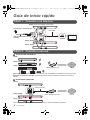
Quick Start Guide
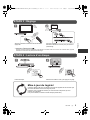
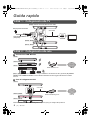
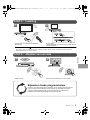
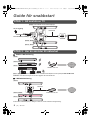
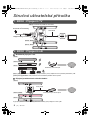
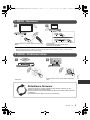
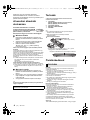
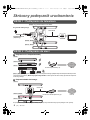
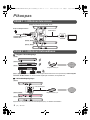
STEP 1 : Connecting to a TV
[BDT330] Use HDMI AV OUT MAIN terminal.
To a household mains
socket
HDMI cable
HDMI IN
AC mains lead
(supplied)
[BDT233] [BDT230]
[BDT131] [BDT130]
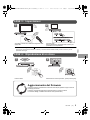
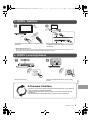
STEP 2 : Connecting to the network
∫ Wireless LAN connection
[BDT330]
[BDT233] [BDT230]
[BDT131] [BDT130]
Wireless router, etc.
SD CARD
Internet
[BDT131] [BDT130] For wireless capability, connect the Wireless LAN Adaptor DY-WL5 (optional). Only
DY-WL5 can be used. Read the operating instructions for DY-WL5 thoroughly when using it.
∫ LAN cable connection
[BDT330]
LAN Cable
[BDT233] [BDT230]
Broadband router, etc.
[BDT131] [BDT130]
Use category 5 or above straight LAN cables (STP) when connecting to peripheral devices.
2
(2)
VQT4V29
Internet