1
HOW TO OPERATE
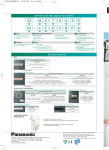
■ Operation Details
Auto, Heat, Cool, Dr y
AUTO - Automatic Operation
• The unit will automatically select
the operation mode according
to the setting, outdoor and room
temperature. During operation mode
selection, power indicator blinks.
For every 30 minutes, the operation
mode is reselected.
1
HEAT - Heating Operation
Start the
operation.
• Enables you to enjoy the warming
effect at your preferred setting
temperature.
• For cold air prevention, air might
not blow out immediately and
power indicator blinks when
operation starts.
2
• Also operates in defrost mode
(maximum 10 minutes) where by
the power indicator blinks. The
melted frost is drained at outdoor
unit and indoor fan is stopped.
Select
elect the
desired
operation.
COOL - Cooling Operation
• Enables you to enjoy the cooling
effect at your preferred setting
temperature.
AUTO
DRY
HEAT
COOL
DRY - Soft Dry Operation
3
• Enables you to set the desired
temperature at low fan speed which
provides you with the dehumidifying
surroundings.
Set
et the
temperature.
(16°C~30°C)
(16
● Supersonic air purifying device (super alleru-buster) operates
automatically while the air conditioner is switched on.
● Powerful, Quiet and Ion operations could be activated in all
operation modes.
● Press
button again to stop the operation.
Hint
●
To save electricity, close the curtains when using air conditioner to prevent sunlight and heat from coming in.
Troubleshooting
4
●
The room has a peculiar odour.
➤ This may be a damp smell emitted by the wall, carpet, furniture or
clothing in the room.
●
Air conditioner does not cool or heat efficiently.
➤
➤
➤
➤
Ensure the temperature has been set correctly.
Ensure windows and doors have been closed properly.
Ensure filters are cleaned or replaced when necessary.
Ensure inlet and outlet vents of the units have not been obstructed.