1
QUALIFICATION
WARNING! Make sure any tests performed in qualification do not unintentionally start
any processes resulting in loss of control.
WARNING! Never open cover in hazardous areas while circuits are energized. Follow all
safety work procedures and lock out circuits before servicing or inspection.
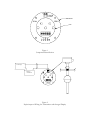
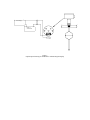
To calibrate units with built-in display, two clip leads are required to connect the indicator to the
puck baseboard. Connect the clip leads in the same polarity as the indicator plugs into the
baseboard making sure no shorts circuits are created; note the indicator will only plug into the
baseboard one way. Units with no built-in display do not require jumpers. Power up the device
using a suitable calibration source, insuring no processes will be affected during calibration. Move
the float to the desired 0% position and adjust the zero adjustment potentiometer on the puck
until the display reads 0% or the calibrator indicates 4 ma. Move the float to the desired 100%
position and adjust the span potentiometer on the puck until the display reads 100% or the
calibrator indicates 20 ma. Move the float back and forth several times to check both settings.
The indicator unit is factory calibrated to read 0% to 100% for 4 to 20 ma respectively and can be
calibrated with a suitable supply by adjusting the “zero” and “span” pots of the upper board of the
display unit. The pot on the lower display board should not be adjusted.
Install the indicator unit and replace the plastic label around the display. Screw the cover back on
the display and tighten.
Replace and tighten the housing cover and energize the power supply for the connected control
unit(s). Fill the tank in order to observe that the readout changes smoothly. The level transmitter
can also be tested manually by moving the float by hand and observing the result. The 0% and
100% points should be re-checked to ensure they are set correctly.
MAINTENANCE
KSR Kuebler level transmitters operate free from maintenance and wear when used properly. A
periodic visual inspection and re-qualification test should be performed at a regular interval.
QUESTIONS
For customer support please call 1-888-KSR-LEVL (577-5385) between the hours of 8:00 a.m. and
5:00 p.m. Eastern time. Please have your model number and serial number (found on the device
label) handy.