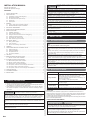
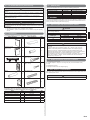
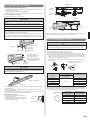
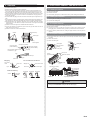
1
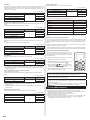
Filter Sign
External input control
The indoor unit has a sign to inform the user that it is time to clean the ¿lter. Select the
time setting for the ¿lter sign display interval in the table below according to the amount of
dust or debris in the room. If you do not wish the ¿lter sign to be displayed, select the setting value for “No indication”.
“Operation/Stop” mode or “Forced stop” mode can be elected.
(Ƈ... Factory setting)
Setting Description
Function Number
Ƈ
(Setting forbidden)
11
No indication
01
Setting record
02
Record any changes to the settings in the following table.
03
Setting Description
Cooling Room Temperature Correction
Filter sign
Depending on the installed environment, the room temperature sensor may require a correction.
The settings may be selected as shown in the table below.
Cooling room temperature correction
(Ƈ... Factory setting)
Setting Description
Ƈ
Function Number
Setting Value
Standard
00
Slightly lower control
01
30
Lower control
02
Warmer control
03
Depending on the installed environment, the room temperature sensor may require a correction.
The settings may be changed as shown in the table below.
(Ƈ... Factory setting)
Setting Description
01
02
Setting Value
Heating room temperature correction
Auto restart
Indoor room temperature sensor switching function
Remote controller signal code
External input control
After completing the FUNCTION SETTING, be sure to turn off the power and turn it on
again.
Selecting the remote controller signal code
Heating Room Temperature Correction
Ƈ
Setting Value
00
46
Forced stop mode
00
Short interval (200 hours)
Function Number
Operation/Stop mode
Setting Value
Standard (400 hours)
Long interval (1,000 hours)
Ƈ
(Ƈ... Factory setting)
Setting Description
Function Number
Setting Value
Standard
00
Lower control
• Con¿rm the setting of the remote controller signal code and the function setting. If these
are not con¿rmed, the remote controller cannot be used to operate for the air conditioner.
01
31
Slightly warmer control
When 2 or more air conditioners are installed in a room and the remote controller is operating an air conditioner other than the one you wish to set, change the signal code of the
remote controller to operate only the air conditioner you wish to set (four selections possible).
When two or more air conditioners are installed in a room, please contact your retailer to
set the individual air conditioner signal codes.
02
Warmer control
03
Auto Restart
Selecting the Remote Controller Signal Code
Use the following steps to select the signal code of the
remote controller. (Note that the air conditioner cannot receive a signal code if the air conditioner has not been set
for the signal code.)
Enable or disable automatic system restart after a power outage.
(Ƈ... Factory setting)
Setting Description
Ƈ
Function Number
Yes
Setting Value
00
40
No
01
* Auto restart is an emergency function such as for power failure etc. Do not start and stop
the indoor unit by this function in normal operation. Be sure to operate by the control unit,
or external input device.
Indoor room temperature sensor switching function
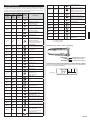
(1) Press the START/STOP button until only the clock is
displayed on the remote controller display.
(2) Press the MODE button for at least 5 seconds to display the current signal code (initially set to ).
(3) Press SET TEMP. ( ) ( ) button to change the sig. Match the code on
nal code between
the display to the air conditioner signal code.
(4) Press the MODE button again to return to the clock
display. The signal code will be changed.
(Only for Wired remote controller)
The following settings are needed when using the Wired remote controller temperature
sensor.
(Ƈ... Factory setting)
Setting Description
Ƈ
No
Yes
Function Number
Setting Value
00
42
01
* If setting value is “00” :
Room temperature is controlled by the indoor unit temperature sensor.
* If setting value is “01” :
Room temperature is controlled by either indoor unit temperature sensor or remote
controller sensor.
Remote controller signal code
Change the indoor unit Signal Code, depending on the remote controllers.
(Ƈ... Factory setting)
Setting Description
Ƈ
A
B
C
D
En-9
Function Number
Setting Value
00
44
01
02
03
If no buttons are pressed within 30 seconds after the signal code is displayed, the system returns to the original clock display. In this case, start again from step 1.
The air conditioner signal code is set to A prior to shipment.
Contact your retailer to change the signal code.
The remote controller resets to signal code A when the batteries in the remote controller
are replaced. If you use a signal code other than signal code A, reset the signal code
after replacing the batteries.
If you do not know the air conditioner signal code setting, try each of the signal codes
) until you ¿nd the code which operates the air conditioner.
(
14.CUSTOMER GUIDANCE
Explain the following to the customer in accordance with the operating manual:
(1) Starting and stopping method, operation switching, temperature adjustment, timer, air
Àow switching, and other remote control unit operations.
(2) Air ¿lter removal and cleaning, and how to use the air louvers.
(3) Give the operating manual to the customer.
(4) If the signal code is changed, explain to the customer how it changed (the system
returns to signal code A when the batteries in the remote controller are replaced).
*(4) is applicable to using wireless remote controller.