1
Connection
17
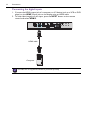
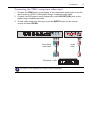
Connecting the YPbPr component video input
1. Connect the YPbPr jacks on the display to the component output jacks on an A/V
device (such as a VCR or DVD player) using a component video cable.
2. Connect the DVD player’s audio outputt jacks to the AV OUT(L/R) jacks on the
display using a suitable audio cable.
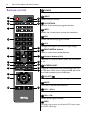
3. To view video image from this input, press the INPUT button on the remote
control and select YPbPr.
Component
video cable
DVD player / VCR
The cables are not supplied and should be purchased separately.
Audio
cable