1
Winmate M700D Tablet PC
User Guide
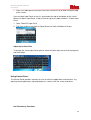
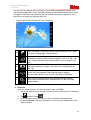
Use the Hot-Tab software utility to make it easy to program and define hot key user’s
most frequent application. Press the MENU button on the M700D and the utilities menu
will appear at the right side. Winmate Hot-Tab provides faster ways to perform many
basic tasks, to display the Winmate Hot-Tab:
•
Tap the right corner until the Hot Tab is displayed
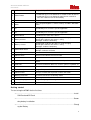
a
Short Cut button is the easiest way to launch whatever user’s wants
to launch including apps, setting and files.
b
Tapping this button will automatically change its orientation from
landscape to portrait mode or different degree such as 0o, 90o, 180o,
270o. Enable or disable auto rotation button is also available in this
part.
c
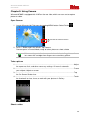
Tap Camera from the Hot Tab button to take pictures, record videos,
and create panoramic images. User adjust the setting trough this
Hot-Tab
d
Device Hot Tab to perform Radio control panel or wireless
communication devices such as WiFi, 3G, GPS, or Bluetooth
e
Setting let user perform basic tasks and monitoring the battery
status, adjust the performance and brightness as well as assign
function button.
a. Short Cut
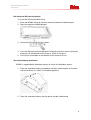
User can create shortcuts for some of favorite apps on M700D:
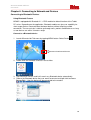
1. Tap on the right corner of the Home Screen to access Winmate Hot Tab button
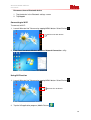
2. Tap
and then select
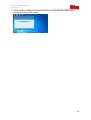
3. In this example, we try to assign first short cut button to Notepad. After
assigned Notepad in the short cut button user can see the notepad icon in the
short cut button.
15