1
Institution of Engineering and Technology
IET.tv User Guide v 1.0, March 2015
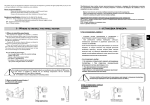
When you select the Channels dropdown, you will see the menu below. In this menu, you
can view all the channels, which have been arranged into 5 areas. See Appendix 1 for more
information about these channels.
Technology, Members, On Campus, The IET and Partners
v
v
v
v
v
For example to select videos in a certain topic, click the Technology channel links. When
you selected a channel, you will go to a channel page, which lets you browse using scroll
arrows and radio buttons that behave exactly as on the home page
(see IT Channel Page below).
View all under the Most Popular heading
for a channel page expands the page to show
all the videos in the current channel sorted by
their popularity (most “liked”) at the top.
View all under the Latest heading
for a channel page expands the page to
how all the videos in the current channel
sorted by date, with the newest at the
top. See the next page for an example.
When IET.tv launches the section marked Forthcoming will show information about videos
that are about to go live on the site.
5
© The Institution of Engineering and Technology 2015
www.theiet.org