1
HARDWARE INSTALLATION
How to Install the HDD
Assembly
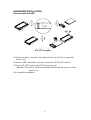
ED-125 Assembly
(1) Push a tip driver into the hole and push out ( to the left ) to open the
front cover
(2) Insert a HD ( hard disk ) into the connector of PCB ( PC board )
(3) Insert #2 ( HD connected to PCB ) into the case
Remark: The convex of the case should match with the concave of the
front cover.
(4) Assembly completed.
2