1
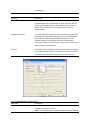
3.2.1.4 802.1x Setting-CA Server
Parameter
Description
Use Certificate Chain
When the EAP authentication type such as TLS, TTLS or PEAP is
selected and required a certification to tell the client what server
credentials to accept from the authentication server in order to
verify the server, you have to enable this function.
Certificate Issuer
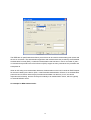
Choose the server from the list to issue the certificate. If “Any
Trusted CA” is selected, any CA included in the list (provided by
the Microsoft Certificate Store) is permitted.
Parameter
Description
Allow Intermediate Certificates
A server designates an issuer as a trusted root authority by
placing the issuer's self-signed certificate, which contains the
issuer's public key, into the trusted root certification authority
certificate store of the host computer. Intermediate or subordinate
certification authorities are trusted only if they have a valid
certification path from a trusted root certification authority.
Server Name
Enter the authentication server name.
Server name must match exactly
When selected, the server name must match exactly the server
name found on the certificate.
Domain name must end in
specified name
When selected, the server name field identifies a domain. The
certificate must use a server name belonging to this domain or to
one of its sub-domains (e.g. zeelans.com, where the server is
blueberry.zeelans.com) but it may be any name used in the
certificate name field.
3.3
Link Status
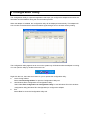
From the “Link Status” option, you can view all the information of the network you are connecting to.
19