1
Mini Pet Tracker 208PA User Manual
1
Mini Pet Tracker 208PA User Manual
2 GETTING STARTED (Out-of-range Alert)
INTRODUCTION
Pets are the accompanying and the family, and it’s a responsibility to protected carefully of our pets. When they
wondering too far away or trying to play hide and seek with you, the Mini Pet Tracker shows you an easier way to keep
an eye on your lovely pet. It works through closets, walls, indoors and outdoors no matter where your pet decides to
hide. The approximate range of the Mini Pet Tracker is 984 feet. When you cannot locate them, press the search button
and listen for the beep. It’s loud enough to help you to locate them but did not bother my cats at all. The Tag unit is
designed to wear on dog collar, and it is water splash resistant with a silicon cover. Different from other pet tracker
products, the Mini Pet Tracker 208PA offers an alarm function: when dog or cat is certain distance away from host, the
base unit would sound a series beep sound.
Product Description
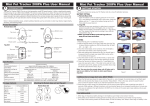
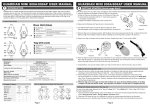
This section shows how to quickly setup and trigger an alert condition when the Base unit is separated from the Tag unit.
1. Place battery into the Base unit and the Tag unit.
Base Unit
1. Open the battery cover by placing your thumb on the cover
(as Figure 1) and pulling it backwards until it clicks open;
then lift off the cover.
2. Insert the battery into the battery compartment with the “+”
Figure 1
Figure 2
sign on the battery facing up (as Figure 2). Then replace
the battery cover by sliding it up into compartment opening.
Base Unit
Front
Back
Buzzer
Bottom cover
Top cover
LED
FindMe button
Battery cover
Power switch
Tag Unit
1. Remove the top cover with your hand. Force the top cover
to slide from its mounted position towards the top of the
Tag. (as figure 3 & 4)
2. Insert the battery into the battery compartment with the the
”-” sign on the battery facing up. Then replace the top cover
by sliding it down into compartment opening.(as figure 5)
Figure 3
Figure 4
2. Make sure that the Base and Tag units are away 50 cm from
each other.
Ring Attachment
Power Switch
Tag Unit
Back
Front
Top cover
Buzzer
Power Switch
(Hold button over
3 seconds to turn
ON/OFF)
Hanging hole
for strap
Bottom cover
LED
FuncƟon
CommunicaƟon Standard
Search Range
Alarm Distance
Base unit/Tag unit
BaƩery Type
BaƩery Life Time with Standby
Beep Sound (at 10cm/3.9inch)
Weight
Dimension (L/W/H)
Working Environment
4. Place the Tag unit in a stationary location. With the Base unit in
hand, walk away from the Tag. At about 164 feet, both Base
and Tag units will begin to beep and flash, indicating an
out-of-range alert condition. (As Figure 7)
Base Unit
Figure 7
Figure 9
Additional Out-of-range Alert notes
Tag Unit
1. When the Tag Unit is within the safe range, the lights on the Base and Tag units blink dimly at regular intervals,i ndicating
an active link between Base and Tag units – this is referred to as “Standby Mode”.
2. When the Base loses the signal to a Tag unit (i.e. out-of-range), the Base unit beeps for 10 seconds and the Tag unit
beeps for 15 seconds. If the Base unit and the Tag unit are not reunited, both units go into Sleep Mode after 10 and 15
seconds respectively. However, the Base unit will intermittently beep until the link is re-established with the Tag unit.
3. When the Tag unit is once again reunited with the Base Unit, press the Search button on the Base unit (Base unit will
enter Search mode). Press the Base unit button a second time to re-establish the link.
Setting Safe Range distances for the Tag unit
1 set
CR2032x2
1 set
You can set the safe range distances for the Tag unit to Near (164 ± 65 feet) or Far (328 ± 98 feet). The factory setting
is for 164 feet.
1. Press and hold the “Search/Setting” button on the Base unit - notice how the LED changes from Red and Green.
Red represents “Near” and Green “Far”.
2. When the LED shows the color (i.e. distance) you want to set, simply release the button to set the option.
Note that when you are in Standby mode, the Base Unit LED will blink the color of the safe distance that you set.
1 set
1 set
1 set
1 set
Remote Base unit
50 metres
Figure 8
7. Congratulations, you just completed the Quick Setup!
How to apply/wear the Base and Tag units
Mini Pet Tracker 208PA
1 set
Figure 6
6. Place the Tag into the provided silicon case(as figure 8) and
attach the case using the ventilation openings at the bottom
onto the Pet’s collar . If the Collar is too wide to fit into the
Silicon case vents please use the provided Velcro strap on the
larger collar and fit the case onto the strap. (As picture 9)
Search & Proximity Alarm
Digital 2.4 GHz RF (Frequency range: 2.40 - 2.48MHz)
0~984 feet (0~300 meter)
Near: 164 ± 65 Ō (50±20m), Far: 328± 98 Ō (100±30m)
Base unit (S08A)x1
Tag unit (S22A)x1
CR2032x1
CR2032x1
30 days (8 hrs)
60 days (8 hrs)
90db ± 3 db
80db ± 3 db
9.5g (0.34oz.)
4.2g (0.15oz.)
2.42x1.42x0.46inch
1.5x1x0.42inch
Temperature: 5℃~40℃、humidity:20%~80%
Package Contents
User manual
Figure 5
Tag Unit
5. Return to the Tag unit location and the alerts will cease.
Specifications
Model Name
Base Unit
Tag Unit
BaƩeries
Velcro strap
Strap
Hook
Silicon Sleeve
3. Turn ON the Power switch on the Base (as Figure 6). Both units
will establish a link and begin to blink synchronously.
Page 1
Page 2
Mini Pet Tracker 208PA User Manual
3
4
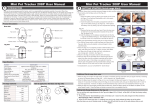
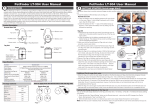
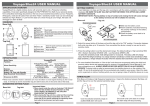
Searching for a misplaced Tag Unit
When a tagged item is misplaced, you can use the
Remote Base unit to start searching if it is within a 300
metres (line of sight) radius. Try this first in an open area
(e.g. large room, or in your yard).
Q. Why does the Remote base unit occasionally indicate a false direction?
A. This is also caused by the reflection or blockage of the signal. Signal reflection from walls or wire fences sometimes may
indicate a false location. A body of water (e.g. fish tank) for even people may block the signal and weaker reflected
signals from surrounding metal objects may indicate a false direction. To remedy this problem, try adjusting your position,
wait for the “Status Indicators” to settle and try your search again.
1. Take the Base Unit and stand apart from the Tag unit
(about 10 m). Turn On the Remote Base unit and it will
begin to chirp.
2. Before searching in a new area, you must first calibrate
the PetFinder, you only need to do this once, unless
your pet goes into an area with very different
surroundings as calibration helps make tracking easier.
In the current terrain and environment, hold the Remote
Base unit in front of you at chest level, in searching
mode and scan the area slowly in a circular direction,
from right to left for 360° (a) and again from left to right
(b), one 360° turn in 3-4 seconds - slowly.
5
Turn ON the
Remote Base
Left = on
Right = off
a
Calibrate
b
Note II: If the “Direction Indicator” illuminates green on
the Base unit during this calibration process, it
does not yet indicate the Tag unit’s direction.
3. Next, begin the search by slowly scanning a third
time from right to left (c). The “Direction Indicator” on
the Base Unit will illuminate (green) when it establishes
the direction of the tagged tem location.
180-360
c
Search
4. Move in the direction of the Tag Unit. As you approach
the Tag unit, the frequency of the chirping and blinking
(LED) on the Base Unit will increase.
5. If the Tag unit is hidden (e.g. in a pocket), you can hold
down the search button to emit light beeps.
Additional Search Function Information
1. In an enclosed room, the green direction indicator may show a false tag location. This is because the RF
signals may be reflecting off of walls from different angles. In this case, hold down the button on the Base
unit to Mute the Base chirping and follow the Tag beep audible to pin-point its location.
2. This product uses RF signals which can penetrate off walls and floors - however, these signals are also
sometimes affected by materials and terrain, such as bodies, water, metal/wire fences, concrete walls,
and crowds (e.g. in malls, amusement parks) - for children, it is important to teach them to move to
open areas when lost to assure optimal conditions for searching from the Remote Base unit.
Page 3
Frequently Asked Questions
Q. In search mode, why does the Remote base unit show a false direction or several different directions?
A. The Remote base unit collects and compares RF signal strength from the Tag unit to determine location. However, when
the Tag unit is already very close to the Remote base unit, the signals can appear emanating from several directions.
This can also occur when both units are in an enclosed environment, which causes signal reflection off of walls from
different directions, indicating a false location. If this is the case, you can mute the Remote base unit, and simply follow
the audio beep issued by the Tag unit during search mode.
The Holding Way
Notice: In order to get good signal reception, please
follow the holding way to hold the Base unit.
Note: You don’t have to scan a full 360°; you can use a
narrower search angle (e.g. 180°).
Mini Pet Tracker 208PA User Manual
Warnings and Important Information
1. The Tag units are water-repellent, but not waterproof! Keep the device dry. Precipitation, humidity, and all types of liquids
or moisture can contain minerals that may corrode electronic circuits. If your unit gets wet, remove the battery, and allow
the unit to dry completely before replacing it.
2. If you want to use the device during air flight, please comply with the air safety regulations for each respective country.
3. We reserve the right to change the hardware/software specifications and designs, as well as the information in the
manuals, at any time without prior notice.
4. Proper operating temperatures for this product are between 40˚F ~104˚F (5˚C~40˚C). Proper storage Temperatures are
between -4˚F~185˚F (-20˚C~85˚C). For operating temperatures under 40°F (5°C) please use LIR2032 batteries only –
Ask your PetFinder agent.
5. Under low battery charge conditions, both Remote base and Tag will alert with a beep every 2 minutes - in this case,
replace batteries immediately. Low battery conditions may result in unpredictable product behavior, such as low alert
volume and false readings. To save battery charge, turn off both units when appropriate (e.g. evenings at home).
6. The batteries provided in this product should be disposed of properly according to national or regional recycling
regulations - contact local authorities for more information.
Warning: Do not expose the batteries to fire or heat - this may result in danger from explosions.
Federal Communication Commission Interference Statement
This equipment has been tested and improved to comply with the limits of a Class B digital device, pursuant to Part 15
of the FCC Rules. These limits are designed to provide reasonable protection against harmful interference in a
residential installation. This FCC Certifications equipment generates, uses and can radiate radio frequency energy, if
installed and used not in accordance with the instructions, may cause harmful interference to radio communications.
However, there is no guarantee that interference will not occur in a particular installation. If this equipment does cause
harmful interference to radio or television reception, which can be determinedly turning the equipment off and on, the
user is encouraged to try to correct the interference by one of the following measures:
■ Reorient or relocate the receiving antenna.
■ Increase the separation between the equipment and receiver.
■ Connect the equipment into an outlet on a circuit different from that to which the receiver is connected.
■ Consult the dealer or an experienced radio/TV technician for help.
This device complies with Part 15 of the FCC Rules. Operation is subject to the following two conditions:
(1) This device may not cause harmful interference, and
(2) this device must accept an interference received, including interference that may cause undesired operation.
FCC Caution: Any changes or modifications are not expressly approved by the party responsible for compliance which
could void the user's authority to operate this equipment.
EU / RCM Declaration Conformity
This product is carrying the RCM and CE-Mark in accordance with the related European / Australia / New Zealand
Directives.
Page 4