1
NETCOMM LIBERTY SERIES - HSPA WiFi Router with Voice
7.2.2
Port Triggering
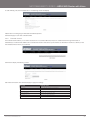
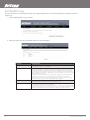
Some applications require specific ports in the Router’s firewall to be open for access by remote parties. Port Triggering opens up the
‘Open Ports’ in the firewall when an application on the LAN initiates a TCP/UDP connection to a remote party using the ‘Triggering
Ports’. The Router allows the remote party from the WAN side to establish new connections back to the application on the LAN side
using the ‘Open Ports’. A maximum 32 entries can be configured.
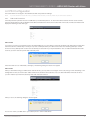
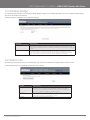
To add a Trigger Port, simply click the Add button. The following will be displayed.
7.2.3
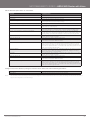
OPTION
DESCRIPTION
Select an Application
U s e r s h o u l d s e l e c t t h e a p p l i c a t i o n f ro m t h e l i s t .
Or
Or
Custom Appli cation
User can enter the name of their choice.
Trigger Port Start
Enter the starting trigger port number (when you select custom application).
W h e n a n a p p l i c a t i o n i s s e l e c t e d , t h e p o r t r a n g e s a re a u t o m a t i c a l l y c o n f i g u re d .
Trigger Port End
Enter the ending trigger port number (when you select custom application).
W h e n a n a p p l i c a t i o n i s s e l e c t e d , t h e p o r t r a n g e s a re a u t o m a t i c a l l y c o n f i g u re d .
Trigger Protocol
T C P, T C P / U D P o r U D P.
Open Port Start
Enter the starting open port number (when you select custom application). When
a n a p p l i c a t i o n i s s e l e c t e d , t h e p o r t r a n g e s a re a u t o m a t i c a l l y c o n f i g u re d .
Open Port En d
Enter the ending open port number (when you select custom application). When
a n a p p l i c a t i o n i s s e l e c t e d , t h e p o r t r a n g e s a re a u t o m a t i c a l l y c o n f i g u re d .
Open Protocol
T C P, T C P / U D P o r U D P
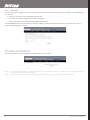
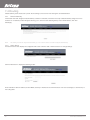
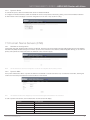
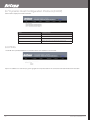
Demilitarized (DMZ) Host
Your Router will forward IP packets from the Wireless Area Network (WAN) that do not belong to any of the applications configured in the
Virtual Servers table to the DMZ host computer.
Enter the computer’s IP address and click Apply to activate the DMZ host. Clear the IP address field and click Apply to deactivate the
DMZ host.
YML10WVR
www.netcommlimited.com
HSPA WiFi Router with Voice-User Guide
37