1
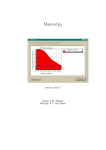
Figure 2: Screenshot of the Parameter definition utility. (1) Browse button for selecting a previous
file (step 1), (2) Text field for parameter name (step 2), (3) drop down menu to select distribution
type (step 3), (4) Text fields to assign arguments for the distribution (step 4), (5) Radio buttons to
output the parameter (step 5), (6) Add Parameter button (step 6), (7) Listboxes that display defined
parameters (step 7), (8) group of editing buttons (step 8), (9) Text field and Browse button (step 9),
(10) Generate File button (step 10).
7