1
Contents
1.
Document control ......................................................................................................... 4
1.1.
Document revision history ..................................................................................... 4
1.2.
Approvals ................................................................................................................ 4
1.3.
Distribution list ...................................................................................................... 4
2.
Legal Obligations for Registrants ................................................................................. 5
3.
Getting Started.............................................................................................................. 6
3.1.
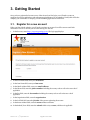
Register for a new account ..................................................................................... 6
3.2.
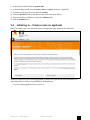
Initial log in – Create or join an applicant ............................................................ 7
3.3.
Subsequent log in ................................................................................................... 9
3.3.1.
4.
5.
Site Access................................................................................................................... 12
4.1.
Login ..................................................................................................................... 12
4.2.
Log out ................................................................................................................. 12
Applicant Management .............................................................................................. 13
5.1.
6.
7.
Change to another applicant ........................................................................... 9
Create a new Applicant......................................................................................... 13
5.1.1.
Add a contact to your applicant ......................................................................15
5.1.2.
Add a brand to your applicant ....................................................................... 18
5.1.3.
Add a test lab to your applicant ..................................................................... 19
5.2.
Add another Authorised Representative to your account ................................... 24
5.3.
Manage the applicant‟s owner ............................................................................. 27
Product Registration................................................................................................... 30
6.1.
Create a product registration application ............................................................ 30
6.2.
Manage your registrations / applications ........................................................... 32
6.2.1.
Search for a registration ................................................................................ 32
6.2.2.
View or edit an application or registration ................................................... 33
6.2.3.
Edit an application ........................................................................................ 36
6.2.4.
Delete a registration ...................................................................................... 36
Account Management ................................................................................................. 37
7.1.
Inbox ..................................................................................................................... 37
7.1.1.
View an email ................................................................................................. 38
7.1.2.
Mark an email as read ................................................................................... 38
7.2.
Personal Details ................................................................................................... 39
Version 0.10 – 13th September 2011
Suppliers' User Guide
2.