1
7.0 Brand/Model Chart
Brand
Code No.
Brand
Code No.
Brand
Code No.
LE130 REMOTE CONTROLLER FOR
SPLIT-TYPE AIR CONDITIONERS
USER GUIDE
Aikira
138
Hitachi
39, 50, 51, 52, 53,
120
Panasonic
47, 61, 62, 63,
64, 65
Aircon
42, 57, 58
Hualing
37, 70
Panda
28
Apton
67
Huifeng
73
Philco
41
AUX
21
Linycin
70
Samsung
49, 102, 111, 112,
119, 135
Power.............................................. 2.1
Changing Modes............................ 2.3
Contents
Features . ............................................ 1.0
Chang Hong
80, 87, 88, 89, 101
Kang Li
43
Sanyo
45, 59, 60, 80, 81, 82, 83,
87, 88, 89, 90, 91, 92, 93,
94, 95, 99, 100, 101, 105,
130, 131, 132, 133, 134
Chigo
42, 57, 58
Kelon
12, 13, 14, 96
Shangling
70
Chuanhua
37, 73
Kolin
44
Sharp
7, 8, 66, 96, 97,
98, 110
Chunlan
19, 103, 104
Konka
70
Shinco
22
Conrowa
37,70,73
Lennox
69, 121, 15, 18
Shining
70
Daewoo
70
LG
17, 116, 117
Siemens
46
Daikin
0, 1, 2, 6, 11, 26, 29,
30, 31, 32, 33, 126,
127
Midea
54, 55, 56, 73
Tadiran
54
Fujitsu
25, 27, 34 , 122,
123, 124, 125
MideaToshiba
48
TCL
24
Toshiba
71, 139
Trane
3, 137, 138
Operation Guide . .............................. 2.0
System Setup. ................................ 2.2
Setting Temperatures..................... 2.4
Setting Fan Speed. ........................ 2.5
Setting Swing................................. 2.6
Z-Wave. ............................................... 3.0
Z-Wave Setup. ............................... 3.1
Enrolling Z-Wave. .......................... 3.2
Un-enrolling Z-Wave..................... 3.3
Setting Swing................................. 2.6
Battery Level Indicator..................... 4.0
Remote Controller Holder ............... 5.0
Galanz
4, 70, 118
Miller
40, 42, 54, 55, 56,
57, 58,
General
16, 25, 27, 34
Mirage
15, 18, 69, 121
Gree
15, 18, 69, 107,
108, 121
Mitsubishi
Electric
35, 37, 70, 106, 140
Voltas
4
Guangda
37, 73
Mitsubishi
Heavy
20, 36, 38, 42, 73, 74,
75, 76, 77, 78, 79, 84,
85, 86, 128, 129
Xileng
103
Haier
23, 109, 113, 114,
115, 136
National
0
York
15
Hisene
9, 10, 68
NEC
80, 81, 82, 83, 88, 89, 90,
91, 92, 93, 94, 95, 99, 100,
101, 105, 130, 131, 132,
133, 134
Yutu
70
Reset............................................... 6.0
Icon Reference Chart . ...................... 7.0
Brand/Model Chart .......................... 7.0
Please note – different models work on different frequencies. Please choose the brand and enter the codes
until the remote controller connects. If it does not connect or your brand is not listed, please contact Customer
Support on 0800 LINK HELP (NZ) or 1800 LINK HELP (Australia)
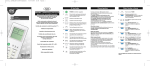
1.0 Features
2.3Changing Modes*
3.2Z-Wave Un-Enrolment
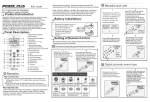
The Schlage LE130 Universal Remote Controller
for split-type systems operates in two ways;
• Press the MODE button to change between
AUTO, COOL, DRY, FAN and HEAT modes
1. A standard remote controller, able to operate
a wide range of brands (refer to Brand/
Model Chart)
2. Through Z-Wave on the Schlage LiNK system,
able to be operated remotely via a computer
or smart phone
2.4Setting Temperature*
a. Refer to the Schlage LiNK Bridge and Setup
User Guide to un-enrol the remote controller
on the bridge
Please read through the instructions before use.
2.0 Remote Controller
Operation Guide
• Use the UP or DOWN buttons to set the
temperature between 16°C and 32°C
2.5 Setting Fan Speed*
• The fan speed can be set to AUTO, LOW,
MEDIUM or HIGH
2.6Setting Swing Function
• Press the SWING button to turn on or off
2.1Power on/off
3.0 Z-Wave
• Use the red button to turn on or off the unit
(Remote Management Capabilities)
• While OFF only the Room Temperature and
Type Number will display on the LCD screen
• While ON the Set Temperature, Working Mode,
Room Temperature and Z-Wave (if applicable)
icons will display on the LCD screen
The below directions apply to enrolling the
remote controller onto the Schlage LiNK system.
If you are enrolling onto a different system,
please consult the applicable user guide.
2.2System Setup (for Z-wave setup, refer to 3.1)
3.1Z-Wave Enrolment
• To enrol the universal remote controller to
your split-type unit:
a. Refer to the Schlage LiNK Bridge and Setup
User Guide to aid in enrolling the remote
controller on the bridge
a.Turn the Universal Remote Controller on
b. On the remote controller press and hold the
SET and FAN buttons simultaneously for 3
seconds. The LED light will flash 3 times.
b.Press and hold the SET button for 3 seconds.
The icon “TYPE” will flash
c.Scroll to select the code relating to your
brand of system (refer to Brand/Model Chart)
d.Press the SET button to select your brand.
This code number will display on the screen
and can be changed at any time by repeating
the above steps
c. Once the Universal Remote Controller has
been successfully enrolled onto the LiNK
system, the Z-Wave icon
will appear
on the screen
b. On the remote controller press and hold the
SET and FAN buttons simultaneously for 3
seconds. The LED light will flash 3 times
c. Once the Universal Remote Controller has
been successfully un-enrolled from the
bridge, the Z-Wave icon will disappear from
the screen
4.0 Batteries and Battery
Level Indicator
• There are four indication levels;
Full
Low
Good
Empty
Icon
Name / Description
Dry Mode
Auto Mode
Cool Mode
Fan Mode
Heat Mode
Temperature Set
Fan speed Auto
Fan speed
(low-medium-high)
Library Code Number
5.0Remote Controller Holder
• Install the remote controller holder in a place
where the signal can be received by the unit
• When the remote controller is not
used, place it in the holder to ensure
communication between the remote
controller and air conditioning unit
Room Temperature
Infra-Red transmission
Z-Wave Connected
6.0Reset
• Gently press the RESET button with a thin
instrument once to reset all settings to
default settings
• The Z-Wave and Brand Codes will not reset
LE130 REMOTE CONTROLLER FOR
SPLIT-TYPE AIR CONDITIONERS USER GUIDE
7.0 Icon Reference Chart
Battery Level
* The functionality of these settings will depend on the
functions available on your heat pump/split system