1
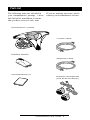
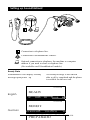
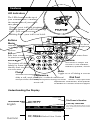
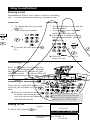
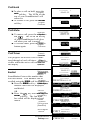
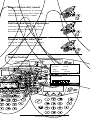
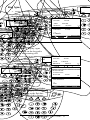
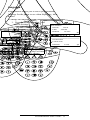
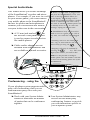
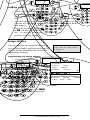
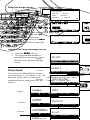
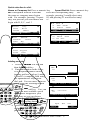
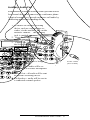
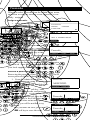
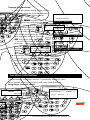
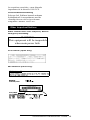
SoundStation 2 USER GUIDE / ADMINISTRATOR GUID E User Guide and Administrator Guide For Polycom SoundStation2 Conference Phone with from Plexus Communications IMPORTANT SAFETY INSTRUCTIONS When using your telephone equipment, the following safety precautions should always be followed to reduce the risk of fire, electric shock, and injury to people. Read and understand all instructions. spark could ignite heavy concentra gas. Follow all warnings and instructions marked on the equipment. Never push objects of any kind int SoundStation2 through housing slots Installation must be performed inmay accordance touch hazardous voltage point with all national wiring rules. out parts that could result in a risk of shock. Never spill liquid of any kind The outlet to which this equipment is contelephone. nected must be installed near the equipment, If liquid is spilled, conta personnel. and must always be readily accessible. reduce the risk of electric shoc This equipment can be hazardous ifToimdisassemble SoundStation2. Openi mersed in water. To avoid the possibility of removing covers may expose you to electrical shock, do not use this equipment ous voltages. Using incorrectly reas while you are in the bathtub or shower, or equipment can cause electric shoc when you are wet. If you accidentally drop your telephone equipment does no the equipment into water, do not retrieve properly, refer to the section describ it until you have first unplugged all cords. to connect service. The support tel Do not reconnect this equipment until it has number can be found on the back dried thoroughly. this booklet. Avoid using this equipment during electrical Never storms in your immediate area. There is a install telephone wiring dur lightning remote risk of electric shock from lightning. storm. Urgent calls should be brief. Even though Never install telephone jacks in we protective measures may have been installed unless the jack is specifically designe to limit electrical surges from entering wetyour locations. home or business, absolute protection from lightning is impossible. Never touch uninsulated telephon terminals unless the telephone line h If you suspect a natural gas leak,disconnected report it from the network inter immediately, but use a telephone away from the area in question. The SoundStation2·s Always use caution when installing electrical contacts could generatemodifying a tiny telephone lines. spark. While unlikely, it is possible that this SAVE THESE INSTRUCTIONS Table of Contents Thank You ............................................. 5 Overview .............................................. 5 Parts List ............................................... 6 Setting up SoundStation2 ........................ 7 Features ................................................ 8 LED Indicators ......................................................................................... 8 Buttons .................................................................................................. 8 Understanding the Display ....................................................................... 8 Using SoundStation2 ............................... 9 Placing a Call .......................................................................................... 9 Answering a Call ..................................................................................... 9 Answering a Second Call .......................................................................... 9 Ending a Call ........................................................................................... 9 Call Hold ............................................................................................... 10 Call Mute .............................................................................................. 10 Call Timer ............................................................................................. 10 Redial ................................................................................................... 10 Ringer Volume Adjustment ..................................................................... 11 Dial Tone and Volume Adjustment ........................................................... 11 Speaker Volume Adjustment .................................................................. 11 Display Contrast ................................................................................... 11 Ring Type ............................................................................................. 12 Back Light ............................................................................................. 12 Language .............................................................................................. 13 Special Audio Mode ............................................................................... 14 Conferencing - using the button ..................................................... 14 Adding a call ......................................................................................... 15 Bridge Soft Key ..................................................................................... 15 Phone Book .......................................................................................... 16 View System Information ...................................................................... 18 Auxiliary Audio Port .............................................................................. 19 Troubleshooting ................................... 20 No Dial Tone ......................................................................................... 20 Does Not Ring ....................................................................................... 20 Flickering LCD ....................................................................................... 20 Keypad Input Doesn·t Register............................................................... 20 Muffled or ´in a wellµ Reception ........................................................... 20 Short Silences, Echoes, or Clipped Speech ................................................ 21 Physical Damage ................................................................................... 21 Table of Contents For Best Performance ............................................................................ LCD Messages ....................................................................................... 21 22 Administrative Setup - Overview ............ 24 Passcode .............................................................................................. 25 Location Information .............................................................................. Phone System ....................................................................................... 26 28 Diagnostics .......................................... 29 Mic (Microphone) Test ........................................................................... Console 29 SPKR (Speaker) Test ................................................................. Restore Defaults ................................................................................... 30 29 Specifications and Warranty Information 31 .. Limited Warranty and Limitation of Liability ............................................ FCC Rules ............................................................................................. 34 32 Canadian Department of Communications Notice US Telephone ...................................... Company 34 Requirements Ring Equivalency ..................................................... Number (REN) ............................................................. 34 Automatic Dialing .................................................................................. 35 35 Telephone Company ConnectorTelephone Canadian ................................................................ Company 35 Requirements Exhibit J - Customer ............................................ Information ............................................................ 35 CE Mark R & TTE Directive (EU Only) ...................................................... 36 Other 37 Important Notices ........................................................................ Appendix A: Caller ID ............................................................................ 38 39 Thank You Thank you for choosing the Polycom SoundStation2. In this User Guide, you will find teverything you need to quickly set up your new conference telephone. Be sure to verify with your System Administrator that your network is prepared for configuring your SoundStation2 telephone. Lastly, it is important that you read the Parts List, and the Safety Notices section in this guide before you begin using the SoundStation2. Overview SoundStation2 is a perfect entry level conference telephone for your business, suitable for use in small to medium-sized conference rooms and offices. SoundStation2 features: Acoustic Clarity Technology Polycom¶s legendary technology that automatically allows people on both sides of the call to speak at the same time. Enhanced User Interface A backlit LCD display and three soft keys make the phone very easy to use. Caller related information such as CallerID is easy to read and the built-in phonebook and speed dial list can hold up to 25 entries. Multi-language Support Set the phone up to display the language that you are most comfortable with. Choose from English, French, German, Italian, Norwegian, Spanish, and Brazilian Portuguese. Enhanced Connectivity Options Simply connect a pair of extension microphones to the telephone to extend the microphone pickup range. SoundStation2 User Guide - 5 Parts List The following items are included in your SoundStation2 package. Check this list before installation to ensure that you have received each item. If you are missing any items, please contact your SoundStation2 reseller. SoundStation2 Console Console Cable Interface Module Telephone Cable Documentation/CD Extension microphones (Sold as an accessory.) SoundStation2 User Guide - 6 Setting up SoundStation2 Connection to telephone line. Connection to SoundStation2 console. Optional connection to telephone, fax machine or computer modem if you need to share a telephone line. (Not available on all SoundStation2 models.) Ready State SoundStation2 will display a Ready message upon power up. The Ready message is also shown after a call is completed and the phone is available for the next call. 5551212 English READY SP DIAL PH BOOK REDIAL 5551212 German BEREIT KURZWAHL TEL.BUCH WIEDER SoundStation2 User Guide - 7 5551212 PREPARADO W. Connection Diagram Features LED Indicators The LEDs located on the top of your SoundStation2 indicate the current status of your conference phone: Green - your call is in progress. Blinking green - a call is incoming. Red - your call is muted. Blinking Red - your call is on hold. Buttons Scroll Menu Navigate up or down through displayed lists. Displays a menu of settings and options. Exit Select Exits from current screen to previous menu. Choose a menu item. Volume Soft Keys Use these to adjust the volume of the handset, headset, speaker, and rin The screen will display labels for these keys, to identify their context-sensitive functions. Mute Phone Toggle on or off during a convers Answers incoming Conference calls, dials a call, ends aCall, call,join, or delete additional Dial Pad and provides dial tone. These 12 keys provide call participants during a conferalphabetic characters, and special ence call. available in context sensitive applica Understanding the Display 5551212 Information Area English This Phone·s Number READY SP DIAL Soft Key Functions PH BOOK 5551212 German The screen will display labels for the keys, to identify their context-sensitiv REDIAL SoundStation2 User Guide - 8 BEREIT functions. Using SoundStation2 Placing a Call SoundStation2 allows you to place a call over an analog line. Several methods are available to initiate a call. Indirect Dial Direct Dial 1. To obtain dial tone, press the key. 2. Dial the desired number. SEND OR 1. From the Ready screen, dial the desired number. 2. Press the key or the SEND soft key to make the call. Ź If you make a mistake entering the telephone number, press the <DEL soft key. SEND Ź To cancel the call, press the Connection Diagram key. OR Ź Press the CANCEL soft key to cancel the call. Answering a Call Press the key or any number key to answer an incoming call. Pressing button will override all other the telephone activity. The three LEDs will blink green when the phone rings. Answering a Second Call If you are on a call when another call is received, you will hear a Call Waiting tone. Ź Press the Conference button to answer the incoming call. This first call will be automatically placed on hold. Ź Switch back and forth between calls using the conference button . Ending a Call CALL To end a call, press the The Call waiting feature may not be available on your telephone line. Check with your telephone system administrator or service provider. ENDED English 00:05:23 key. SP DIAL PH BEENDET SoundStation2 User Guide - 9 German 5551212 00:05:23 BOOK REDIAL 5551212 Call Hold 5551212 1555555222 ŹTo place a call on hold, press the English HOLD soft key. The LEDs on the top of your SoundStation2 will blink red. ŹTo resume a call, press the RESUME English soft key. German 00:01:15 HOLD 5551212 5551212 15555552222 HOLD 00:01:15 RESUME HALTEN Call Mute 5551212 5551212 15555552222 15555552222 HALTEN 00:01:15 00:01:15 Spanish German Ź To mute a call, press the mute butEnglish ton . The LEDs on the top of your SoundStation2 will glow red when your call is muted. Spanish Ź To release mute, press theFrench mute English German button again. Call Timer WEITER ESPERA HOLD 5551212 5551212 5551212 15555552222 15555552222 ESPERA 00:01:15 MUTE 00:01:15 GARDE REANUDAR HOLD HALTEN 5551212 5551212 5551212 15555552222 Italian French Spanish German 15555552222 GARDE 00:01:15 STUMM 00:01:15 Call progress on an active call is monitored through a local call timer. English This is Norwegian Italian visible within the active call window on Spanish the display. French 15555552222 00:01:15 15555552222 15555552222 00:01:15 Portuguese German Norwegian (Brazilian) Italian French SoundStation2 stores the number that was last dialed. This number can be Spanish recalled using the REDIAL soft key.English Portuguese Ź Press the REDIAL soft key. Italian The last egian Norw (Brazilian) number called will be displayed and dialed. French OR German Portuguese Norwegian Ź Press the key and then the (Brazilian) REDIAL soft key. The last number called will be displayed and Italian dialed. Spanish Portuguese (Brazilian) Norwegian French 15555552222 15555552222 5551212 5551212 5551212 5551212 HOLD HOLD RIPRENDI ESPERA GARDE 5551212 5551212 5551212 HALTEN 00:01:15 HOLD 5551212 SECRET 00:01:15 5551212 ESPERA FORTSETT GARDE 15555552222 READY00:01:15 ATTESA SP DIAL PH 15555552222 5551212 5551212 REDIAL BOOK ESPERA ESPERA MUTE 5551212 5551212 00:01:15 15555552222 RETOMAR HOLD BEREIT00:01:15 ATTESA 5551212WIEDER TEL.BUCH 5551212 GARDE KURZWAHL 15555552222 DEMP 00:01:15 PREPARADO 00:01:15 MARC HOLD ESPERA RÁP DIR 5551212 TEL RELLAMAR ATTESA MUDO 15555552222 PRÊT 00:01:15 ABRÉGÉ 5551212 5551212 15555552222 5551212 5551212 ESPERA ANNUAIRE SoundStation2 User Guide - 10 Italian Portuguese 5551212 ATTESA REPRISE HALTEN ESPERA 00:01:15 ATTESA SILENCIAR 00:01:15 5551212 15555552222 Redial 2 PRONTO RECOMP HOLD 5551212 5551212 W. Ringer Volume Adjustment When the SoundStation2 is in Ready state or on hook, press the Volume buttons to adjust the ringer volume. Dial Tone and Volume Adjustment When the SoundStation2 is off hook, press the Volume buttons to adjust the dial tone volume. Speaker Volume Adjustment During an active call, press the Volume buttons to adjust the speaker volume. Display Contrast 1. Press the Menu button and choose Settings. 2. Cycle through the options using the Scrolling buttons and choose Contrast, and then press the Select button . 3. Press the Scrolling buttons or the + and - soft keys to adjust the display contrast. 4. Press the SAVE soft key or the Select button to apply the selected contrast setting. Ź Press the Exit button to cancel this change. SETTINGS PHONE BOOK THIS PHONE BRIDGE SETUP CONTRAST - + SoundStation2 User Guide - 11 SAVE Ring Type 1. Press the Menu button and choose Settings. 2. Cycle through the options using the Scrolling buttons and choose Ringer Type, and then press the Select button . 3. Sample the ring types by pressing the Scrolling buttons or the <³ and ³> soft keys. 4. Press the SAVE soft key or Select button to apply the selected ringer setting. Ź Press the Exit button cancel this change. to SETTINGS PHONE BOOK THIS PHONE BRIDGE SETUP RINGER TYPE Classic SAVE Back Light The SoundStation2¶s display lights up when any button on the keypad is pressed, or on an incoming call. To turn the back light on or off: 1. Press the Menu button and choose Settings. 2. Cycle through the options using the Scrolling buttons and choose Back Light, and then press the Select button . Ź The current status of the back light will be displayed. 3. Press the ON or OFF soft key or cycle through OFF and ON by pressing the Scrolling buttons . 4. Press the SAVE soft key or Select button to apply the selected backlight setting or the Exit button to cancel this change. SETTINGS PHONE BOOK THIS PHONE BRIDGE SETUP SETTINGS BACKLIGHT LANGUAGE RINGER TYPE BACKLIGHT On OFF ON SoundStation2 User Guide - 12 SAVE Language SoundStation2 allows you to select your preferred language for the phone to use when displaying information. To change the language setting: 1. Press the Menu button and choose Settings. 2. Cycle through the options using the Scrolling buttons and choose Language, and then press the Select button . 3. Cycle through the available languages by pressing the Scrolling buttons or the <² and ²> soft keys. 4. Press the SAVE soft key or Select button to apply the selected language setting or the Exit button to cancel this change. SETTINGS PHONE BOOK THIS PHONE BRIDGE SETUP SETTINGS BACKLIGHT LANGUAGE RINGER TYPE SoundStation2 User Guide - 13 Special Audio Mode This feature allows you to take advantage of the SoundStation2¶s speaker and microphones. For example, if you were in a call on your mobile phone, you could connect your mobile phone to the SoundStation2 and use its speaker and microphones to continue your conversation and include everyone in the room in the conversation. Ź A 2.5 mm jack marked on the left side of the phone console is used to connect to audio devices like mobile phones. Ź Cables and/or adaptors are not included with SoundStation2 and are available as optional accesories. Ź When a 2.5mm cable is plugged into this jack, the SoundStation2 screen will show a message ³Mobile Phone In´ on the display. This message will be displayed regardless of whether a mobile phone is connected to the other end of the cable or whether a mobile phone call is actually active or not. To clear this message, unplug the 2.5mm cable. Ź SoundStation2 may still be used to make or receive regular phone calls at any time, even with this cable plugged in. Incoming calls over the analog line will ring as usual and the call may answered by pressing the key. Outgoing calls may be initiated by pressing the key. Then enter the digits of the number you wish to dial. Note: It is not possible to bridge a mobile phone call with another call that is active on the analog phone line of the SoundStation2. Conferencing - using the button If your telephone system supports multiparty call conferencing, then you can establish multi-party calls with your SoundStation2. ŹCheck with your System Administrator to determine the number of parties that can be conferenced together. ŹYour System Administrator may need to activate multi-party conferencing features or provide you with instructions specific to your telephone system. SoundStation2 User Guide - 14 Adding a call 1. While on an active call, press the Conference button . The first call is automatically placed on hold. 2. 2. Dial the number you wish to call. You may use the Redial or Direct Dial method. 3. Press the Conference button or JOIN soft key to join the second call. To drop the second call, press the Conf key again. OR 1. Press the HOLD soft key to place the first call on hold. Press the Conference button and enter the number you wish to call. You may use the Redial or Direct Dial method. Bridge Soft Key You may program the telephone number of your preferred audio conferencing bridge or service into the SoundStation2 so that it is immediately available. The SPEED DIAL soft key will not display when the bridge number is configured. Programming the Bridge number 1. Press the Menu button , choose Bridge Setup using the Scrolling buttons, and press the Select button . 2. Choose Enter Phone Number and press the Select button and then enter the bridge number using the dial pad. Enter any necessary prefix such as 9 and/or 1. Ź If you make a mistake entering the number, use the <DEL soft key to correct the error. 3. Press the SAVE soft key or CANCEL soft key if you wish to cancel the procedure. SETTINGS PHONE BOOK THIS PHONE BRIDGE SETUP BRIDGE ENTER EDIT SETUP PHONE SOFT SoundStation2 User Guide - 15 KEY NUMBER Editing the Bridge soft key 1. Press the Menu button , choose Bridge Setup using the Scrolling buttons , and press the Select button . 2. Choose Edit Soft Key, press the Select button and enter the new soft key label using the dial pad. The first six characters will display. Ź If you make a mistake entering the soft key label, use the <DEL soft key to correct the error. 3. Press the SAVE soft key or CANCEL soft key if you wish to cancel the procedure. SETTINGS PHONE BOOK THIS PHONE BRIDGE SETUP Placing a call using the Bridge soft key 1. Press the BRIDGE soft key. 2. The programmed number is automatically dialed andEnglish a call is placed to your preferred bridge vendor. 5551212 READY BRIDGE PH BOOK REDIAL 5551212 Phone Book German BEREIT BRÜCKE TEL.BUCH WIEDERW . You can use the Phone Book to store a Selecting the PH BOOK soft key displays 5551212by names. local directory of 25 contacts. You can the Phone Book list sorted add, edit, delete, dial, or search any This list may be sorted by Name, PREPARADO Spanish contact in this list using just a few key Company, or Speed Dial. strokes. PUENTE DIR TEL RELLAMAR 5551212 English French READY SP DIAL 5551212 PRÊT PH BOOK REDIAL PONT ANNUAIRE 5551212 Italian German BEREIT KURZWAHL 5551212 PRONTO TEL.BUCH WIEDER BRIDGE W. RUBRICA RISEL. 5551212 Spanish Norwegian PREPARADO MARC RECOMP RÁP DIR KLAR TEL RELLAMAR BRO SoundStation2 5551212 User GuideTLFLISTE - 16 PRÊT Portuguese 5551212 NY 5551212 OPPR Quick selection in a list: Name or Company list: Press a numeric key to corresponds with the letter that that the name or company name begins with. For example, pressing 3 repeatedly will provide you with names that begin with D, E, F, and 3. Dennis Derek Donald SO RT Gray Brown Wilson NEW NEW Felix Fiona Mason Ferguson Frank James SORT NEW 02 03 Chris R Matt Smithe 04 Andrew SORT DIAL Earl Edwards Elizabeth Grason Elliot Ray SORT Speed Dial list: Press a numeric key select the corresponding entry. For example, pressing 2 would select entry 02, and pressing 23 would select entry 23. 23 24 25 Adams NEW DIAL George William Harold Smith Jim Shoe SORT DIAL NEW DIAL DIAL Adding an entry 1. Press the PH BOOK soft key and then the NEW soft key. 2. Enter information in the Name, Ph# (telephone number including any prefixes, such as 9 and/or 1), and Co (company) field using the alphanumeric keys on the dial pad. You can move between fields using the Scrolling buttons . 3. Press the SAVE soft key. You can accept the next available speed dial number assigned to your new entry or you can choose your own speed dial number by using the Scrolling buttons or the dial pad. 4. Press the OK soft key to save or the BACK soft key to edit the phone book entry. _ Name: PH#: CO: CANCEL Charles_ Name: PH#: CO: < DEL SPACE CANCEL Charles White 5555559876 Name: PH#: CO: < DEL SPACE Charles Speed SAVE White Dial BACK SoundStation2 User Guide - 17 #:24 OK Editing an entry 1. Choose the entry you wish to edit and press the Select button . 2. Press the CHANGE soft key. Using the Scrolling buttons , select the field you wish to edit. 3. Using the alphanumeric keys on the dial pad, make changes. 4. Press the SAVE soft key. You can accept the current speed dial number assigned to the entry or you can choose another speed dial number by using the Scrolling buttons or the dial pad. 5. Press the OK soft key to save or the BACK soft key to edit the phone book entry. Deleting an entry 1. Choose the entry you wish to delete and press the Select button . 2. Press the REMOVE soft key. Press the OK soft key to remove or the CANCEL soft key to leave the menu without removing. 23 Charles White 5555559876 CHANGE 23 REMOVEDIAL Charles White 5555559876 CHANGE REMOVEDIAL REMOVE 23 FROM Charles CANCEL PH BOOK? White OK View System Information This feature displays the following information about the SoundStation2: Location and Number and System Information. System Information Location and Number 1. Press the Menu button and choose This Phone. 2. Cycle through the options using the Scrolling buttons and choose Location and Number, and then press the Select button . 1. Press the Menu button and choose This Phone. 2. Cycle through the options using the Scrolling buttons and choose System Information, and then press the Select button . SoundStation2 User Guide - 18 Auxiliary Audio Port SoundStation2 offers an auxiliary audio port that allows for external devices to connect to the conference phone. A typical example is to record conference call audio by connecting an external recording device. 1. Connect an external recording device, such as a cassette tape recorder, via the auxiliary jack on the interface module. The auxiliary jack is marked . 2. Press the Menu button and choose Settings. 3. Choose Aux Audio and press the Select button . Cycle through the options using the Scrolling button . Press the SAVE soft key or Select button to save the setting. The setting for auxiliary audio needs to match the kind of device that is being connected to the phone. Ź Wireless Mic = audio will be received from a wireless microphone device. Ź Record Out = all audio will be sent to an audio recording device. Ź Ext Speaker = audio will be sent to a connected external speaker. SoundStation2 User Guide - 19 Audio cable (RCA cable) Troubleshooting No Dial Tone The telephone cable must be plugged into an analog telephone jack. If the dial tone is not heard, verify the following: Ź Check that the console is operaŹ Check that the telephone cable tional. from the interface module is connected to an analog telephone (POTS) line. Does Not Ring Check that the ringer is not turned off. See ³Ring Type´, page 12. Ź If the volume is turned all the way down, increase the volume with the Volume buttons. Flickering LCD If your screen appears to flicker, it may be because you are using a certain type of florescent lighting in your building. Move the SoundStation2 away from the lights or replace the florescent bulbs. Keypad Input Doesn·t Register This could happen if you enter inforSome buttons may not be recognized mation too quickly. Press the alphanu- if you press them too quickly. meric buttons slowly. Muffled or ´in a wellµ Reception This is caused by highly reverberant rooms and people speaking too far from the microphone. Speak closer to the console so that the microphones pick up your speech more accurately. Ź Add more sound absorbency to the room. SoundStation2 User Guide - 20 Short Silences, Echoes, or Clipped Speech Ź Do not move the SoundStation2 console while it is in use. Ź Keep your hands away from the console during calls. Ź To avoid excessive noise around SoundStation2, keep papers, cups, and other noise-producers away from the console. Ź At the beginning of each call, let someone at each location speak in turn for a few moments to enable SoundStation2 to adapt to its environment. Ź The other parties may be using non-Polycom equipment which may cause audio performance issues. Ź Try calling again; a different line may provide a better connection. Physical Damage Ź If physical damage is severe enough that the internal parts become visible, disconnect the SoundStation2 immediately. Ź Do not reconnect to the telephone network until the SoundStation2 has been repaired. For Best Performance Your SoundStation2 performs optimally when you follow these guidelines: Ź Position the SoundStation2 in the center of the conference table or desk. Ź Do not move the SoundStation2 during a call. Ź Do not shuffle papers near the SoundStation2. ŹPosition extended microphones 7¶ from the SoundStation2 console. Ź Speak at a normal conversation level, and direct your voice towards the SoundStation2, or towards the extended microphone. Ź Unplug all cords before cleaning the SoundStation2. Do not use liquid cleaners or aerosol cleaners. Use a damp, soft cloth for cleaning. SoundStation2 User Guide - 21 LCD Messages The following messages are displayed on the LCD. LCD Message What it means: What you will see: Ready Phone is in idle state and ready to Idle make screen. calls. Call Ended The call has been dropped. ´Call Endedµ with elapsed time indicated. Mobile Phone In A mobile phone is plugged in to the mobile phone jack OR a mobile phone call has been initiated. ´Mobile Ph Enter Number Enter the number you wish to dial. Digits of the number you are dialing SoundStation2 User Guide - 22 Administrator Guide SoundStation2 Administrator Guide - 23 Administrative Setup - Overview The Administrative Setup menu consists of the following options. The Admin istrative Setup menu can be passcode protected by setting an optional passcode. Subsequent access to this menu will require passcode entry. Location: 1 Location Name Enter a name for the SoundStation2¶s location, such as ³Conference Room B´. 2 This Phone # Phone System: Enter the SoundStation2¶s telephone number. 1 Caller ID Configure Caller ID. 2 Flash Timing Set the flash delay to 75, 100, 300, or 600 milliseconds. Passcode: 1 Set an optional passcode. (Default: no passcode is set.) Diagnostics: 1 Mic Test View the sample level received by each microphone. 2 Console Speaker Select acoustic test signals to drive through the Test SoundStation2¶s speakers. 3 Restore Defaults Reset all custom settings and data entries. Restores original default settings. SoundStation2 Administrator Guide - 24 Passcode When you select Passcode from the Admin Setup menu, the screen will display whether or not a passcode is currently assigned. Assign a passcode: ADMIN SETUP 1. Press the Menu button , LOCATION choose Admin Setup using the PHONE SYSTEM PASSCODE Scrolling buttons , and press the Select button . Choose PASSCODE Passcode using the Scrolling buttons , and press the Select NOT ASSIGNED button . ASSIGN 2. Press the ASSIGN soft key and enter a three-digit password. If you make an error, press the <DEL soft ENTER NEW key to erase the error. 3. Press the SAVE soft key. You may Passcode:_ press the CANCEL soft key or the CANCEL SAVE < DEL Exit button if you choose not to save the passcode. ŹRecord the passcode. If the passcode is forgotten, contact Polycom Support at www.polycom.com/support and click on ³How to Contact Support and Service´ for your local support contact information. Remove a passcode: Removing the passcode removes the requirement for an access passcode for the Admin Setup menu. PASSCODE 1. From the Admin Setup menu, choose Passcode using the Scrolling ASSIGNED buttons and press the Select butCHANGE REMOVE ton . 2. Press the REMOVE soft key, enter the current passcode, and press the ENTER CURRENT ENTER soft key. If you decide not to Passcode:_ remove the password, press the CANCEL soft key or the Exit button . CANCEL ENTER < DEL ŹIf you enter an incorrect password, you will be notified to try INCORRECT PASSCODE again. ŹIf you make an error, press the Passcode:_ <DEL soft key to erase the error. CANCEL < DEL SoundStation2 Administrator Guide - 25 ENTER Change the passcode: 1. From the Admin Setup menu, choose Passcode using the Scrolling buttons PASSCODE and press the Select button . ASSIGNED 2. Press the CHANGE soft key, enter the CHANGE REMOVE current passcode, and press the ENTER soft key. If you decide not to change the password, press the CANCEL soft ENTER CURRENT key or the Exit button . ŹIf you enter an incorrect password, Passcode:_ you will be notified to try again. < DEL CANCEL ENTER ŹIf you make an error, press the <DEL soft key to erase the error. ENTER NEW 3. You will be prompted to enter a new passcode. Enter a new passcode and Passcode:_ press the SAVE soft key. You may CANCEL SAVE < DEL press the CANCEL soft key or the Exit button if you choose not to save the passcode. Ź Record the passcode. If the passcode is forgotten, contact Polycom Support at www.polycom.com/ support and click on ³How to Contact Support and Service´ for your local support contact information. Location Information You can assign a location, such as ³Conference Room B´ and the telephone number associated with your SoundStation2. Assigning a location name: 1. Press the Menu button , choose Admin Setup and press the Select button , enter passcode (if required) and press the ENTER soft key. Choose Location using the Scrolling buttons , and press the Select button . LOCATION LOCATION THIS PHONE NAME # SoundStation2 Administrator Guide - 26 LOCATION 2. Choose Location Name using the Scrolling buttons , and press the Select button . Enter a location name using the dial pad. This name will be displayed when ³Location Name and Number´ submenu of ³This Phone´ menu is selected from the main menu. ŹIf you make an error, press the <DEL soft key to erase the error. 3. Press the SAVE soft key or the Select button to save your entry. You may press the Exit button to cancel your entry. LOCATION NAME Conference Room B < DEL SPACE SAVE Assigning a telephone number: 1. Press the Menu button , choose Admin Setup and press the Select button , enter passcode (if required) and press the ENTER soft key. Choose Location using the Scrolling buttons , and press the Select button . 2. Choose This Phone # using the Scrolling buttons , and press the Select button . Enter the SoundStation2¶s telephone number. ŹIf you make an error, press the <DEL soft key to erase the error. 3. Press the SAVE soft key or the Select button to save your entry. You may press the Exit button to cancel your entry. LOCATION LOCATION THIS PHONE THIS NAME # PHONE# 5554321 < DEL SAVE SoundStation2 Administrator Guide - 27 Phone System Caller ID* You can configure Caller ID according to the specifications and standards that pertain to the phone line you are connecting to. Standards may differ from country to country. Please refer to Appendix A for additional information. 1. Press the Menu button , choose Admin Setup and press the Select button , enter passcode (if required) and press the ENTER soft key. Choose Phone System using the Scrolling buttons , and press the Select button . 2. Choose CallerID from the available options and press the Select button . 3. Use the <- and -> soft keys to step through the available Caller ID options. 4. Press the SAVE soft key or the Select button to save your entry. You may press the Exit button to cancel your entry. ADMIN SETUP LOCATION PHONE SYSTEM PASSCODE CALLERID Bellcore SAVE *Caller ID is a subscription service. Check with your local telephone service provider to determine if this service is available in your area. Flash Timing You can adjust the timing of the Flash delay to 75, 100, 300, or 600 milliseconds. 1. Press the Menu button , choose Admin Setup and press the Select button , enter the passcode (if required) and press the ENTER soft key. Choose Flash Timing using the Scrolling buttons , and press the Select button . 2. Choose Flash Timing from the available options and press the Select button . 3. Use the <- and -> soft keys to step through the available Flash Timing options. 4. Press the SAVE soft key to save changes. You may press the Exit button to cancel your selection. ADMIN SETUP LOCATION PHONE SYSTEM PASSCODE FLASH TIMING 100 mS SoundStation2 Administrator Guide - 28 SAVE Diagnostics Mic (Microphone) Test You may test the SoundStation2¶s microphones to ensure that they are working optimally. 3. 1. Press the Menu button , choose Admin Setup and press the Select button , enter passcode (if required) and press the ENTER soft key. Choose Diagnostics using the Scrolling buttons , and press the Select button . 2. Choose Mic Test using the Scrolling buttons , and press the Select button . The microphones are numbered acMIC 1 cording to the diagram. If a testing microphone¶s meter indicates that it is receiving an atypically low or high sample, despite appropriately controlled input, contact Polycom Technical Support. Choose any microphone using the Scrolling buttons , and press the Select button . ŹThe testing microphone¶s LED will glow red. ŹThe testing microphone will begin sampling at a 1 Hertz rate, 50% duty cycle. ŹThe display will show a meter that modulates according to the relative sample received by the testing microphone. MIC 3 LEVEL METER CANCEL MIC 4 MIC 5 MIC 2 MIC 3 Console SPKR (Speaker) Test You can select an acoustic test signal to drive through the SoundStation2¶s speaker for speaker testing and to sample the room acoustics. ŹSine Sweep is a test signal 1. Press the Menu button , consisting of a 100 Hertz to choose Admin Setup and press the 3,500 Hertz sine wave whose Select button , enter passcode ENTER frequency is swept according to (if required) and press the soft key. Choose Diagnostics using a linear progression of frequency as a function of time, or the Scrolling buttons , and press (t)=A*sin(kt). the Select button . ŹOne kiloHertz Tone is a con2. Choose Console Speaker Test stant tone generated at exactly using the Scrolling buttons 1,000 Hertz. and press the Select button . Choose the desired signal using the Scrolling buttons SoundStation2 Administrator Guide - 29 ŹWhite Noise is a signal whose energy is distributed uniformly among all frequencies within a band of interest, which for the SoundStation2 is approximately from 300 to 3,400 Hertz. 3. Press the Select button to activate the signal. Restore Defaults Restoring the defaults will irretrievably remove all settings and data that have been entered since the SoundStation2 was first installed. 1. Press the Menu button , choose Admin Setup and press the Select button , enter passcode (if required) and press the ENTER soft key. Choose Diagnostics using the Scrolling buttons , and press the Select button . 2. Choose Restore Defaults using the Scrolling buttons , and press the Select button . Press the OK soft key if you wish to restore defaults or the CANCEL soft key or the Exit button to return to the Diagnostics submenu. ŹPhone Book entries and Speed Dial numbers are not lost when restoring all defaults. SoundStation2 Administrator Guide - 30 Specifications and Warranty Information Limited Warranty and Limitation of Liability Limited Warranty Polycom warrants to the end user (³Customer´) that this product will be free from defects in workmanship and materials, under normal use and service, for one year from the date of purchase from Polycom or its authorized reseller. Polycom¶s sole obligation under this express warranty shall be, at Polycom¶s option and expense, to repair the defective product or part, deliver to Customer an equivalent product or part to replace the defective item, or if neither of the two foregoing options is reasonably available, Polycom may, in its sole discretion, refund to Customer the purchase price paid for the defective product. All products that are replaced will become the property of Polycom. Replacement products or parts may be new or reconditioned. Polycom warrants any replaced or repaired product or part for ninety (90) days from shipment, or the remainder of the initial warranty period, whichever is longer. Products returned to Polycom must be sent prepaid and packaged appropriately for safe shipment, and it is recommended that they be insured or sent by a method that provides for tracking of the package. Responsibility for loss or damage does not transfer to Polycom until the returned item is received by Polycom. The repaired or replaced item will be shipped to Customer, at Polycom¶s expense, not later than thirty (30) days after Polycom receives the defective product, and Polycom will retain risk of loss or damage until the item is delivered to Customer. LIMITATION OF LIABILITY. TO THE FULL EXTENT ALLOWED BY LAW, POLYCOM EXCLUDES FOR ITSELF AND ITS SUPPLIERS ANY LIABILITY, WHETHER BASED IN CONTRACT OR TORT (INCLUDING NEGLIGENCE), FOR INCIDENTAL, CONSEQUENTIAL, INDIRECT, SPECIAL, OR PUNITIVE DAMAGES OF ANY KIND, OR FOR LOSS OF REVENUE OR PROFITS, LOSS OF BUSINESS, LOSS OF INFORMATION OR DATA, OR OTHER FINANCIAL LOSS ARISING OUT OF OR IN CONNECTION WITH THE SALE, INSTALLATION, MAINTENANCE, USE, PERFORMANCE, FAILURE, OR INTERRUPTION OF ITS PRODUCTS, EVEN IF POLYCOM OR ITS AUTHORIZED RESELLER HAS BEEN ADVISED OF THE POSSIBILITY OF SUCH DAMAGES, AND LIMITS ITS LIABILITY TO REPAIR, REPLACEMENT, OR REFUND OF THE PURCHASE PRICE PAID, AT POLYCOM¶S OPTION. THIS DISCLAIMER OF LIABILITY FOR DAM AGES WILL NOT BE AFFECTED IF ANY REMEDY PROVIDED HEREIN SHALL FAIL OF ITS ESSENTIAL PURPOSE. Exclusions Polycom will not be liable under this limited warranty if its testing and examination disclose that the alleged defect or malfunction in the product does not exist or results from: ŹFailure to follow Polycom¶s installation, operation, or maintenance instructions; ŹUnauthorized product modification or alteration; ŹUnauthorized use of common carrier communication services accessed through the product; ŹAbuse, misuse, negligent acts or omissions of Customer and persons under Customer¶s control; or ŹActs of third parties, acts of God, accident, fire, lightning, power surges or outages, or other hazards. SoundStation2 Administrator Guide - 32 WARRANTY EXCLUSIVE. IF A POLYCOM PRODUCT DOES NOT OPERATE AS WARRANTED ABOVE, CUSTOMER¶S SOLE REMEDY FOR BREACH OF THAT WARRANTY SHALL BE REPAIR, REPLACEMENT, OR REFUND OF THE PURCHASE PRICES PAID, AT POLYCOM¶S OPTION. TO THE FULL EXTENT ALLOWED BY LAW , THE FOREGOING WARRANTIES AND REMEDIES ARE EXCLUSIVE AND ARE IN LIEU OF ALL OTHER WARRANTIES, TERMS OR CONDITIONS, EXPRESS OR IMPLIED, EITHER IN FACT OR BY OPERATION OF LAW, STATUTORY OR OTHERWISE, INCLUDING WARRANTIES, TERMS OR CONDITIONS OF MERCHANTABILITY, FITNESS FOR A PARTICULAR PURPOSE, SATISFACTORY QUALITY, CORRESPONDENCE WITH DESCRIPTION, AND NON-INFRINGEMENT, ALL OF WHICH ARE EXPRESSLY DISCLAIMED. POLYCOM NEITHER ASSUMES NOR AUTHORIZES ANY OTHER PERSON TO ASSUME FOR IT ANY OTHER LIABILITY IN CONNECTION WITH THE SALE, INSTALLATION, MAINTENANCE OR USE OF ITS PRODUCTS. Service Agreements If you purchased your product from a Polycom Authorized Reseller, contact the Authorized Reseller for information about service agreements applicable to your product. For technical assistance or information on service programs, please visit Polycom¶s website at www.polycom.com and select the Support menu. Disclaimer Some countries, states, or provinces do the not allow the exclusion or limitation of to implied warranties or the limitation of incidental or consequential damages for certain products supplied to consumers, or the limitation of liability for personal injury, so the above limitations and exclusions may be limited in their application to you. When implied warranties are not allowed be excluded in their entirety, they will be limited to the duration of the applicable written warranty. This warranty gives you specific legal rights which may very depending on local law. Governing Laws This Limited Warranty and Limitation of Liability shall be governed by the laws of the State of California, USA, and by the laws of the United States, excluding their conflicts of laws principles. The United Nations Conven- tion on Contracts for the International Sale of Goods is hereby excluded in its entirety from application to this Limited Warranty and Limitation of Liability. SoundStation2 Administrator Guide - 33 FCC Rules This device complies with part 15 of the FCC Rules. Operation is subject to the following two conditions: (1) This device may not cause harmful interference, and (2) This device must accept any interference received, including interference that may cause undesired operation. NOTE: This equipment has been tested and found to comply with the limits for a Class B digital device, pursuant to part 15 of the FCC Rules. These limits are designed to provide reasonable protection against harmful interference in a residential installation. This equipment generates, uses and can radiate radio frequency energy and, if not installed and used in accordance with the instructions, may cause harmful interference to radio communications. However, there is no guarantee that interference will not occur in a particular installation. If this equipment does cause harmful interference to radio or television reception, which can be determined by turning the equipment off and on, the user is encouraged to try to correct the interference by one or more of the following measures: Reorient or relocate the receiving antenna. ʈ Increase the separation between the equipment and receiver. ʈ Connect the equipment into an outlet on a circuit different from that to which the receiver is connected. ʈ Consult the dealer or an experienced radio/TV technician for help. In accordance with part 15 of the FCC rules, the user is cautioned that any changes or modifications not expressly approved by Polycom Inc. could void the user¶s authority to operate the equipment. ʈ Canadian Department of Communications Notice This Class [B] digital apparatus complies with Canadian ICES-003. Cet appareil numérique de la classe [B] est conforme à la norme N M B-003 du Canada. US Telephone Company Requirements This equipment complies with part 68 of the FCC Rules. Please refer to the labeling on equipment for the following information: Registration Number ʈ Ringer Equivalence ʈ Grantee¶s Name ʈ Model Number ʈ Serial Number and/or Date of Manufacture ʈ Country of Origin If requested this information must be provided to the telephone company Notes: ʈ ʈ ʈ ʈ This registered equipment may not be used with party lines or coin lines. If trouble is experienced, the customer shall disconnect the registered equipment from the telephone line to determine if the registered equipment is malfunctioning and that if the registered equipment is malfunctioning, the use of such equipment shall be discontinued until the problem has been corrected. If, in the unlikely event that this equipment causes harm to the network, the telephone company will SoundStation2 Administrator Guide - 34 notify you in advance that temporary discontinuance of service may be required. However if advance notice is not practical, the telephone company will notify you as soon as possible. Also, you will be advised of your right to file a complaint with the FCC if you believe it necessary. ʈ The telephone company may make changes to its facilities, equipment, operations or procedures that could affect the operation of the equipment. If this happens, the telephone company will provide advance notice so you can make the necessary modifications to maintain uninterrupted service. Ring Equivalency Number (REN) The REN is used to determine the quantity of devices that may be connected to the telephone line. Excessive RENs on the telephone line may result in the devices not ringing in response to an incoming call. Typically the sum of RENs should not exceed five (5.0). To be certain of the number of devices that may be connected to a line (as determined by the total RENs) contact the local telephone company. Automatic Dialing WHEN PROGRAMMING EMERGENCY NUM BERS AND/OR MAKING TEST CALLS TO EMERGENCY NUMBERS: 1. Remain on the line and briefly explain to the dispatcher the reason 2. for the call. Perform such activities in the offpeak hours, such as early morning or late evening. Telephone Company Connector A FCC compliant telephone cord and modular plug is provided with this equipment. This equipment is designed to be connected to the telephone network or premises wiring using a compatible modular jack that is Part 68 complaint. See the rest of these installation instructions for details. Canadian Telephone Company Requirements NOTICE: The Industry Canada label identifies certified equipment. This certification means that the equipment meets telecommunications protective, operational and safety requirements as prescribed in the appropriate Terminal Equipment Technical Requirements document(s). The Department does not guarantee the equipment will operate to the user¶s satisfaction. Before installing this equipment, users should ensure that it is permissible to be connected to the facilities of the local telecommunications company. The equipment must also be installed using an acceptable method of connection. The customer should be aware that compliance with the above conditions may not prevent degradation of service in some situations. Repairs to certified equipment should be coordinated by a representative designated by the supplier. Any repairs or alterations made by the user to this equipment, or equipment malfunctions, may give the telecommunications company cause to request the user to disconnect the equipment. Users should ensure for their own SoundStation2 Administrator Guide - 35 protection that the electrical ground connections of the power utility, telephone lines and internal metallic water pipe system, if present, are connected together. This precaution may be particularly important in rural areas. Caution: Users should not attempt to make such connections themselves, but should contact the appropriate electric inspection authority, or electrician, as appropriate.¶¶ ³NOTICE: The Ringer Equivalence Number (REN) assigned to each relevant terminal device provides an indication of the maximum number of terminals allowed to be connected to a telephone interface. The termination on an interface may consist of any combination of devices subject only to the requirement that the sum of the Ringer Equivalence Numbers of all the devices does not exceed 5.¶¶ The term ³IC:´ before the certification/ registration number dignifies only that the Industry Canada technical specifications were met. Exhibit J - Customer Information This equipment complies with Part 68 of the FCC rules and the requirements adopted by the ACTA. On the exterior of the cabinet of this equipment is a label that contains, among other information, a product identifier in the format US: 2HWTF09BSOUNDS2. If requested, this number must be provided to the telephone company. FCC Registration Number: Ringer Equivalence Number (REN): Facility Interface Code (FIC): Service Order Code (SOC): USOC Jack Type: US: 2HWTF09BSOUNDS2 0.9B 02LS2 6.0Y RJ11C A FCC compliant telephone cord and modular plug is provided with this equipment. This equipment is designed to be connected to the telephone network or premises wiring using a compatible modular jack that is Part 68 compliant. See Installation Instructions for details. advance that temporary discontinuance of service may be required. But if advance notice isn¶t practical, the telephone company will notify the customer as soon as possible. Also, you will be advised of your right to file a complaint with the FCC if you believe it is necessary. The REN is used to determine the quantity of devices that may be connected to the telephone line. Excessive RENs on the telephone line may result in the devices not ringing in response to an incoming call. Typically, the sum of RENs should not exceed five (5.0). To be certain of the number of devices that may be connected to a line (as determined by the total RENs) contact the local telephone company. The telephone company may make changes to its facilities, equipment, operations or procedures that could affect the operation of the equipment. If this happens, the telephone company will provide advance notice so you can make the necessary modifications to maintain uninterrupted service. If this equipment SoundStation2 causes harm to the telephone network, the telephone company will notify you in If trouble is experienced with this equipment SoundStation2, for repair or warranty information, please contact Polycom Inc.: 1-888-248-4143; 1408-474-2067 Option 1; 4750 Willow SoundStation2 Administrator Guide - 36 Road, Pleasanton, CA 94588-2708, USA; or http://www.polycom.com. If the equipment is causing harm to the telephone network, the telephone company may request that you disconnect the equipment until the problem is resolved. Connection to party line service is subject to state tariffs. (Contact the state public utility commission, public service commission or corporate commission for information.) Portions of the software contained in this product are Copyright © 1995 - 2003, SPIRIT. CE Mark R & TTE Directive (EU Only) This SoundStation2 has been marked with the CE mark. This mark indicates compliance with EEC Directives 89/336/EEC, 73/23/EEC1999/5/EC. A full copy of the Declaration of Conformity can be obtained from Polycom Ltd., 270 Bath Road, Slough, Berkshire, SL1 4DX, UK. Declaration of Conformity Hereby, Polycom Ltd. declares that this SoundStation2 is in compliance with the essential requirements and other relevant provisions of Directive 1999/5/EC. Konformitetserklæ ring Hermed erklærer Polycom Ltd., at indeståSoundStation2 er I overensstemmelse med de grundlæggende krav og de relevante punkter I direktiv 1999/5/EF. Konformitätserklärung Hiermit erklärt Polycom Ltd., dass SoundStation2 die grundlegenden Anforderungen und sonstige maßgebliche Bestimmungen der Richtlinie 1999/5/EG erfüllt. Vaatimustenmukaisuusvakuutus Polycom Ltd. vakuuttaa täten, että SoundStation2 on direktiivin 1999/5/EC keskeisten vaatimusten ja sen muiden tätä koskevien säännösten mukainen. Déclaration de Conformité Par la présente, Polycom Ltd, declare que ce SoundStation2 est conforme aux conditions essentielles et à toute autre modalité pertinente de la Directive 1999/ 5/CE. Dichiarazione di Conformità Con la presente Polycom Ltd. dichiara che il SoundStation2 soddisfa i requisiti essenziali e le altre disposizioni pertinenti della directtiva 1999/5/CE. Verklaring Van Overeenstemming Hierbij verklaart Polycom Ltd. dat diens SoundStation2 voldoet aan de basisvereisten en andere relevante voorwaarden van EG-rightlijn 1999/5/EG. Declaração de Conformidade Attravés da presente, a Polycom Ltd. declara que este SoundStation2 se encontra em conformidade com os requisitos essenciais e outras desposições relevantes da Directiva 1999/5/CE. Declaración de Conformidad Por la presente declaración, Polycom Ltd. declara que este SoundStation2 cumple SoundStation2 Administrator Guide - 37 los requisitos esenciales y otras cláusulas importantes de la directiva 1999/5/CE. Överensstämmelseförklaring Polycom Ltd. förklarar harmed att denna SoundStation2 överensstämmer med de väsentliga kraven och övriga relevanta stadganden i direktiv 1999/5/EG. Other Important Notices Mains Powered POTs Voice Telephony Without Emergency 000 Dialing. WARNING This equipment will be inoperable when main power fails. VCCI Class B (Japan Only) RRL Statement (Korea Only) Serial Number SoundStation2 Administrator Guide - 38 Appendix A: Caller ID SoundStation2 needs to be configured to match the Caller ID standard that is in use in your country. The following table is a guideline for choosing the correct setting. If you need further information, please consult with your telephone service provider. Country: Caller ID Standard: USA, Hong Kong, Singapore, Canada Bellcore Austria, Belgium, France, Germany, Luxemburg, Norway, Poland, Spain, Czech Republic, Slovenia, Switzerland, Taiwan, Turkey, South Africa, Italy ETSI United Kingdom British Telecom China, Denmark, Finland, Greece, Netherlands, Portugal, Sweden, Uraguay, Brazil DTMF SoundStation2 Administrator Guide - 39 Technical Support in the United States www.polycom.com/support Polycom WW Headquarters: Polycom, Inc. Corporate Headquarters 4750 Willow Road Pleasanton, CA 94588 The latest revision of this document is available at www.polycom.com/voicedocumentation © 2005 Polycom, Inc. All rights reserved. Polycom, the Polycom logo design, and SoundStation are registered trademarks and SoundStation2 is a trademark of Polycom, Inc. in the U.S. and various countries. All other trademarks are the property of their respective companies. Specifications are subject to change without notice. 1725-16755-001 Rev. C (Re-order Part # 2151-16700-001)