Transcript
Troubleshooting
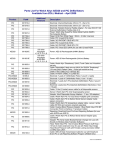
The following table lists the symptoms, the possible causes, and the possible corrective actions for common
problems. Refer to the other sections of the user manual for detailed explanations on how to implement the
corrective actions. If the unit continues to be non-functional, refer the unit for servicing. (Refer to Chapter 12 of this
manual for contact information.)
Symptom
Possible Cause
Corrective Action
Insert battery pack
Battery pack depleted or
needs servicing
Replace battery pack
or call for service.
Unit needs servicing
Call for service
Battery pack depleted
Replace battery pack
Unit needs servicing
Call for service
Unit needs servicing
Go to AED Status
Screen by pressing the
CENTER softkey button
or call for service
Battery pack non-functional
Replace battery pack
Defibrillation pads are not
pre-connected to unit
Connect defibrillation
pads to unit
Defibrillation pads
or battery pack expired
Replace expired
component
Battery pack not inserted
Insert battery pack
Battery pack is low
or needs servicing
Replace battery pack
or call for service.
Unit needs servicing
Call for service
Power on self-test failed,
service code “xxxx”
Unit needs servicing
Record code number
and call for service
Battery pack self-test failed,
service code “xxxx”
Battery pack needs servicing
Record code number
and call for service
Service required
Unit needs servicing
Call for service
“Replace battery now” prompt
Battery pack capacity is
critically low
Unit may not deliver a
shock, replace battery
pack immediately
“Battery low” prompt
Battery pack capacity is
getting low
Replace battery pack as
soon as possible
Battery pack depleted
Replace battery pack
Battery pack not
inserted properly
Make sure battery pack
is oriented correctly and
fully inserted
Unit needs servicing
Call for service
Pads connector not plugged in
Plug in pads connector
Pads connector broken
Replace pads
Unit’s connector broken
Call for service
Unit will not turn on
Unit immediately turns off
ASI flashes red and/or unit makes
periodic ”beep” sound.
ASI does not flash at all
Display screen does not work
“Plug in pads connector” prompt
5. Maintenance And
Troubleshooting
Battery pack not inserted
5-7
DAC-2513EN-AB