1
PULSE OUTPUT INSTRUCTIONS
Series 8500/8600 Diesel Multifunction Instrument
************************************************************************************
NOT FOR 9500/9600 OR TWINSCAN COMBINATION INSTALLATIONS
************************************************************************************
The 85/8600 series Pulse Output Multifunction Instrument (MFI) produces a 1000 pulse per liter, or 3785 pulse per gallon output
signal. During normal operation this signal equals the engines fuel consumption. In diagnostic mode zero fuel flow is transmitted. The
signal output is optically isolated, which helps to minimize noise interference.
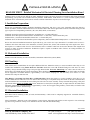
WIRING:
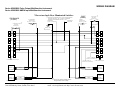
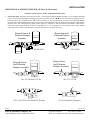
Single Engine Installation
1.
2.
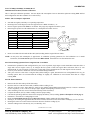
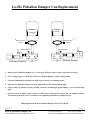
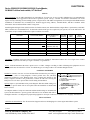
Connect the WHITE/RED wire from pin 2 to the GPS fuel “SIGNAL” input.
Connect the GREEN/BLACK wire from pin 7 to the GPS “REFFERENCE” input.
Fuel
Twin Engine Installation
1.
2.
3.
4.
5.
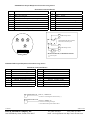
WHITE/RED
Signal
2
Reference
7
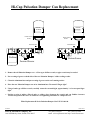
Select the MFI that is physically closest to the GPS.
GREEN/BLACK
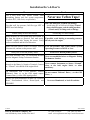
Connect its WHITE / RED wire from pin 2 to the GPS fuel “SIGNAL” input.
Connect its GREEN / BLACK wire from pin 7 to the GPS fuel “REFFERENCE” input.
Connect the WHITE / RED wire from pin 2 of the second MFI to the WHITE / YELLOW wire from pin 3 of the first MFI.
Connect he GREEN / BLACK wire from pin 7 of the second MFI to the BLACK wire from pin 5 of the first MFI.
PC or other Equipment, Setup and Operation:
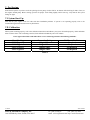
Connect Pin 2, WHITE / RED wire, to the computer or equipment’s signal input. If the input does not supply pull-up current, Pin 2
must also be connected to +12 VDC, through a 10K – 47KΩ pull-up resistor.
Connect Pin 7, GREEN/BLACK wire, to the PC, or other equipment’s Ground. If the FloScan MFI is used as the pull-up power
supply, Pin 7 must also be connected to the BLACK wire on Pin #5, (Instrument Ground).
GPS Output Calibration:
The GPS output requires no special calibration. Calibration of the MFI totalizer automatically calibrates the GPS output signal.
GPS SETUP AND OPERATION:
GPS setup and operation information is located in the GPS user manual. Select a Presentation screen from the setup menu and
program in the fuel volume unit desired. Go to the Sensor Control screen and set the fuel flow sensor to Pulse. Set conversion to:
1000p/Liter
3785p/Gallon
4546p/UK or Imperial Gallon
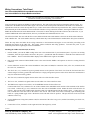
When not locked onto a satellite, the GPS goes into, “Hunt Mode”. Screen readings may freeze until it locks onto a satellite. If this
occurs, changing to a different screen then back should update the original screen.
•
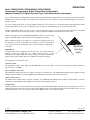
The WHITE / RED and GREEN / BLACK wires are twisted to prevent noise interference. If they are not long enough to reach
the GPS, cut them back to 3”. Use a shielded wire to connect the GPS and MFI. Connect the shield to the GPS, “REF” terminal.
5/15/2002
FloScan Instrument Company, Inc.
3016 NE Blakeley Street, Seattle, WA 98105
7000-105-00D
Tel: (206) 524-6625
Fax: (206) 523-4961
email: [email protected] http://www.floscan.com