1
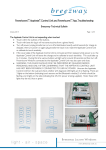
Page 2 of 13 The Apptivate Control Unit is not responding when touched: Touch within the outlines of the buttons. Touch with bare skin (eg it will not sense touches from a gloved hand). Turn off power (unplug transformer or turn off at distribution board) wait 60 seconds for charge to dissipate, then turn power on again (plug transformer back in) to make the Apptivate Control Unit re-calibrate its touch sensitivity. If the cover plate of the Apptivate Control Unit is removed and then replaced while power is on, the Apptivate Control Unit will sense the change and re-calibrate its touch sensitivity. This could take up to 4 minutes. During this time various buttons will light up for around 20 seconds and then turn off, Powerlouvre Windows connected to the Apptivate Control Unit may also open and close. WARNING: THIS CHECK SHOULD ONLY BE PERFORMED BY QUALIFIED SERVICE PERSONNEL AND ONLY AFTER CONFIRMING THAT THE APPTIVATE CONTROL UNIT HAS NOT BEEN MISTAKENLY CONNECTED TO 240V AC POWER. Unscrew the Apptivate Control Unit from the wall and check whether all 5 diagnostic LED lights are lit or flashing. There are 3 lights on the bottom (indicating touch sensors and the Bluetooth module) 2 of which should be flashing, and 2 lights on the side (indicating that 24v DC power is being supplied). Note: these LED lights may be red, blue or green.