1
(Page 1 of 2)
Operating Instructions Standard Remote Control
Call 1800 777 758 for further assistance.
Powerlouvre Windows are operated remotely by a Remote Receiver. The Remote Receiver may be
concealed within the Breezway Easyscreen Window frame, or housed externally in a casing when
Powerlouvre Windows in component form are installed in timber, commercial or other frames. A
Remote Receiver within an external casing is know as a Remote Receiver Unit.
Remote Receiver Units have 2 channels. Each channel can operate up to 6 Powerlouvre motors
simultaneously but the 2 channels cannot be operated simultaneously.
Powerlouvre Easyscreen Windows are all wired identically. Powerlouvre Easyscreen Windows 2-9
blades high use a single channel of the Remote Receiver to operate all the motors, and therefore all
the blades, within the window simultaneously. Powerlouvre Easyscreen Windows 10-18 blades high
use the first channel of the Remote Receiver to simultaneously operate the motors controlling the
blades in the upper halves of each bay and the second channel of the Remote Receiver to
simultaneously operate the motors controlling the blades in the lower halves of each bay.
Powerlouvre Windows controlled by external Remote Receiver Units can be installed in multiple
different ways including each channel of the Remote Receiver Unit operating all blades of 10-18 blade
high Powerlouvre Windows or multiple windows of different sizes simultaneously. Please consult
your supplier or installer to confirm the configuration of your windows.
Multiple Powerlouvre Easyscreen Windows or Remote Receiver Units can be controlled
simultaneously by a single Standard Remote Control, or each one can be controlled independently
by individual Standard Remote Controls.
1
1
1
1
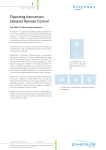
2-9 Blades high - all blades within a single frame
operate simultaneously
REF: 545 RC 07a
2
10-18 Blades high - the
upper bank can operate
independantly to the
lower bank
(Page 2 of 2)
Operating Instructions Standard Remote Control
Call 1800 777 758 for further assistance.
Operation
To Open the Powerlouvre™ Window
To fully OPEN the Powerlouvre™ Window briefly press the top OPEN button (figure one) on
the Standard Remote Control. To partially OPEN the Powerlouvre™ Window press and hold the
OPEN button (figure one) on the Remote Control and release it when the window has reached the
desired position.
figure
one
To Close the Powerlouvre™ Window
To fully CLOSE the Powerlouvre™ Window briefly press the bottom CLOSE button (figure two) on
the Standard Remote Control. To partially CLOSE the Powerlouvre™ Window press and hold the
CLOSE button (figure two) on the Standard Remote Control and release it when the window has
reached the desired position.
Stopping the Powerlouvre™ Window
At any time when the Powerlouvre Window is opening or closing, press the middle TOGGLE button
(figure three) on the Standard Remote Control to stop the window.
To Toggle Between Operating The Upper And Lower Blades or
Between Channels of the Remote Receiver Unit
figure
two
To toggle between banks or units press the TOGGLE button (figure four) briefly. (<1 second)
NOTE: After 30 seconds the Standard Remote Control will default back to controlling the upper
bank or the first channel of the Remote Receiver Unit. On 2-9 blade high Powerlouvre™ Windows
or Remote Receiver Units utilising only 1 channel the TOGGLE button only functions as a stop
button.
To Auto Close the Entire Powerlouvre™ Window or All Motors
Operated By A Remote Receiver Unit
To quickly and fully close the entire Powerlouvre™ Window or all motors operated by a Remote
Receiver Unit from any position, press and hold the middle TOGGLE button (figure four) on the
Standard Remote Control for 3 seconds. The top banks or the motors controlled by channel 1 will
close first followed by the lower banks or the motors controlled by channel 2.
figure
three
OPEN
T O G G LE
CLO S E
figure
four
REF: 545 RC 07b
TM denotes trademarks owned or licensed by Breezway Australia Pty Limited.
Copyright owned by Breezway Australia 2010. www.breezway.com.au